



To cut to the chase, Agentforce Service, Atera, Fin, Freshdesk, Front, Hiver in Gmail, Jira Service Management, LiveAgent, Zendesk for Customer Service, and Zoho Desk are the 10 best free help desk software for tech startups.
I’ve spent enough time evaluating help desk tools for early-stage teams to know that “free” rarely means straightforward. You pick the wrong tool, and you’re either migrating six months later because the free plan ran out of runway, or you’re stuck on a product that makes sense for a 200-person support org but not for a five-person startup trying to stop tickets from falling through the cracks in Slack.
For this guide, I went through the top products on G2’s free help desk software category page and tested or evaluated each one specifically from a tech startup perspective: how fast can a small team actually get going, what does the free plan genuinely cover, where does it break down, and what’s the trigger that forces you to pay. I also cross-referenced verified G2 reviews from small businesses in the computer software and IT and services industries to understand how similar teams are using these tools day to day.
Here’s what I found about the best free help desk software for tech startups in 2026.
What are the best free help desk software options for tech startups in 2026?
- Agentforce Service: Best for startups already on the Salesforce platform
For tech startups that have already built their customer data in Salesforce and need support operations that sit inside that ecosystem rather than alongside it. - Atera: Best for IT-focused startups managing their own infrastructure
For technical founders and IT leads at startups who need RMM, remote access, and ticketing in a single platform without paying per device. - Fin: Best for startups that want AI to handle tier-1 support from day one
For product-led tech startups with a help center already in place who want to deflect repetitive queries automatically before they ever reach a human. - Freshdesk: Best for startups wanting a straightforward, scalable support foundation
For small technical teams that need a clean ticketing system with automation they can grow into, without paying for complexity they don’t need yet. - Front: Best for startups running support out of a shared inbox
Suits early-stage tech teams where customer communication happens entirely over email and everyone needs visibility into the same conversations. - Hiver in Gmail: Best for startups that live in Gmail and want to keep it that way
Best for small technical teams that want shared inbox accountability and assignment without leaving the Gmail interface they already use. - Jira Service Management: Best for startups already using the Atlassian stack
Ideal for engineering-led startups where dev and support teams need to work from the same system, with issues linked directly to Jira Software tickets. - LiveAgent: Best for startups needing affordable multi-channel support
For tech startups that need to handle email, chat, and eventually phone support from one place, without paying enterprise prices to do it. - Zendesk for Customer Service: Best for startups that expect to scale support quickly
Suits fast-growing tech startups that need a platform they won’t outgrow, with AI features and a startup program that can make the platform free for up to two years for qualifying teams. - Zoho Desk: Best for startups already using or planning to use Zoho products
For budget-conscious tech startups that want the lowest upgrade cost in the category and tight Zoho ecosystem integration.
*Tools are listed alphabetically. These tools offer free trials, free forever options, or freemium models.
Comparison of the best free help desk software for tech startups
Here’s a side-by-side look at free plan limits and pricing before diving into the full reviews.
| Tool | G2 Rating | What the free plan covers | Paid Starts At |
| Agentforce Service | 4.4/5 | Free forever (Salesforce Foundations, $0): Agentforce Builder, Prompt Builder, Agent Script, Agentforce Coworker, Agentforce Vibes | $2/conversation (Agentforce usage; Service Cloud seat sold separately) |
| Atera | 4.6/5 | 30-day full trial with full access to Atera Expert free plan, no credit card required | $149/technician/month (Professional, annual) |
| Fin | 4.5/5 | Free trial only (no free-forever plan); usage-based via Intercom | $0.99/resolution + Intercom seat from $29/seat/month |
| Freshdesk | 4.4/5 | Free for 6 months: 2 agents, email and portal only; no automation, SLA, or live chat | $19/agent/month (Growth, annual) |
| Front | 4.6/5 | Free trial on Starter (single-channel); 14-day trial for Professional features | $25/seat/month (Starter, annual) |
| Hiver in Gmail | 4.6/5 | Free forever: shared inbox and ticketing, email and help center channels, 24/7 support | $25/user/month (Growth, annual) |
| Jira Service Management | 4.3/5 | Free forever: up to 3 agents, 2GB storage, 100 email notifications/day, 500 automation runs/month | $750/year (Standard, 1-3 agent tier; annual is bucketed, not per-agent) |
| LiveAgent | 4.5/5 | Free trial only (no free-forever plan); startup deal for qualifying early-stage startups | $15/agent/month (Small Business, annual) |
| Zendesk for Customer Service | 4.3/5 | 14-day trial; Zendesk for Startups: up to 2 years free for up to 50 agents (qualifying startups) | $19/agent/month (Support Team, annual) |
| Zoho Desk | 4.4/5 | 15-day free trial (no free-forever plan) | $7/user/month (Express, annual) |
*All pricing details are based on publicly available data at the time of publication and are subject to change.
I don’t need to tell you how important customer service is, regardless of company size or industry. And with 90% of tech startups implementing helpdesk software in their first year of operations, according to a study in 2026, it is very clear that free help desk software is one of the first pieces of support infrastructure worth getting right. Due to this, I’ve compiled a list of the top free tools in this category, since the free plans below are where most teams start.
How did I find and evaluate these free help desk software tools?
I started with G2’s free help desk software category page, which lists tools that offer free plans, free trials, or freemium models. From there, I evaluated the top products specifically from a tech startup perspective: how well each tool handles the realities of a small, fast-moving technical team, including speed of setup, how much the free plan actually covers, and where the first real friction point appears.
I cross-referenced verified G2 reviews for each tool, prioritizing reviews from small businesses in the computer software and IT and services industries, with preference for more recent submissions. Where a tool’s industry-filtered review pool was limited, I extended the date range back to July 2025 and noted this where relevant. Freshservice and Jira Service Management had particularly thin pools in this segment; both are flagged in the tool sections below. G2 review data referenced throughout was pulled in 2026. Some reviews have been lightly edited for clarity.
Free plan details and paid plan pricing were verified on each tool’s official pricing page at the time of writing.
The screenshots featured in this article may be a mix of those taken from the vendor’s G2 page or from publicly available materials.
What I look for in free help desk software for tech startups
Testing these tools in a tech startup context made certain things obvious fast. Here’s what I actually paid attention to:
- Set up speed and time to first ticket: A startup team isn’t going to spend a week configuring a help desk before they can use it. The tools that earned the most trust here were the ones where I could be handling real tickets within an hour of signing up.
- What the free plan actually covers vs. what it withholds: “Free” ranges from genuinely useful to effectively a 40-minute demo. I noted the exact limits for each tool so you can match them against what your team actually needs right now.
- Automation without needing an admin: Early-stage teams don’t have a dedicated support ops person. Automation rules that require deep admin knowledge to configure are automation rules that won’t get used.
- Dev and engineering team integration: Startups live and die by their engineering velocity. A help desk that connects customer issues to Jira tickets, GitHub issues, or internal Slack channels is a different tool from one that operates in isolation.
- How the free plan handles growth: The upgrade trigger matters as much as the free plan itself. A tool that scales gradually is worth more than one that forces a decision between free and expensive the moment the team grows by two people.
- The external user experience: Your customers don’t know or care what help desk you’re running. A tool that makes it hard for users to submit tickets, check status, or access a knowledge base is a tool that creates support overhead rather than reducing it.
To be included on this list, a tool must:
- Provide a system for customers or employees to submit and track support requests
- Allow agents to manage, assign, and respond to tickets from a centralized interface
- Offer automation, routing, or workflow features to reduce manual handling
- Enable reporting or visibility into ticket status and team performance
*This data was pulled from G2 in 2026. Some reviews may have been edited for clarity.
1. Agentforce Service: Best for startups already on the Salesforce platform
Agentforce Service (formerly Salesforce Service Cloud) doesn’t typically show up on lists like this one, and for most early-stage startups, it still shouldn’t. The platform is genuinely powerful, but it’s built for organizations that are ready to invest time in configuration and have customer data they want to centralize inside Salesforce. If that describes you, the trial is worth running.
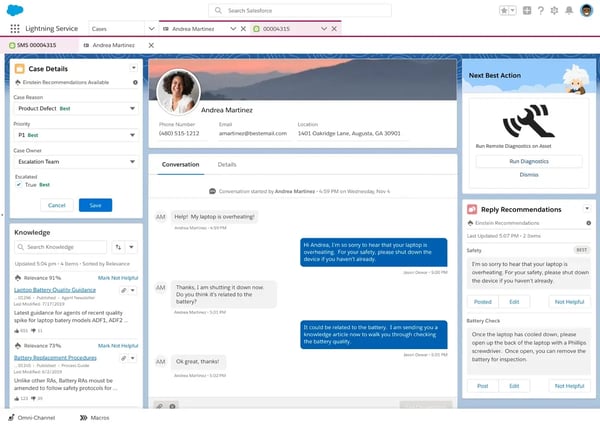
What makes it interesting for a specific type of startup is the 360-degree customer view. When a support ticket comes in, agents can see the full customer history, linked contracts, open deals, and previous interactions without switching tools. For a SaaS startup with a small but high-value customer base, that context matters. The AI features, including case summarization and suggested responses, are also genuinely useful once the platform is set up correctly, not just checkbox functionality.
The 30-day free trial gives you full platform access to evaluate it properly. Salesforce also offers a Foundations tier at no cost for existing Enterprise Edition customers that includes 1,000 AI conversations, which gives qualifying startups a meaningful way to test Agentforce capabilities before committing.
What does Agentforce Service’s free plan include?
- 30-day free trial with full platform access, no credit card required
- Salesforce Foundations (for Enterprise Edition customers): 1,000 AI conversations, 200,000 Flex Credits, 250,000 Data Cloud credits included at no additional cost
- Case management, workflow automation, omnichannel routing
- Dashboards, reporting, and Einstein AI features during trial
When should you upgrade your Agentforce Service free plan?
The 30-day trial is a real evaluation window, not a teaser. After it ends, you move onto a paid Service Cloud seat, which Salesforce sells through its sales team rather than at a fixed public starting price, so it’s worth getting a quote based on your agent count and edition before committing. The upgrade becomes clearly justified when your team is handling volume that requires automated case routing, SLA tracking, or AI-assisted responses at scale. Be aware that the Agentforce AI conversations themselves are billed separately at $2/conversation on top of the seat license, so model both the seat cost and the expected conversation volume when you forecast spend.
Where Agentforce Service genuinely stands out:
- The unified customer view is the clearest differentiator for Salesforce-native startups. When a customer opens a ticket, agents see the full account history, open deals, and prior interactions immediately, without toggling between tools. G2 reviewers in the CS and IT industries consistently cite this as the reason they stay on the platform.
- The workflow automation engine is more flexible than most tools in this category. Startups that need to build custom case routing logic, approval flows, or cross-team escalation rules can do so without writing code, which matters when you don’t have a dedicated admin.
What G2 users like about Agentforce Service:
“What I like most about Agentforce Service is how it gives a complete, unified view of the customer in one place, so agents don’t have to jump between systems. Built-in automation and AI features really help reduce manual work and speed up responses, while the platform remains flexible enough to customize for different business needs.”
– Agentforce Service review, Vanshika S.
Is Agentforce Service right for your tech startup?
Best for: Startups already operating inside the Salesforce ecosystem that need customer support, case tracking, and customer data all in one place, and have the technical appetite to configure it properly.
Not ideal for: Early-stage startups looking for a quick setup with minimal configuration overhead, or teams that don’t already have Salesforce infrastructure in place.
What I dislike about Agentforce Service:
- The setup and configuration process is significantly more involved than any other tool on this list. For a small startup team without a Salesforce admin, the initial investment in getting the platform configured correctly can feel disproportionate to the team size. That said, once the workflows are set up, the platform runs without much ongoing maintenance.
- Licensing costs can escalate quickly as you scale users or add AI features, which makes it a harder call to start on at the early stage. For startups with a clear Salesforce roadmap, the cost structure makes more sense long-term.
What G2 users dislike about Agentforce Service:
“If feels complex and sometime hard to debug. Also, the UI has little inconsistencies.”
– Agentforce Service review, Amit K.
2. Atera: Best for IT-focused startups managing their own infrastructure
Atera is a different kind of tool from everything else on this list. It’s built for teams whose support work is fundamentally about managing devices and infrastructure, not just routing customer emails. If your startup has an IT function, even a small one, and that function is responsible for keeping endpoints healthy, deploying patches, and handling internal IT tickets, Atera’s all-in-one model makes a genuine case for itself.
The per-technician pricing model is what makes it viable for small teams. You pay for the number of technicians using the platform, not the number of devices they manage. For a startup where one or two people are responsible for a growing fleet of laptops and cloud infrastructure, that model means costs stay flat as the device count grows. The 30-day free trial covers the full Expert plan, which gives you a real sense of the platform’s capabilities before committing.
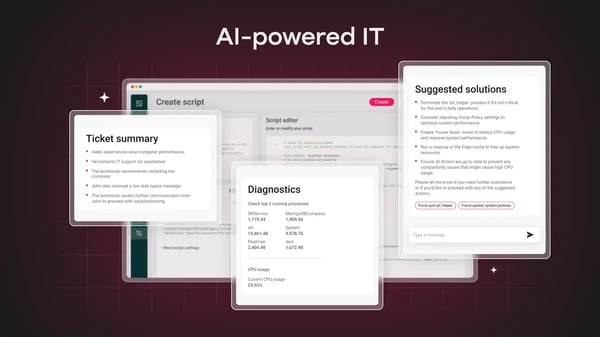
During testing, the unified dashboard was the standout. Monitoring alerts, open tickets, remote access sessions, and patch status all sit in the same interface. For a technical founder or sole IT lead, not having to switch between an RMM tool, a ticketing system, and a remote desktop app genuinely reduces daily friction.
What does Atera’s free plan include?
- 30-day free trial with full Expert plan access, no credit card required
- Remote monitoring and management (RMM) with real-time alerts
- Patch management for Windows, Mac, and Linux
- Helpdesk ticketing and automation workflows
- Remote access via Splashtop (2 concurrent sessions on the Professional tier)
- Mobile app access
- No permanent free tier after the trial ends
When should you upgrade your Atera free plan?
The 30-day trial is enough to know whether the platform fits your workflow. The Professional plan at $149/technician/month is the entry point, which is high compared to general-purpose help desks but reflects the bundled RMM and remote access capabilities. The upgrade is justified when the automation and monitoring features are actively saving time that would otherwise go to manual device checks and reactive troubleshooting.
Where Atera genuinely stands out:
- The all-in-one model means there’s genuinely no other tool needed for day-to-day IT startup support operations. RMM, ticketing, remote access, and patch management in a single dashboard is a meaningful advantage for a one- or two-person IT function that doesn’t have the bandwidth to manage integrations between separate tools.
- The proactive monitoring capability gives IT startup leads advanced warning before issues become user-reported tickets. G2 reviewers in the IT and services industry specifically cite the alert-to-ticket conversion, where a monitoring alert automatically becomes a support ticket, as a feature that reduces reactive firefighting.
What G2 users like about Atera:
“Atera makes it easy for our support team to handle tickets and remote sessions in one place. The UI is clean and intuitive, so onboarding new team members doesn’t take long. It integrates well with the tools we already use, and performance is solid even during busy periods. For the feature set you get, the pricing is fair, and the ROI is clear.”
– Atera review, Alexander A.
Is Atera right for your tech startup?
Best for: Tech startups with a dedicated IT function managing internal infrastructure, endpoints, and employee devices, where a combined RMM and help desk in one tool justifies the per-technician cost.
Not ideal for: Customer-facing support teams, or startups that need a lightweight external ticketing system without the device management layer.
What I dislike about Atera:
- The reporting capabilities are functional but limited in customization. Teams that need granular, tailored dashboards beyond the built-in templates will find themselves working around the tool’s constraints, though the core monitoring and ticket data is always accessible. Reviewers say that the reporting works, but advanced custom views require workarounds that can slow things down.
- The mobile app doesn’t match the desktop experience. For quick alert triage on the go, it’s workable, but any real troubleshooting or remote session work sends you back to the desktop dashboard. For a team that occasionally needs to respond to alerts from outside the office, this is worth knowing upfront.
What G2 users dislike about Atera:
“Atera is easy to use and offers good value, but some advanced features feel less mature than competing RMM platforms. Reporting and automation can be somewhat limited, and the alerting system can occasionally generate noise that requires manual review.”
– Atera review, Liam H.
3. Fin: Best for startups that want AI to handle tier-1 support from day one
Fin is a different kind of entry on this list. While it’s not a traditional help desk platform, it’s an autonomous layer that reads your help center and answers incoming customer questions on its own, resolving the routine ones before they ever reach a person. It works two ways: on top of Intercom’s own platform, or connected to a help desk you already run, so you don’t have to switch systems to use it. And for a tech startup with a reasonably well-documented help center and a high volume of repetitive incoming questions, it can meaningfully change the workload ratio for a small support team.
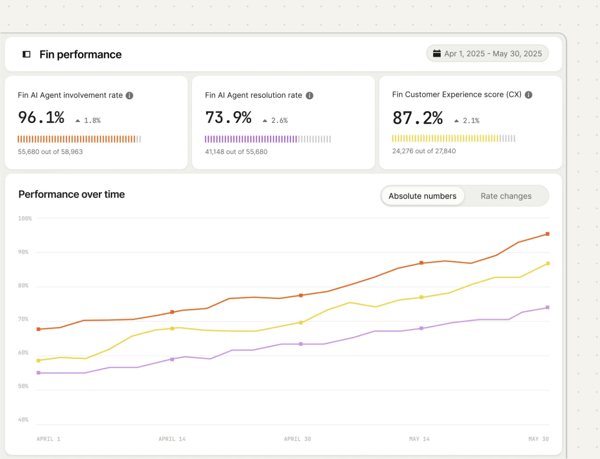
The model is simple: you pay $0.99 per resolved conversation. If Fin doesn’t resolve it, you don’t pay for it. The 14-day trial gives you full access including unlimited Fin outcomes at no charge, which is a genuine evaluation window. Intercom’s Early Stage program takes the value proposition further for qualifying startups: 93% off Intercom in year one plus a full year of Fin at no additional cost, which removes the pricing uncertainty entirely while you’re figuring out your support volume.
What I found during testing is that the setup is genuinely fast. Fin pulls from your existing help center articles and starts answering questions almost immediately. The quality depends entirely on how well your documentation is written, but for a startup that’s already invested in a knowledge base, the time-to-value is shorter than almost anything else on this list.
What does Fin’s free plan include?
- 14-day free trial with unlimited Fin outcomes at no charge, no credit card required
- Full access to Fin AI agent configuration and testing
- Deployment across chat, email, and messaging channels
- Knowledge source connection to existing help center articles
- Early Stage startup program: 93% off the Intercom platform + 1 year of Fin free for qualifying startups
- No permanent free tier after the trial (Fin is usage-based: $0.99/resolution)
When should you upgrade your Fin free plan?
The 14-day trial will tell you Fin’s resolution rate on your specific content, which is the only number that matters for the upgrade decision. Once you know your own resolution rate from the trial, you can model the actual monthly cost against the agent time Fin saves. The Intercom seat plan starting at $29/seat/month is required to use Fin if you’re not already on Intercom.
Where Fin genuinely stands out:
- The setup speed is the clearest differentiator. Connecting Fin to an existing help center and deploying it across chat takes minutes, not days. For a startup team that already has documentation and wants to stop answering the same questions manually, this is the fastest path to AI-assisted support available.
- The per-outcome pricing model means you only pay when Fin actually delivers. There’s no monthly minimum for resolutions, and the Early Stage program removes pricing risk entirely for qualifying startups. G2 reviewers in the CS industry specifically cite the workload reduction for small teams as the reason they stay on the platform.
What G2 users like about Fin:
“Fin AI has helped us manage the volume of tickets we receive every day, and it’s been effective at answering our users’ questions with good accuracy. We’ve also set up workflows to route certain ticket types to human agents, and that has been working well so far.”
– Fin review, Su Yi L.
Is Fin right for your tech startup?
Best for: Product-led tech startups with an existing help center and a high volume of tier-1 queries that follow predictable patterns, where reducing per-ticket cost is the primary support goal.
Not ideal for: Startups without an established knowledge base, or teams handling complex, investigative support issues that require human judgment to resolve.
What I dislike about Fin:
- The configuration can become a significant project for teams with multiple products or complex, overlapping documentation. Fin works best when the knowledge base is clean and well-organized; the more ambiguous the source content, the more tuning the setup requires before responses are reliably accurate.
- Reviewers point out that Fin’s answer accuracy depends heavily on how well its knowledge sources are structured. Several G2 users with multiple similar products or overlapping help content note that Fin can reference the wrong article or blur contexts, which matters most for a startup running closely related product lines. The same reviewers add that accuracy improves as the knowledge base is tightened, so the limitation tends to ease with content upkeep.
What G2 users dislike about Fin:
“The pricing model creates some uncertainty, since costs depend on resolution. I never really know how many conversations it will handle in a given month, which makes it harder to predict expenses.”
– Fin review, Daniel R.
4. Freshdesk: Best for startups wanting a straightforward, scalable support foundation
Freshdesk is the most widely used tool on this list for a reason: it gets teams from zero to functioning ticket management faster than almost any alternative, without requiring anyone to read documentation first. For a tech startup that needs to stop losing customer issues in email and start tracking them properly, the free plan is a genuinely useful starting point.
The 14-day Enterprise trial gives you full platform access to evaluate ticketing, automation, and reporting before deciding where to land. For a startup that’s moving quickly, that window is usually enough to know whether Freshdesk fits how the team works before committing to a paid plan.
What I kept coming back to during testing was the onboarding experience. New team members can start working on tickets the same day they’re added. The interface is clean, the ticket view is organized, and the automation rules follow a logic that doesn’t require an ops background to understand. For a startup where support is a shared responsibility across the team rather than a dedicated function, accessibility matters.
What does Freshdesk’s free plan include?
- Free for 2 agents with a 6-month limit, then account converts or suspends
- Email and customer portal support only; no live chat, phone, or social channels
- Unlimited tickets, knowledge base, and ticket trend reports
- Ticket dispatch: basic automatic assignment to agents
- 14-day trial of the full Enterprise tier runs concurrently with free plan signup
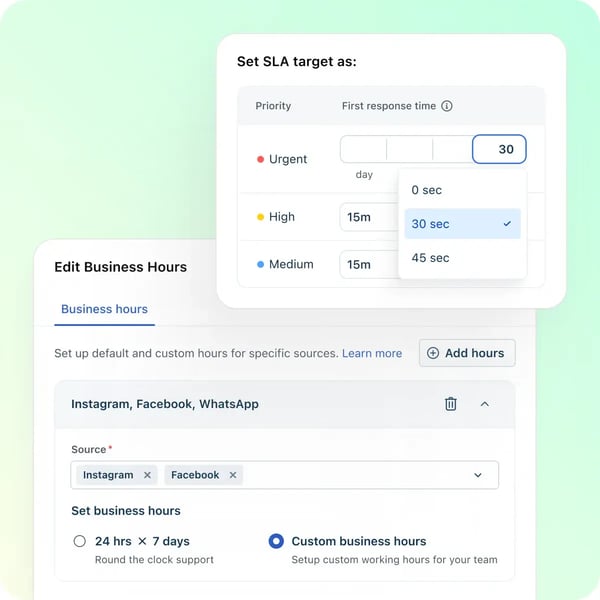
- No automation rules, SLA management, collision detection, or marketplace integrations on the free plan
When should you upgrade your Freshdesk free plan?
The two clearest upgrade triggers are the 6-month free plan expiry and the team growing beyond two agents. Either one forces the decision. The Growth plan at $29/agent/month unlocks automation rules, SLA management, collision detection, and marketplace integrations. If your team is handling more than 200 tickets per month by the time the free period ends, the Growth plan cost is easy to justify. The bigger jump, from Growth to Pro at $49/agent/month, is where CSAT surveys, round-robin routing, and custom reports unlock, which is typically a later-stage concern.
Where Freshdesk genuinely stands out:
- The onboarding speed is the clearest advantage over most tools in this category. Moving a team from shared email inboxes to structured ticketing happens in hours, not days. G2 reviewers in the IT and services industry specifically highlight how quickly teams adapt without formal training, which is the right quality to look for when support is a secondary responsibility for a small startup team.
- The automation engine on paid plans is more accessible than most competitors at the same price point. Ticket routing, SLA escalations, and canned response workflows are configured through an intuitive interface rather than code, and G2 reviewers repeatedly note how much manual effort the automation rules remove on repetitive requests. For a startup that eventually needs automation but doesn’t have a dedicated support ops person, this is a meaningful advantage.
What G2 users like about Freshdesk:
“What stood out to me first was how quickly the team adapted to it without much training. We moved from shared inboxes and scattered chats into Freshdesk, and suddenly it became easier to track who replied to what and which issues were still hanging. The automation rules saved us more time than expected, especially for repetitive requests that used to eat up half of the day.”
– Freshdesk review, Neelakshi S.
Is Freshdesk right for your tech startup?
Best for: Tech startups that need to move off shared inboxes quickly, want clean ticket management with a short learning curve, and are likely to grow into paid automation features within the first year.
Not ideal for: Teams that need more than two agents on a permanent free plan, or startups that want omnichannel support (live chat, phone, social) from day one without upgrading.
What I dislike about Freshdesk:
- Reviewers point to plan pricing escalating steeply between tiers. They note the jump from Growth ($19/agent/month) to Pro ($55/agent/month) is significant, and that several features they consider standard, including CSAT surveys, round-robin routing, and multilingual support, sit behind that jump. For a startup that hits the Growth ceiling quickly, reviewers say the upgrade cost can feel abrupt, while also acknowledging the Growth plan covers most daily support workflows well into the early scaling phase.
- The interface can start to feel cluttered and slow down once ticket volume is high, and the breadth of features, tabs, and settings adds a learning curve at the start. Reviewers note this is mostly a first-few-weeks adjustment, and the same depth that feels busy early on is what lets a growing team customize workflows as support scales.
What G2 users dislike about Freshdesk:
“The pricing structure feels unrealistic, especially when switching between plans. The jump from one plan to another can be 4x to 5x, which is hard to justify. It would be better if pricing scaled more gradually and transparently.”
– Freshdesk review, Hari Vignesh G.
Need an internal IT service desk too? Freshworks also offers Freshservice, an ITSM and ESM platform built for internal IT operations rather than customer-facing support. If your team needs to handle employee IT requests, asset management, and service catalogs alongside customer support, see G2’s guide to the best service desk software for a closer look at that category.
5. Front: Best for startups running support out of a shared inbox
Front takes a different approach than most tools on this list. Instead of asking your team to move customer communication into a separate ticketing system, it turns your existing email inbox into a collaborative workspace. Conversations still look like emails to customers, but internally they behave like tickets: assignable, commentable, and visible to the whole team.
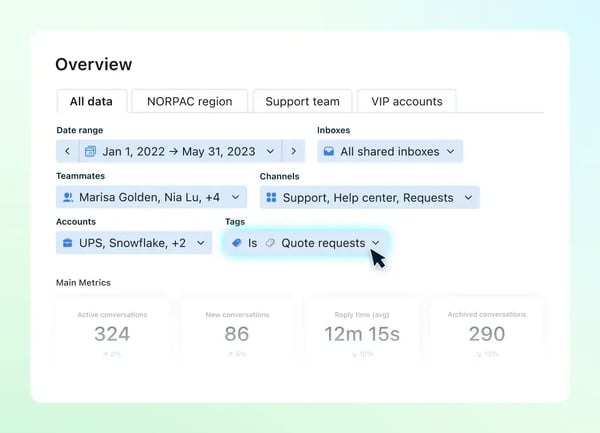
For an early-stage tech startup where support is handled by the founders or a small generalist team, this approach removes a significant adoption barrier. There’s no new interface to learn, no ticket submission workflow to explain to customers, and no disruption to how communication already flows. The 14-day trial includes Professional plan features, and Front’s startup program offers six months free for qualifying teams.
What I found during testing is that the shared inbox collaboration is genuinely different from just sharing a Gmail account. You can see who is actively replying to a conversation, leave internal comments that stay hidden from the customer, and avoid the duplicate reply problem that makes shared inboxes chaotic at scale. For a small team where two people might otherwise send conflicting responses to the same customer, the collision detection alone is worth the setup.
What does Front’s free plan include?
- 14-day free trial for Starter and Professional plan features, no credit card required
- Startup program: 6 months free for qualifying early-stage startups
- No permanent free tier; Starter plan at $25/seat/month (annual, max 10 seats) after trial
- Starter plan covers single-channel support only (email, chat, or SMS, not combined)
- Omnichannel support requires the Professional plan at $65/seat/month
When should you upgrade your Front free plan?
The 14-day trial is the right time to evaluate whether the shared inbox model works for your team’s communication volume. After the trial, the Starter plan at $25/seat/month covers email-based teams well. The upgrade to Professional at $65/seat/month becomes necessary when you need multi-channel support (email and chat simultaneously), more than 10 seats, or advanced automation and analytics. For a startup where support is primarily email-based and the team is under 10 people, the Starter plan has a long runway.
Where Front genuinely stands out:
- The internal collaboration layer is the clearest differentiator. Comments, assignments, and mentions all happen in the context of the actual customer email thread, which means the full conversation history, including internal discussion, is in one place. G2 reviewers in the CS industry consistently highlight the reduction in CC chains and forwarded emails as the primary workflow improvement.
- The external experience is zero-friction. Customers receive and respond to emails exactly as they always have. There’s no ticket portal to navigate, no new account to create, and no change in how communication feels from their side. For a startup where customer relationships are still being built, that continuity matters.
What G2 users like about Front:
“What I like best about Front is how it turns hard inboxes into something organized and calm. The team collaboration features are very useful. You can see who is replying, leave internal comments, and avoid sending duplicate responses to customers. I also like how fast and clean the interface feels.”
– Front review, Sanket P.
Is Front right for your tech startup?
Best for: Early-stage tech startups where customer communication is email-driven, support is shared across a small team, and adoption speed matters more than feature depth.
Not ideal for: Startups that need omnichannel support from day one, or teams that want a permanent free tier rather than a trial or startup program.
What I dislike about Front:
- The Gmail and Front inboxes don’t stay in sync well. If your team has historically used Gmail, switching to Front as the primary interface requires a clean break; the two systems don’t have parity, and reviewers who’ve tried to run both simultaneously find the experience fragmented. For teams fully committed to moving into Front, this isn’t an issue, but it’s worth knowing before you start.
- The pricing escalates meaningfully from Starter to Professional. The single-channel restriction on the Starter plan is a real constraint for any team that handles more than email, and the jump to $65/seat/month for omnichannel access is significant for a small startup. AI add-ons like Copilot and Smart QA are additional costs on top of the seat price. For an email-first team that lives in a shared inbox, though, the Starter plan covers the core workflow well, and the omnichannel tiers only become relevant once support genuinely outgrows email.
What G2 users dislike about Front:
“I wish Front and Gmail inboxes worked better together. The downside of implementing Front is that you basically have to choose one or the other. There’s no parity between them.”
– Front review, Ellen R.
6. Hiver in Gmail: Best for startups that live in Gmail and want to keep it that way
Hiver in Gmail is the most frictionless tool on this list if your team runs on Gmail. It adds shared inbox assignment, internal notes, collision detection, and basic SLA tracking directly inside the Gmail interface, without requiring anyone to open a separate application or change how they think about email.
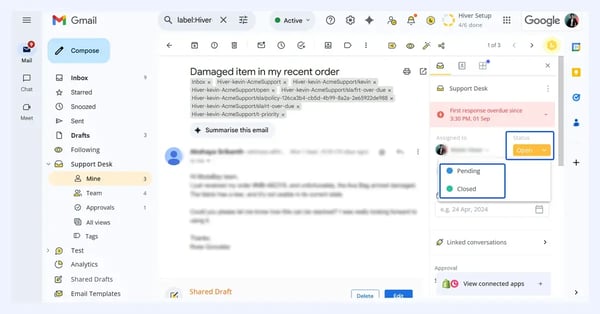
During testing, the onboarding was the fastest of any tool I evaluated. The Hiver extension installs in minutes, and the core functionality, assigning emails, adding internal notes, and checking conversation status, is visible immediately in the existing Gmail interface. There’s no context switch, no new login, and no migration of historical email. For a team that has resisted adopting a help desk because it felt like too much overhead, Hiver’s model removes most of the friction.
What does Hiver in Gmail’s free plan include?
- Free forever: unlimited users with basic shared inbox features
- Email shared inbox with assignment, status tracking, and collision detection
- Live chat (basic)
- Knowledge base
- Internal notes on email conversations
- No SLA management, CSAT surveys, or advanced automation rules (Pro plan and above)
- 7-day trial of the Elite plan available at signup
When should you upgrade your Hiver in Gmail free plan?
The free plan works well while the team is small and ticket patterns are predictable. The upgrade triggers are SLA tracking, which unlocks at the Pro plan ($55/user/month), and CSAT surveys, also Pro-only. If your startup needs to measure response times against commitments or wants customer satisfaction data, those features push you to Pro. Growth at $25/user/month (annual) is the step between free and Pro, adding analytics, basic automation, and more integrations.
Where Hiver in Gmail genuinely stands out:
- The adoption speed is unmatched among tools that add structure to email. Because it lives inside Gmail, there’s no behavioral change required from the team. G2 reviewers in the IT and services industry specifically highlight that productivity is immediate from day one because there’s nothing new to learn, a meaningful advantage when support is one of many responsibilities for a small startup team.
- The free plan is more capable than most. A permanent free tier with shared inbox assignment, tags, and internal notes built right into Gmail is a genuinely useful setup, not a stripped-down demo. G2 reviewers on the free plan specifically highlight being able to categorize emails, assign responsibilities, and have contextual internal chats without leaving the inbox, which is a real option for a startup still figuring out its support volume.
What G2 users like about Hiver in Gmail:
“What I really like about Hiver is that even the free plan offers amazing features. We’re able to categorize emails, set responsibilities, use tags, and have internal chats, which is extremely helpful for managing our shared inbox and avoiding confusion about who is responsible for what. Setting up Hiver was a breeze; onboarding took less than ten minutes.”
– Hiver in Gmail review, Nadia S.
Is Hiver in Gmail right for your tech startup?
Best for: Tech startups fully on Google Workspace, where support is email-based, the team is small, and removing adoption friction is more important than feature depth.
Not ideal for: Teams not on Gmail or Google Workspace, or startups that need omnichannel support beyond email and chat, or SLA tracking without upgrading to Pro.
What I dislike about Hiver in Gmail:
- The Gmail-only constraint is the hard limit of the platform. If even one part of your support workflow happens outside Gmail, whether that’s Outlook, a dedicated chat tool, or a customer portal, Hiver doesn’t cover it. For teams where Gmail is the entire communication layer, this isn’t a real limitation, but it’s a reason to think carefully before committing if there’s any chance the stack evolves.
- The AI and automation features are more basic than dedicated helpdesk platforms at the same price point. The core email management is solid, but teams that want advanced AI-driven routing, automated workflows, or deep analytics will find the ceiling lower than tools like Freshdesk or Zendesk at comparable paid tiers. For startups where email triage is the primary need, the current feature set is sufficient for a long time.
What G2 users dislike about Hiver in Gmail:
“While Hiver covers most of the essential integrations, it could broaden its integration options further. Also, some of its more advanced automation and AI capabilities still feel fairly basic compared with dedicated helpdesk platforms.”
– Hiver in Gmail review, Ronak S.
7. Jira Service Management: Best for startups already using the Atlassian stack
Jira Service Management is the right answer for a specific kind of tech startup: one where the engineering team already uses Jira Software, and where the boundary between developer tickets and support tickets is deliberately blurry. When a customer-reported bug needs to become a tracked engineering issue, the connection between JSM and Jira Software is native and immediate. No third-party integration, no manual duplication, no context loss.
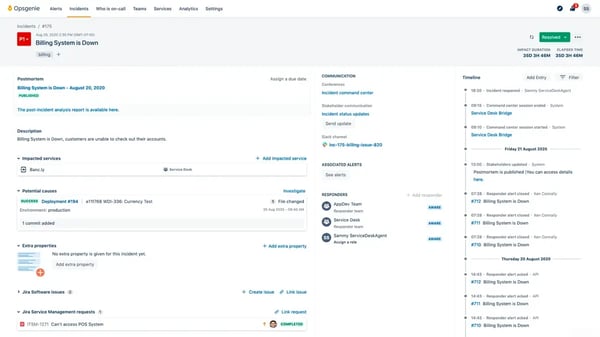
The free plan is one of the more capable free tiers in the ITSM category. Up to three agents get access to templates for IT service management and customer service workflows, a customer portal, email and chat intake, customizable forms, SLA tracking, and an embedded knowledge base. For a startup where the IT or support function is run by a small technical team, three agents is often enough to get real work done without spending anything.
During testing, the integration with the Atlassian ecosystem was the standout. An incident ticket in JSM can be linked to a Jira Software bug in one click, with full context synchronized between them. For a startup where support and engineering share accountability for product issues, that connection removes a category of coordination overhead that otherwise lives in Slack threads.
What does Jira Service Management’s free plan include?
- Free forever: up to 3 agents, unlimited customers submitting requests
- Customer portal, email, and chat intake channels
- Customizable forms, workflows, and queues
- Alerts and on-call schedules
- 2GB file storage; 100 email notifications/day; 500 automation rule runs/month
- No asset management, no AI features, no advanced reporting (Standard plan and above)
When should you upgrade your Jira Service Management free plan?
The 3-agent cap is the most common trigger for upgrades. Once the support function grows beyond three people, the Standard plan starts at approximately $25/agent/month when charged on a monthly basis and is necessary. The other trigger is automation: 500 rule runs per month is enough for a small team, but can be exhausted quickly at higher ticket volumes. Asset management and advanced AIOps features unlock at the Premium plan ($57.30/agent/month) from 4-15 agents, which is a later-stage consideration for most startups.
Where Jira Service Management genuinely stands out:
- The Atlassian ecosystem integration is the strongest differentiator in the category. Linking a customer-reported issue in JSM to an engineering ticket in Jira Software is a native, one-click action that keeps both teams aligned without manual duplication. G2 reviewers in the IT and services industry consistently cite this connection as the reason they choose JSM over alternatives, particularly for engineering-led support operations.
- The customizability of workflows, SLAs, and automation rules is genuinely deep for a free plan. For a startup that needs to configure different routing rules for different request types, or different SLA commitments for different customer tiers, the configuration flexibility is there without needing to pay for it immediately.
What G2 users like about Jira Service Management:
“What I like best about Jira Service Management is its seamless integration with the entire Atlassian ecosystem, especially Jira Software and Confluence. I also appreciate the high level of customization available, from workflows and SLAs to automation rules, which helps us tailor the platform exactly to our business processes.”
– Jira Service Management review, Md Sharique
Is Jira Service Management right for your tech startup?
Best for: Engineering-led tech startups already using Jira Software or Confluence, where support and development teams need to work from a connected system, and the 3-agent free cap fits the team size.
Not ideal for: Non-technical teams or startups without existing Atlassian tooling, where the setup complexity and learning curve aren’t offset by ecosystem benefits.
What I dislike about Jira Service Management:
- The learning curve is steeper than most tools on this list, particularly for anyone without prior Jira experience. Setting up workflows, permissions, and request types correctly takes time, and non-technical stakeholders who need to navigate the queue interface often find it less intuitive than alternatives. The platform rewards investment in setup, but that investment is real and worth budgeting for.
- Performance can slow down once you are handling a high volume of issues or a lot of custom fields. Reviewers running busy queues note the interface getting sluggish at scale, though for a small startup team operating within the 3-agent free tier, the volumes that trigger this are well above where most teams start.
What G2 users dislike about Jira Service Management:
“Jira becomes very slow when handling too many issues or custom fields.”
– Jira Service Management review, Arvind J.
8. LiveAgent: Best for startups needing multi-channel support at the lowest price
LiveAgent’s appeal for tech startups is straightforward: it covers more support channels at a lower price point than most alternatives. Email ticketing, live chat, phone, social media, and a customer portal are all available, and the free plan gets you started on email without a time limit. When the team is ready to pay, $15/agent/month for the Small Business plan unlocks a feature set that typically costs twice as much at competitors.
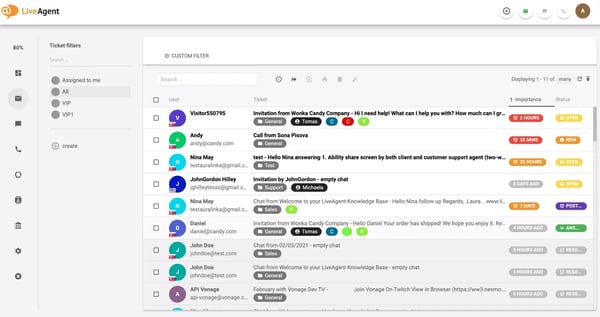
The free plan is intentionally basic: one email address, limited ticket history, and core ticketing features only. No live chat, no call center, no social integrations. But for a startup that’s in the earliest stages and just needs structured email support while it figures out its volume, it provides a real working environment rather than just a demo. The 30-day free trial of any paid plan can be started at any point without a credit card, which gives you a clean transition path when you’re ready to expand channels.
During testing, the setup was fast and the ticket interface was clean. The full-featured live chat widget is the standout for a startup audience: it’s quick to deploy, requires no backend configuration, and the free chat is included on the Small Business paid plan. For a SaaS product that wants proactive in-app chat alongside email support, LiveAgent’s pricing makes it a competitive option.
What does LiveAgent’s free plan include?
- Free forever: 1 email address, basic ticketing features
- Unlimited ticket submissions from customers
- Limited ticket history (7-day visibility on free plan)
- Basic reporting and customer portal
- No live chat, call center, social media integrations, or advanced automation on the free plan
- 30-day free trial of any paid plan available separately, no credit card required
When should you upgrade your LiveAgent free plan?
The free plan’s 7-day ticket history limit is the most immediate practical constraint. Any support workflow that requires looking back at prior conversations, which is almost every workflow, will hit this quickly. The Small Business plan at $15/agent/month removes the history limit, adds live chat, and includes most of the features a small startup needs. Social media integrations are available as add-ons or on higher-tier plans. The upgrade decision is simple: when you need chat or historical ticket context, move to Small Business.
Where LiveAgent genuinely stands out:
- The price-to-feature ratio at the Small Business tier is the best on this list for multi-channel support. $15/agent/month covers email, live chat, the customer portal, and core automation, which at most alternatives requires a plan at two to three times the cost. For a startup that needs to support customers across more than one channel without a large budget, this is a meaningful advantage.
- The setup speed for the live chat widget is faster than most. The widget is JavaScript-based, requires no backend integration, and is deployable on any web product in minutes. For a SaaS startup that wants to add support chat to its product, this is often the fastest path from decision to live chat available.
What G2 users like about LiveAgent:
“What I like best is the flexibility across email, chat, and voice interactions.”
– LiveAgent review, Ryan R.
Is LiveAgent right for your tech startup?
Best for: Budget-conscious tech startups that need multi-channel support (email, chat, phone) without paying premium pricing, and where a simple, functional interface matters more than advanced AI or analytics.
Not ideal for: Startups that need extensive third-party integrations out of the box, or teams that want deep AI-assisted workflows and analytics at the entry tier.
What I dislike about LiveAgent:
- The reporting and data export capabilities feel limited compared to alternatives at the same price point. Extracting specific data cuts, like companies associated with tickets, takes extra steps that slow down a reporting workflow. For a startup that needs to track support metrics by customer segment, this is worth testing before committing. The core ticketing and communication features are solid, and the analytics layer is enough for day-to-day support, even if it trails the competition on advanced cuts.
- The mobile app experience doesn’t keep pace with the desktop product. Basic ticket triage and alert checking work fine, but teams that need to handle anything beyond surface-level tasks from mobile will find the app limiting. For a startup where the support team is primarily desk-based, this is unlikely to matter in practice.
What G2 users dislike about LiveAgent:
“I would improve data extraction from reports, for example it is not possible to extract the companies associated with the tickets.”
– LiveAgent review, Massimo M.
Note: LiveAgent had a limited review pool from the computer software and IT and services industries (3 named reviews in Jan-Jun 2026). Both quotes are drawn from that filtered IT and services pool.
9. Zendesk for Customer Service: Best for startups that expect to scale support quickly
Zendesk for Customer Service is the tool on this list that most tech startups have already considered and either adopted or ruled out on price. For teams in the latter camp, the Zendesk for Startups program is worth re-examining. Qualifying early-stage startups get up to two years of the Zendesk Resolution Platform free for up to 50 agents, which removes the pricing objection entirely during the period when most startups are figuring out their support operations.
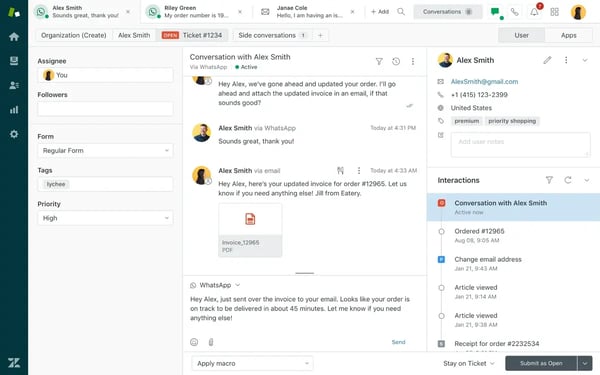
What makes Zendesk worth considering, even against cheaper alternatives, is the ceiling. If your startup is on a growth trajectory that leads to a serious support operation, Zendesk is the only tool on this list that you genuinely won’t need to migrate away from. The ticketing infrastructure, automation engine, AI features, and reporting are built for scale. Setting it up at the early stage means the workflows and integrations you build today are still the right foundation when the team is ten times larger.
The 14-day trial gives full Suite Professional access, including AI Copilot. For teams not in the startup program, this is a meaningful evaluation window. The support team, macros, triggers, views, and reporting are all accessible, and the integration ecosystem of 1,500+ apps is available to connect.
What does Zendesk for Customer Service’s free plan include?
- 14-day free trial: full Suite Professional access including AI Copilot, no credit card required
- Zendesk for Startups program: up to 2 years free for qualifying early-stage startups, up to 50 agents
- Email, chat, social, voice, and web widget channels during trial
- Automation (macros, triggers), SLA management, reporting, and app integrations
- No permanent free tier after trial or startup program; Support Team plan starts at $19/agent/month
When should you upgrade your Zendesk for Customer Service free plan?
The startup program’s up-to-2-year window is a genuinely long runway. By the end of it, you’ll know whether the platform fits your team’s workflow. After the program ends, the Support Team plan at $19/agent/month is the entry point for basic ticketing only. The Suite Team plan at $55/agent/month is where most growth-stage teams land when they need omnichannel support and AI features together. The cost jump between trial and ongoing subscription is real, so modeling the budget for the post-program period is worth doing before you build workflows around the platform.
Where Zendesk for Customer Service genuinely stands out:
- The automation and reporting capabilities are the most mature in this category. Macros, triggers, views, SLA rules, and custom reports give a support team genuine operational leverage that the cheaper tools on this list don’t match. G2 reviewers in the CS industry specifically highlight the reporting depth as a reason they stay on Zendesk as their teams grow.
- The startup program terms are among the most generous here. Up to two years free for up to 50 agents is a substantial runway for an early-stage team to build workflows, train agents, and validate the platform before the first invoice arrives. For a startup in a growth phase where the support function is being built from scratch, this changes the cost calculus significantly.
What G2 users like about Zendesk for Customer Service:
“Agent interface is clear and easy to use. Robust reporting across hundreds of metrics. Easy to customize for different business cases; I’ve used it for both 24/7 global support across 12 languages and as a jumping-off point for a small 2-person team. Responsive customer support and account management.”
– Zendesk for Customer Service review, Emily I. G.
Is Zendesk for Customer Service right for your tech startup?
Best for: Tech startups on a clear growth trajectory that want to build on a platform they won’t need to migrate away from, particularly those that qualify for the startup program and can defer costs during the early build phase.
Not ideal for: Very early-stage startups with minimal ticket volume where the cost after the trial or startup program ends is hard to justify, or teams that need a permanent free tier.
What I dislike about Zendesk for Customer Service:
- The admin configuration complexity is the most common point raised by new users, and it’s real. Setting up triggers, business rules, and conditional workflows correctly takes time, and building something that works well in production often requires a few rounds of iteration. The documentation and community resources are extensive, which helps, but the initial investment in configuration is higher than most tools on this list.
- Many of the features that make Zendesk valuable at scale, including advanced AI, analytics via Zendesk Explore, and higher-tier automation, are locked behind the Suite plans starting at $55/agent/month. For startups that enter on the $19/agent/month Support Team plan after the trial, the feature gap between what they evaluated and what they’re paying for can be jarring.
What G2 users dislike about Zendesk for Customer Service:
“Zendesk can feel a bit overwhelming at first because there are so many features and configuration options. It takes time to set up properly and can be confusing for new users. Another thing is pricing; many useful features and integrations are locked behind higher plans, which can be tough for smaller teams. Also, when ticket volume is high, the interface can feel slightly cluttered.”
– Zendesk for Customer Service review, Radhika R.
10. Zoho Desk: Best for startups already using or planning to use Zoho products
Zoho Desk has the most capable free plan on this list in terms of what’s included at no cost, and the cheapest upgrade path of any tool in the category. The free plan covers up to three agents with email ticketing, a knowledge base, and basic ticket management on a permanent basis. When the time comes to move beyond three agents, the Express plan starts at $7/user/month, which is the lowest paid entry point here by a significant margin.
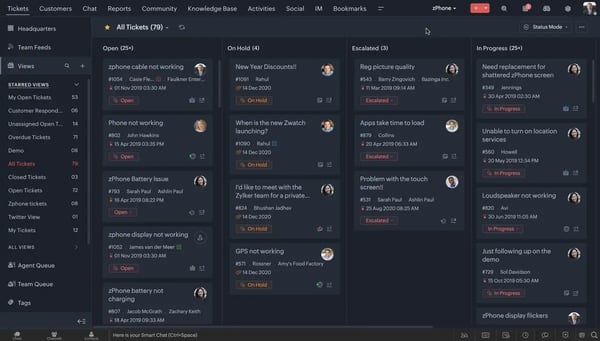
For a tech startup already using other Zoho products, including Zoho CRM, Zoho Projects, or Zoho Analytics, the integration layer is the strongest argument for Desk. The connection between Desk and Zoho CRM is genuinely tight: tickets link to contact records, deal timelines update automatically, and support context is visible to sales without manual data entry. For a startup where the same team handles both customer support and account management, that integration removes a meaningful coordination overhead.
During testing, the interface was clean and the setup was faster than the feature depth would suggest. Getting the first inbox configured, adding a custom domain, and enabling the knowledge base portal took about 20 minutes. The free plan’s constraints (no SLA management, no automation rules, no Zia AI) are real, but the core ticketing functionality is enough to handle a genuine support operation while a startup is still in early growth.
What does Zoho Desk’s free plan include?
- Free forever: up to 3 agents
- Email ticketing, knowledge base, and basic ticket management
- Customer portal and help center
- Mobile apps for iOS and Android
- No SLA management, automation rules, real-time collaboration, or Zia AI (paid plans)
- No live chat on the free plan; calling requires a separate Zoho Voice subscription
When should you upgrade your Zoho Desk free plan?
The 3-agent cap is the primary trigger, and at $7/user/month for the Express plan, the upgrade cost is low enough that it rarely requires a significant budget conversation. The Express plan adds social media ticket capture, CSAT ratings, basic workflow rules, and email templates. The Standard plan at $14/user/month adds SLA management, instant messaging, and unlimited macros. The upgrade path is gradual and the cost increments are small, which makes Zoho Desk one of the easiest tools on this list to grow into without a disruptive pricing jump.
Where Zoho Desk genuinely stands out:
- The free plan is the most generous permanent tier in the category. Three agents, email ticketing, a knowledge base, and a customer portal at no cost with no time limit gives a small startup a real working support environment before spending anything. For a founder-led team that wants to start structured before scaling, the free plan covers a longer runway than any competitor.
- The Zoho ecosystem integration is the tightest in the category for teams already on Zoho products. Linking tickets to CRM records, triggering workflow actions across Zoho apps, and pulling support data into Zoho Analytics requires no custom integration work. G2 reviewers in the IT and services industry specifically highlight the ecosystem connection as the reason they choose Desk over alternatives with more brand recognition.
What G2 users like about Zoho Desk:
“What I like best about Zoho Desk is how easy it is to use. The interface is clean and intuitive, which makes it simple to manage support tickets, track customer conversations, and keep the team organized. The browsing experience is smooth, and the platform helps improve the support workflow without making the process complicated.”
– Zoho Desk review, Bruno N.
Is Zoho Desk right for your tech startup?
Best for: Budget-conscious tech startups that want the most capable free plan available, teams already using other Zoho products, and startups that want a gradual upgrade path with the lowest entry cost in the category.
Not ideal for: Startups that need deep third-party integrations outside the Zoho ecosystem, or teams where customer-facing polish and a modern UI are high priorities.
What I dislike about Zoho Desk:
- The initial configuration, particularly for automation rules, workflows, and cross-department routing, is more involved than the clean interface suggests. New users can find the volume of options in the settings area overwhelming at first; the depth that makes the platform flexible for complex setups also makes it harder to navigate for someone just trying to get started quickly. Once the initial setup is complete, the day-to-day experience is straightforward.
- The integration depth outside the Zoho ecosystem is thinner than alternatives at a similar price point. Teams that rely heavily on non-Zoho tools for CRM, project management, or analytics may need Zapier or custom API work to connect Desk to their existing stack, which adds setup overhead that Freshdesk or Zendesk often handles natively.
What G2 users dislike about Zoho Desk:
“Where Zoho Desk can fall short is in usability and polish compared to higher-end platforms like ServiceNow or even more MSP-focused tools like ConnectWise. The UI can feel a bit cluttered or unintuitive, especially for new technicians.”
– Zoho Desk review, Rudy C.
Who should use free help desk software for tech startups?
Free plans work best in these situations:
- Validating volume before committing budget: when you need to understand your support load before paying for it.
- Small support teams: when the team handling support is small enough that paid per-seat costs add up fast.
- Structure needed before revenue: when you need a structured system immediately, but the revenue isn’t there yet to justify line items.
Most of the tools on this list offer enough on their free plans to handle a real support operation for an early-stage startup, not just a demo environment. The ceiling appears when support becomes a primary business function rather than a side responsibility. That’s when recording, AI assistance, SLA management, and advanced reporting stop being nice-to-haves and start being the difference between a team that’s on top of tickets and one that’s constantly catching up.
When does free stop being enough?
Three triggers come up consistently across the tools on this list:
- Agent count hits first: most free plans cap at two to three agents, and a growing startup team hits that ceiling faster than expected.
- Automation is the second trigger: routing tickets manually, resending the same responses repeatedly, and tracking SLA breaches in a spreadsheet are signs that the free plan’s automation limits have been reached.
- Reporting is the third: when you need to show support performance data to stakeholders, investors, or the product team, the free plan dashboards on most tools don’t give you enough to work with.
The upgrade costs are reasonable across the board: Zoho Desk at $7/user/month, Freshdesk at $29, Zendesk at $19, and Jira Service Management at $20 represent the range for entry-level paid plans. Use the free plan properly first. Most tools give you enough to know within two to three weeks whether the platform fits how your team actually works.
Frequently asked questions about free help desk software for tech startups
Have more questions about using free helpdesk tools? We’ve got the answers below.
Q1. What is the best free help desk software for tech startups?
It depends on what your startup actually needs right now. Jira Service Management has a capable permanent free plan (up to 3 agents, no time limit) and is a strong option if your team is on the Atlassian stack and needs dev-support integration. Hiver is quick to adopt if your team lives in Gmail. Zoho Desk has the lowest paid entry point if you are comfortable starting on its 15-day trial. And Zendesk’s startup program is worth applying for if you expect to scale quickly and want a platform you won’t outgrow.
Q2. Which free help desk plan has no time limit?
Hiver in Gmail (free forever, basic shared inbox features) and Jira Service Management (up to 3 agents) offer genuinely permanent free tiers. Zoho Desk (15-day trial), LiveAgent (30-day trial), Atera (30-day trial), Fin (usage-based trial), Zendesk and Front (trials plus startup programs) run on trials rather than free-forever plans, so the evaluation window is where you test them before committing.
Q3. Can a tech startup use Jira Service Management for customer support as well as internal IT?
Yes. JSM offers templates for both customer service and IT service management, and both can run in the same instance. For a startup where the same small team handles both internal IT requests and external customer inquiries, this is a meaningful advantage. The free plan supports up to 3 agents across both use cases.
Q4. What if my startup needs both customer support and internal IT support?
Most of the tools on this list are built for customer-facing support. If your team also needs to handle internal IT requests, like employee onboarding, device issues, and software access, that’s a separate category called IT service management (ITSM). Some platforms span both: Jira Service Management handles customer and internal service desks in one instance, and Freshworks offers Freshservice alongside Freshdesk for teams that want a dedicated ITSM tool. If internal IT is a real part of your workload, it’s worth looking at the best service desk software as a companion category.
Q5. Is Fin worth it for a small startup with limited ticket volume?
The per-resolution model means Fin’s cost scales directly with its value. At low ticket volumes, the monthly spend stays low. The question is resolution rate: Fin delivers value in proportion to how many incoming queries it resolves autonomously. If your help center is thin or your queries are highly complex, that rate will be lower, and the ROI calculation changes. The 14-day trial gives you real resolution rate data before any cost commitment.
Q6. Which free help desk tool is easiest to set up for a non-technical founder?
Hiver is the fastest for teams on Gmail, since it installs as a browser extension and adds structure to an existing inbox without requiring a new system. Freshdesk is the easiest standalone help desk to set up from scratch. Zoho Desk is close behind. All three can have a first inbox configured and handling real tickets within an hour of signup.
Q7. Does Zendesk offer anything specifically for startups?
Yes. The Zendesk for Startups program provides up to two years of the Zendesk Resolution Platform free for up to 50 agents for qualifying early-stage startups. Eligibility is based on company stage, funding, and headcount. For a startup that qualifies, it’s among the most generous startup programs here and removes the pricing objection entirely for up to two years.
Q8. What should a tech startup look for in a help desk when choosing between free plans?
The most useful questions are: is there a free-forever plan or only a trial, how many agents does it support, does it have a time limit, what does it withhold that your team will actually need, and what does the upgrade cost when you outgrow it? A permanent free plan with up to three agents and no time limit (Jira Service Management) is more valuable than a trial that starts a billing clock if you’re not ready to pay within that window. For trial-only tools like Zoho Desk and LiveAgent, the question is whether the trial is long enough to prove the fit before billing starts. The upgrade trigger and the cost at that trigger are as important as the free plan itself.
Ensure stellar customer satisfaction at a fraction of the cost
The right tool depends less on features and more on where your startup is right now. If your team lives in Gmail and you need structure without disruption, Hiver gets you there in under an hour. If you’re already on Atlassian and need to connect customer issues to engineering work, Jira Service Management is the obvious choice. If you want the most capable free plan with the cheapest upgrade path, Zoho Desk is hard to beat.
For startups on a growth trajectory that want a platform they’ll never need to migrate away from, Zendesk’s startup program changes the calculus: six months free, up to 50 agents, and a platform that scales to any support operation you’re likely to build. Apply for the program before defaulting to a cheaper alternative you’ll outgrow.
If you’re choosing between the mid-tier tools, Freshdesk is the most accessible for teams new to structured support, while Freshservice is the stronger choice if internal IT is the primary use case. Front earns its place for email-first teams where collaboration across a shared inbox is the core workflow.
For AI-forward startups that want to automate tier-1 support from day one, Fin’s resolution-based pricing is the most honest pricing model in the category: you pay when it works. The Early Stage program makes it effectively free for qualifying startups in the first year.
Start with the free plan. Run real tickets through it. You’ll know within two weeks whether it fits how your team works, and that’s more useful than any comparison guide.
Want to go deeper before you decide? Read G2’s full breakdown on the 8 best help desk software, then browse verified reviews to match the right tool to your startup’s stage.