



As a cloud architect, IT director, infrastructure manager, or migration lead, by the time you’re comparing vendors for the best cloud migration software, there’s usually a deadline attached to the decision: a data center exit, a platform consolidation initiative, a contract renewal, or a modernization project that’s already underway.
The challenge isn’t deciding whether to migrate. It’s choosing a tool that can move workloads, applications, and data without creating new risks around downtime, security, compliance, or operational disruption.
McKinsey found that 75% of cloud migrations ran over budget, while 37% ran behind schedule. In many cases, those setbacks aren’t caused by the migration itself. They’re what happens when organizations treat software selection as a checkbox rather than a decision that shapes everything that follows: cutover, stabilization, compliance posture, and the cleanup sprint nobody budgeted for.
I went through this evaluation specifically to avoid giving you another generic shortlist. The six tools I landed on, including Agentforce 360 Platform, MigrationWiz, Cloudiway, HubSpot Data Hub, AvePoint Confidence Platform, and IBM webMethods Integration, are each matched to a distinct migration scenario.
What makes this list different is the validation layer: G2 review data with input from cloud architects, IT administrators, and MSP teams that tell you how these tools perform when a real migration is on the line. I pulled the data from G2’s Winter 2026 Grid Reports, ran the reviews through AI analysis to find what kept coming up, and checked everything against people doing this work daily.
If you’re working against a contract renewal window, a compliance deadline, or an infrastructure refresh already in motion, the scenario-matching in each section will help you move faster on the right call.
6 best cloud migration software for 2026: My top picks
- Agentforce 360 Platform: Best for enterprise application modernization
Enterprise cloud platform supporting secure data migration and scalable integrations across environments. (Free trial available; Paid plans start at $25 per user/month.) - MigrationWiz: Best for structured tenant and email migrations
Automated mailbox and document migrations for Microsoft 365 and Google Workspace transitions. (Paid plans start at $14 per user.) - Cloudiway: Best for cross-platform collaboration migrations
Migration platform for Microsoft 365, Google Workspace, and directory transitions with governance controls. (Free trial available; Paid plans start at $570 for 50 licenses.) - HubSpot Data Hub: Best for CRM and marketing data consolidation
Data synchronization and migration within HubSpot for marketing and sales teams. (Free plan available; Paid plans start at $9 per seat/month.) - AvePoint Confidence Platform: Best for governance-heavy enterprise transitions
Policy-driven migration and compliance platform for Microsoft 365 environments. (Demo available; Paid plans available on request.) - IBM webMethods Integration: Best for enterprise middleware migrations
Cloud and hybrid integration platform connecting enterprise applications, APIs, and data flows across complex environments. (Pricing available on request.)
*These cloud migration platforms are top-rated in their category based on G2’s Winter 2026 Grid® Report. I’ve included their strengths and ideal use cases to help you choose the right solution for your organization.
6 best cloud migration software I recommend
The right cloud migration platform does more than transfer workloads. It preserves data integrity, maintains access hierarchies, and keeps integrations intact so modernization doesn’t destabilize what’s already running. Whether you’re migrating a live tenant, consolidating analytics environments, or moving enterprise workloads across regions, that baseline is non-negotiable.
Where stronger platforms separate themselves is execution discipline. I consistently found that tools that hold up under real migration pressure go beyond accurate replication and visibility into validation; they provide governance controls that work before and during cutover, not just a report that surfaces what broke after. That distinction is easy to miss during evaluation and expensive to discover mid-migration.
G2 adoption data spans mid-market teams, growing SaaS companies, MSPs, and global infrastructure groups navigating compliance requirements across distributed systems. The stakes are consistent regardless of environment; uptime, reporting accuracy, and security posture don’t have a grace period. When execution is poor, the cost shows up in cleanup sprints, permission audits, and reporting gaps that outlast the migration itself.
How did I find and evaluate the best cloud migration software?
The shortlisting process began with G2’s Winter 2026 Grid Report for cloud migration software. Platforms were ranked by verified user satisfaction scores and market presence across small businesses, mid-market organizations, enterprises, and managed service providers. This kept the list focused on tools actively supporting production migrations rather than general cloud utilities with limited execution depth.
From there, I analyzed verified G2 reviews at scale using AI to surface recurring themes tied to real migration execution: how teams actually use these tools under pressure, where replication accuracy breaks down, and what consistently stalls post-cutover stabilization. Feature lists alone don’t capture that. I relied on review signals to find what actually holds up.
Because I haven’t personally deployed every platform included, findings were validated against direct feedback from cloud architects, infrastructure leaders, IT administrators, and MSP teams running these tools in live environments.
All visuals and product references are sourced from G2 vendor listings and publicly available product documentation.
What makes the best cloud migration software worth it: My criteria
After reviewing verified G2 feedback and cross-referencing practitioner input, I uncovered five dimensions that surfaced as the most consequential for migration outcomes. These aren’t generic software evaluation criteria; they reflect where migrations specifically tend to fail.
- Data integrity and schema continuity: Migrations that corrupt object relationships or truncate metadata create reconciliation debt that can take weeks to clear. I prioritized platforms where users consistently report clean transfers with intact data structures, not just successful file movements.
- Permission continuity across identity layers: Role mapping and access synchronization are where many migrations quietly go wrong. A transferred environment with drifted permissions creates security exposure that’s hard to audit after the fact. I evaluated tools based on how reliably they preserve group hierarchies and access policies from source to destination.
- Governance visibility during cutover: Compliance obligations don’t pause because a migration is in progress. Tools that provide audit logs, structured validation reporting, and governance oversight throughout the transition give regulated teams something to stand behind. Platforms without this shift governance risk onto the organization instead.
- Integration stability across dependent systems: Broken integrations after cutover rarely announce themselves immediately. Analytics pipelines, collaboration workflows, and downstream applications can silently degrade before anyone notices. I rated tools higher where reviewers consistently reported preserved integrations and early detection when something was off.
- Post-migration stabilization effort: Execution quality shows up most clearly in what happens after go-live. Where users report minimal cleanup, predictable stabilization timelines, and structured validation before final cutover, the platform is doing its job. Where they report extended remediation and unexpected gaps, the migration tool transferred the problem rather than preventing it.
Based on these criteria, I narrowed the list to cloud migration platforms that consistently reinforce operational stability, governance control, and data integrity across environments. No single system leads in every dimension, so the right choice depends on whether your organization prioritizes enterprise governance, analytics migration, collaboration platform transitions, or speed of execution.
Below, you’ll find authentic user reviews from the Cloud Migration Software category. To appear in this category, a tool must:
- Support structured migration of applications, data, or workloads across environments
- Preserve data integrity and access controls during transition
- Provide validation, monitoring, and governance visibility
- Deliver scalable execution across cloud architectures
This data was pulled from G2 in 2026. Some reviews may have been edited for clarity.
1. Agentforce 360 Platform: Best for enterprise application modernization
Agentforce 360 Platform (formerly Salesforce Platform) is a cloud-based application development and automation environment built to unify customer data, workflows, and business logic. Within the cloud migration category, G2 review patterns frame it as a flexible, highly configurable infrastructure rather than a narrow migration utility. In my read of the review data, the emphasis stays on customization depth, integration capability, and centralized operational control.
What struck me while going through the review data is how consistently G2 users highlight confidence in secure storage and structured access controls during migration projects, a consistency reflected in its 94% data protection rating on G2. That trust holds especially when consolidating legacy systems into a centralized cloud environment.
Administrative control across users, roles, and data layers holds up consistently in G2 review feedback. Teams reference the ability to manage permissions while supporting collaboration across departments, and I’d argue that balance is harder to maintain than most migration checklists acknowledge. Its especially important during complex multi-team migrations, where access and security scores 93% on G2.
Records, workflows, and system logic transfer reliably to the cloud, with G2 users often describing smoother transitions from fragmented systems into a unified platform. This reliability, which I’d consider non-negotiable during transformation initiatives, reduces disruption during transformation initiatives. Teams moving large volumes of structured data consistently report cleaner outcomes at cutover.
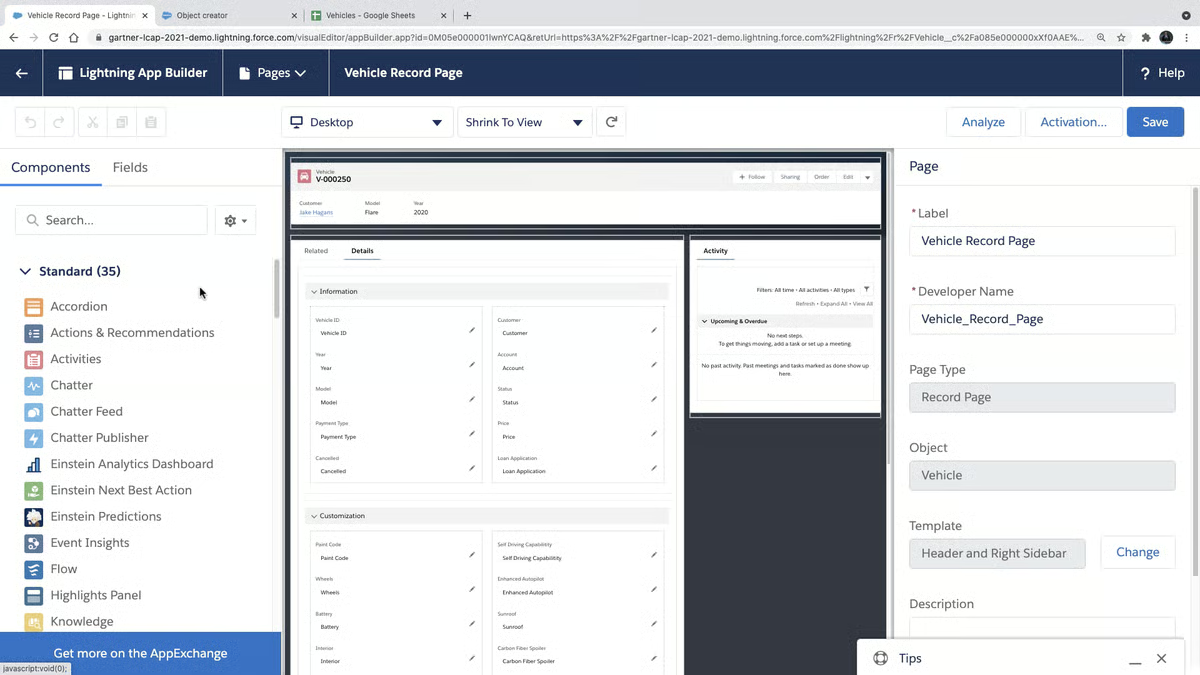
One thing I kept seeing across G2 reviews is how much teams value the low-code, point-and-click configuration. Teams can create objects, automate workflows, and customize applications without extensive coding, making the platform accessible to internal teams without deep technical resources. That flexibility supports faster deployment cycles and allows processes to adapt as business needs evolve.
Third-party systems, internal tools, and multiple cloud offerings connect cleanly within the platform, helping eliminate siloed data environments. G2 users frequently mention how this unified structure improves visibility across sales, service, and operational workflows. For organizations migrating into a consolidated cloud stack, that depth is what keeps broken dependencies from showing up after go-live.
Summarized data views that support management decisions come up often in G2 reviews. This consolidated analytics layer gives leadership clearer operational visibility without additional tooling. Teams describe reduced reliance on scattered reporting tools and manual data compilation. The result is faster decision-making once migration stabilizes.
While overall feedback is strong, G2 reviewers note that building and maintaining complex workflow automations demands certified Agentforce 360 admin expertise. Smaller teams and growing businesses without a dedicated administrator on staff are most exposed to this gap. The platform’s depth of customization, integration capability, and governance control remain consistent regardless of team configuration.
Licensing and add-on costs climb as usage expands across multiple clouds or premium features, as noted by some G2 users. This pressure is felt most by mid-sized companies scaling up their Agentforce 360 footprint quickly. The breadth of capability on offer tends to justify the spend at higher adoption levels, and G2 review patterns reflect strong satisfaction with the platform’s long-term value at scale.
All in all, Agentforce 360 Platform presents as a mature, enterprise-ready cloud foundation built around customization, integration, and centralized control. Its strength lies in supporting complex migrations and long-term scalability rather than lightweight deployments. For organizations seeking a structured cloud transformation with room to evolve, it stands out as the platform I’d recommend when long-term scalability is non-negotiable.
What I like about Agentforce 360 Platform:
- It gives teams deep flexibility to customize data models, workflows, and applications using low-code tools, making it easier to centralize complex sales, service, and operational processes in one cloud environment.
- It combines strong security, data protection, and integration capabilities, allowing organizations to migrate systems into the cloud while maintaining control, visibility, and cross-team collaboration.
What G2 users like about Agentforce 360 Platform:
“Salesforce stands out for its flexibility and its ability to be customized to support complex business processes. I appreciate how it brings sales, service, and automation together on a single platform, which makes it easier to manage work in one place. The reporting and dashboard features are especially powerful and genuinely help with making data-driven decisions. I use it regularly, and it has significantly improved efficiency and visibility across teams.”
– Agentforce 360 Platform review, Vishal H.
What I dislike about Agentforce 360 Platform:
- Building complex workflow automations demands certified admin expertise, leaving smaller teams without a dedicated administrator at a significant disadvantage. However, the platform’s configurability becomes a clear strength for users.
- Licensing and add-on costs climb quickly as usage expands across multiple clouds or premium features, a pressure felt most by mid-sized companies scaling their Agentforce 360 footprint rapidly. The breadth of capability on offer tends to justify the spend at higher adoption levels.
What G2 users dislike about Agentforce 360 Platform:
“Performance can be slow with complex customizations. Sometimes, debugging and error messages can be unclear. And there’s high licensing and add-on costs.”
–Agentforce 360 Platform review, Ayush M.
If compliance is a core requirement during and after cloud transitions, the best cloud compliance software belongs on your evaluation list alongside your migration platform.
2. MigrationWiz: Best for structured tenant and email migrations
MigrationWiz is a cloud migration platform built to automate tenant-to-tenant and workload migrations across Microsoft 365 and similar environments. For MSPs and internal IT teams, it offers a repeatable framework for handling email, document, and archive transfers with minimal disruption.
Folder structures, metadata, and message integrity hold up consistently across Microsoft 365 moves, with G2 users describing clean transitions without extensive post-migration cleanup, supported by a 92% data protection rating on G2. This reduces disruption once users settle into the new environment. For MSPs managing multiple client tenants, that consistency becomes a baseline expectation rather than a bonus.
While going through the reviews, I noticed how frequently MSPs reference trial migrations as a confidence builder before full cutover. These trial runs validate permissions and configurations early, reducing risk during production migration windows. Teams that run structured test passes consistently report fewer surprises at go-live.
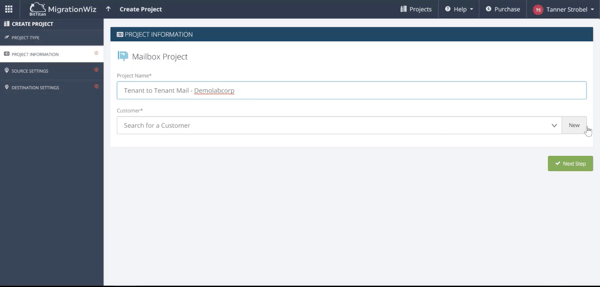
Credential validation and execution oversight are structured clearly within the platform, with defined workflows and authentication checks helping MSPs manage multiple tenants while maintaining visibility across migration phases. G2 users I came across describe that control as especially useful when coordinating parallel projects across different client environments, with access and security rated at 92% on G2.
Manual intervention drops significantly once environments are prepared, with G2 users frequently highlighting clear step-by-step setup guidance that lets teams launch projects quickly. That automation holds particularly well for standard Microsoft 365 scenarios where environments are clean and well-documented.
Batch migrations in MSP environments allow email, OneDrive, SharePoint, and archive workloads to be handled within a single operational model. This keeps oversight centralized and removes the need for separate utilities across different workload types. G2 users managing high-volume client migrations describe this consolidation as a meaningful time saver, and from what I’ve analyzed, it’s one of the cleaner differentiators in this category.
Going through G2 reviews, I kept running into the same observation about source flexibility. The coverage spans Google Workspace, IMAP, on-premises Exchange, Lotus Domino, and multiple cloud tenants, allowing MSPs to run migrations from nearly any starting point into Microsoft 365 without switching tools. Verified user feedback consistently highlights this versatility, particularly for service providers managing clients across mixed and legacy environments, reflected in a 94% data migration rating on G2.
Despite the strengths above, G2 users highlight that reaching a live support agent when a blocking error halts a project mid-migration is not possible through the current support model. MSPs working against tight client deadlines feel this constraint most sharply. Although many insist that the platform’s automation depth and documentation cover the vast majority of scenarios independently.
G2 users point out that Mailboxes exceeding standard size thresholds and items flagged during error-handling cannot always be resolved within the platform’s automated workflow, requiring manual intervention to move forward. MSPs handling large, complex client environments with varied mailbox sizes run into this most regularly. That said, MigrationWiz’s overall execution reliability and data integrity track record remain consistently well-regarded across G2 feedback.
In my view, MigrationWiz delivers structured, automated migration workflows that reduce manual effort and support batch-based execution. Its staged controls and Microsoft 365 focus make it well aligned with MSPs and IT teams managing recurring cloud transitions. When projects are properly scoped and executed within their framework, it enables efficient migrations with operational clarity.
What I like about MigrationWiz:
- It structures cloud migrations into clear stages, from credential verification to trial and full migration, which gives MSPs and IT teams more control and visibility throughout the process.
- It automates large portions of Microsoft 365 migrations, reducing manual effort while supporting multiple workloads like email, OneDrive, and SharePoint in batch-based projects.
What G2 users like about MigrationWiz:
“The MigrationWiz is automated and scalable, that means the tool automates much of the migration process, reducing manual effort. Capable of support multiple Workloads, like emails, documents, personal archives etc. The best solution to manage Microsoft 365 Migrations .”
– MigrationWiz review, Carlos C.
What I dislike about MigrationWiz:
- Oversized mailboxes and flagged error items sometimes fall outside what the tool can handle automatically, pulling engineers back into the process manually. The platform’s track record for clean, accurate data transfers holds up strongly across the bulk of migration scenarios.
- No real-time support channel exists when a critical issue surfaces mid-project, which creates exposure for service providers running against fixed delivery windows. The tool’s self-service depth and structured documentation resolve most situations without outside intervention.
What G2 users dislike about MigrationWiz:
“I used BitTitan MigrationWiz years ago, and I remember it did work to migrate our customers. In 2025, I am working with a new MSP and was given MigrationWiz to help migrate the data. The software does not work as designed. When I get stuck on an error that prevents me from moving forward, I have to email support. They can take from 2 days to a week to respond. There is no way to reach a live person. How can we give our customers a time and date for project completion if errors prevent us from completing, and support doesn’t respond.”
– MigrationWiz review, Anthony P.
3. Cloudiway: Best for cross-platform collaboration migrations
Cloudiway supports structured cloud migrations across platforms, with particular strength in tenant-to-tenant moves and collaboration data transfers. Migration projects report into one interface, and if you’re managing multiple concurrent tenants, keeping coordination, monitoring, and issue tracking centralized is what holds complex projects together.
What I noticed in G2 reviews is how consistently users describe clean outcomes even across complex tenant structures, with emails, files, contacts, and shared data arriving in the target environment without rework. Structured pre-migration checks and detailed logs reduce surprises mid-project. That early validation lowers the risk of missing data, broken permissions, or unexpected downtime during cutovers, reflected in a 97% data migration rating on G2.
Organizations retain control over permissions and document rights throughout transitions, with G2 reviewers referencing files arriving at the destination with correct access levels intact. That security alignment reduces post-migration cleanup and limits operational risk when moving sensitive Microsoft 365 data between tenants. For regulated environments, that consistency matters at every stage of the transfer.
Progress tracking, replication safeguards, and consistent handling of mixed file formats come up repeatedly in G2 feedback, highlighting dependable continuity across varied content types. Real-time status updates reduce manual follow-ups and give stakeholders clarity during complex transitions, with data protection scoring 96% on G2. Teams managing large file volumes across mixed ecosystems describe fewer mid-project surprises as a result.
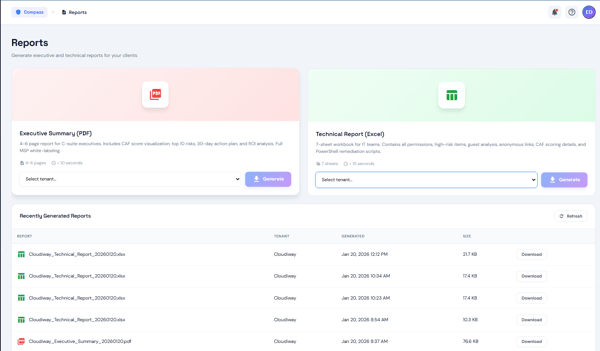
Structured dashboards, clear step-by-step processes, and reliable progress visibility across multiple concurrent tasks are frequently described in G2 reviews. As projects scale in size and complexity, the platform preserves coordination order. If you’re managing stakeholder approvals across parallel workstreams, this coordination layer holds up in ways that matter at scale.
Smooth Microsoft 365 migrations covering Teams conversations, shared drives, and user profiles come up consistently across G2 feedback. Automation options and API integrations support large-scale transfers across mixed ecosystems, with access and security rated at 97% on G2. I’ve seen smaller IT teams handling periodic migrations describe the platform as accessible without requiring enterprise-level resource commitment.
While analyzing G2 reviews, one pattern stood out: document rights carry over unchanged after transfer, removing the manual access-level adjustments that typically follow cross-platform moves. Users consistently describe time saved specifically because permissions do not need to be reset in the destination environment. That continuity holds across mixed file formats and varied content types without additional configuration.
G2 reviewers do point to a recurring consideration around initial environment setup, specifically that mapping source and destination tenant permissions manually is required before automated workflows can begin. First-time administrators without prior cross-platform migration experience encounter the steepest ramp-up here. Although the configuration investment pays dividends in execution accuracy once the project is underway.
Certain advanced log views take additional time to load when reviewing detailed audit trails across large migration batches, a pattern that surfaces in verified user feedback from high-volume projects. Compliance-focused administrators generating audit documentation in parallel feel this most during active migration windows. The depth and granularity of data available are consistently praised capabilities across the platform.
Rather than centering on ad hoc transfers, Cloudiway emphasizes structured workflows, visibility, and repeatable migration planning. For teams prioritizing control, auditability, and minimal disruption are the priorities, I’d put Cloudiway near the top of any serious shortlist.
What I like about Cloudiway:
- It delivers a structured and predictable migration process, with clear dashboards, pre-migration checks, and detailed logs that make tracking progress and debugging issues far more manageable.
- It handles complex tenant-to-tenant and Microsoft 365 migrations with strong data integrity, preserving emails, files, permissions, and collaboration data without disrupting daily operations.
What G2 users like about Cloudiway:
“ I genuinely liked about cloudiway is its structured migration process. It provides clear dashboards, pre migration checks and detailed logs which makes debugging and tracking issues much easier. Also the API integration and automation options are helpful when handling large scale migrations.”
– Cloudways review, Divyanshu C.
What I dislike about Cloudiway:
- Setting up a new migration project involves manual permission work on both the source and destination sides before any automation kicks in, which adds preparation time for those new to tenant migrations. The structured approach pays off in fewer surprises once data movement begins.
- Pulling up detailed audit trails on large batches involves noticeable load times, which slows down review cycles for administrators managing compliance requirements in parallel. The breadth of logging detail captured throughout the process is a frequently highlighted advantage.
What G2 users dislike about Cloudiway:
“The initial setup can be a bit complex and requires some technical understanding. It takes a little time to get everything configured properly.”
– Cloudways review, Nicole S.
4. HubSpot Data Hub: Best for CRM and marketing data consolidation
HubSpot Data Hub is used by organizations looking to centralize customer and operational data across marketing, sales, and service systems. It focuses on syncing, cleaning, and automating data so teams can operate from a single source of truth. The platform is commonly adopted where CRM-driven workflows require accuracy and cross-team visibility, which, in my read, covers most growing teams hitting data quality walls.
Here’s what G2 reviews actually showed me: customer and operational data from marketing campaigns, sales pipelines, and support interactions consolidates cleanly into one environment. The breadth supports complete reporting and customer lifecycle tracking, backed by a 92% data variety rating on G2. Teams describe moving away from disconnected spreadsheets and fragmented tool sets toward a unified view of customer activity.
Syncing across marketing automation, CRM, and service platforms holds up dependably, with verified reviewers noting consistent data alignment across connected systems without manual reconciliation. For your team, adding new channels and touchpoints, that reliability becomes a foundation for cleaner pipeline reporting, something that shows in its 93% data replication rating on G2.
Centralized control over customer records and reliable permission management come up consistently across G2 reviews. G2 users describe real-time visibility into unified data that reduces fragmentation across tools and supports more confident day-to-day operations, with access and security rated at 95% on G2. That control matters especially for teams where multiple functions access and update the same customer records simultaneously.
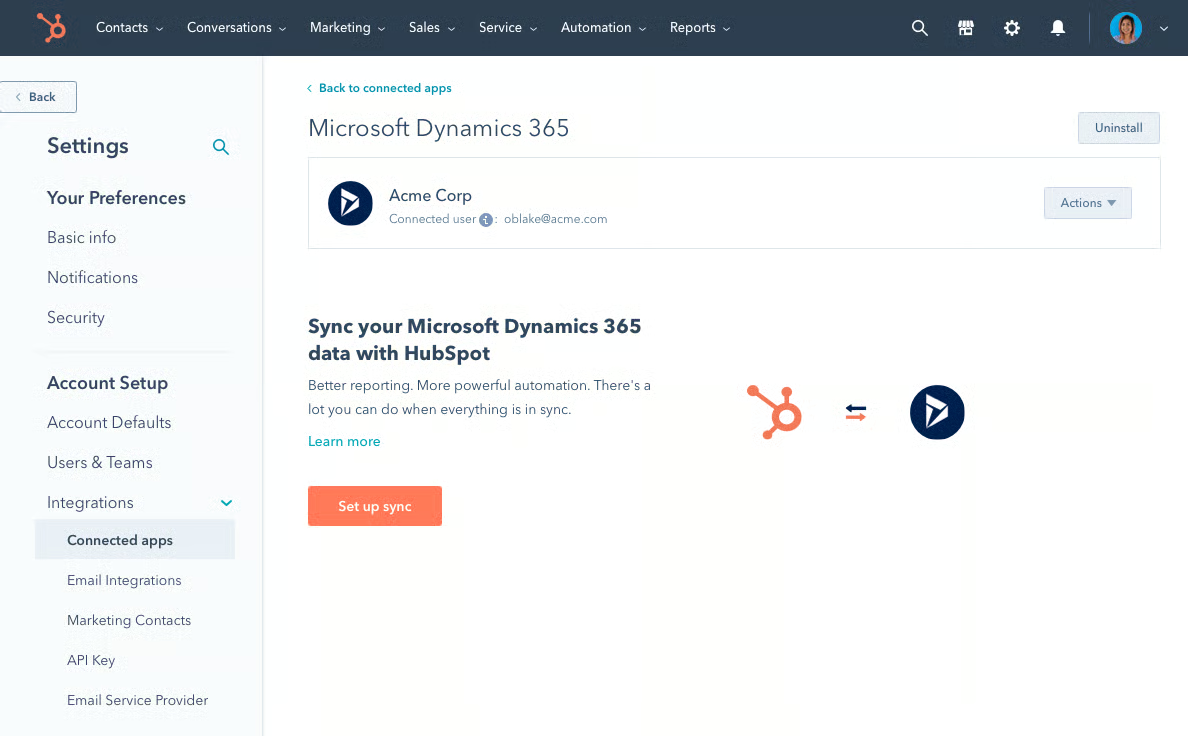
Setup is described as smooth, even for teams without deep technical backgrounds, with G2 users noting clear interfaces and straightforward onboarding that make the platform accessible without dedicated engineering resources. That accessibility lowers the barrier for smaller teams moving away from manual data management for the first time.
What I picked up while studying G2 review data is how consistently users describe a shift away from repetitive maintenance, property management tools, deduplication features, and workflow automation, which reduce manual data entry and cleanup work significantly. Teams handling high volumes of contact records describe meaningful time savings once automated cleanup runs replace manual intervention.
Native integrations across marketing channels and CRM systems support coordinated campaign execution, with G2 users referencing email, social media, and content workflows managed within a unified ecosystem. I’ve seen that consolidation consistently show up as one of the first things teams mention when describing what changed after implementation.
G2 users point out that configuring complex integrations and advanced data mapping beyond standard field connections requires technical expertise that many smaller teams do not have readily available. Most say the core syncing and pipeline features remain accessible and well-regarded across the broader user base.
Across G2 reviews, one constraint surfaces consistently: custom code actions and advanced workflow customizations are gated behind higher-tier plans. Fast-growing teams whose automation needs outpace their current subscription run into this boundary most during implementation. However, the standard feature set covers the majority of day-to-day data management needs with strong reliability.
HubSpot Data Hub is built for teams that want consistent, reliable data across revenue systems without heavy technical overhead. Its strengths lie in real-time syncing, automation, and centralized visibility. For small to mid-sized organizations focused on operational efficiency and cleaner CRM data, it remains the option I’d prioritize for teams that need reliable data without heavy technical overhead.
What I like about Hubspot Data Hub:
- It centralizes customer data from multiple systems into a single, reliable source of truth, giving marketing, sales, and service teams clear visibility without constant manual syncing.
- Its automation and data cleanup tools reduce duplicate records, fix sync issues, and streamline workflows, saving teams significant time while improving data accuracy.
What G2 users like about Hubspot Data Hub:
“This tool is exceptional in unifying customers’ data in a single place. It gives a real-time view and access to full customer information. This has led to great productivity in the company.
Their customer service support team is on top-notch. Respond to issues fast and efficiently. It is also highly scalable and flexible. Ideal for most organizations..”
– Hubspot Data Hub review, Marwa B.
What I dislike about Hubspot Data Hub:
- Connecting systems beyond standard field mappings calls for technical knowledge that many lean marketing and sales teams do not have internally. The out-of-the-box data syncing and deduplication capabilities remain straightforward for most standard use cases.
- Deeper automation capabilities and programmable workflow actions are only unlocked at higher subscription levels, which catches growing teams off guard when their requirements expand mid-implementation. The entry-level tier handles routine data management reliably for most day-to-day needs.
What G2 users dislike about Hubspot Data Hub:
“Some of the more advanced features (like custom code actions) can feel intimidating if you’re not technical, and a few things are locked behind higher-tier plans. But once you get the hang of it, it’s super powerful.”
– Hubspot Data Hub review, Haley K.
5. AvePoint Confidence Platform: Best for governance-heavy enterprise transitions
AvePoint Confidence Platform centralizes SaaS data protection, governance, migration, and compliance management into a single control layer. Backups, lifecycle policies, risk monitoring, and Microsoft 365 administration operate from one console instead of fragmented tools. The platform focuses on visibility across multi-cloud environments while maintaining structured controls. IT teams gain a consolidated view of data movement, protection status, and policy enforcement. That’s something I would say is rare across this category.
Activity tracking and visibility across Microsoft 365 environments draw consistent praise, with reviewers noting how quickly unusual behavior or policy gaps are surfaced without pulling reports from separate tools, backed by a 94% alerts and logging rating on G2. That consolidated visibility reduces the manual monitoring overhead that typically comes with managing multiple SaaS environments simultaneously.
One thing I couldn’t overlook in G2’s review data is how smoothly tenant-to-tenant Microsoft 365 transitions run, with users describing minimal disruption, especially during environment consolidations or licensing restructures across departments. That reliability holds across varied project sizes without requiring additional migration utilities. Organizations consolidating Microsoft 365 tenants find the migration capability sufficient without additional tooling.
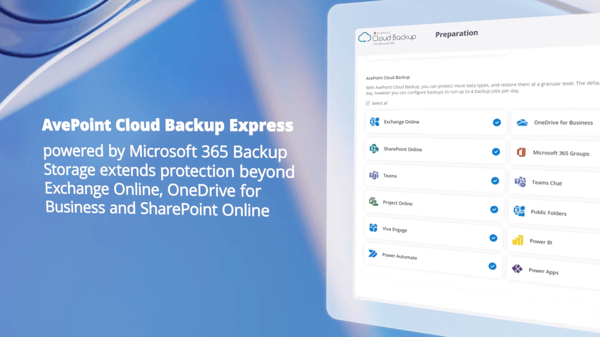
Microsoft 365 license consumption becomes visible at a granular level through the platform’s reporting layer, with verified reviewers noting instances where departments had accumulated licenses for features that see little to no use . That visibility surfaces subscription inefficiencies that, in my experience reviewing this data, tend to typically stay hidden until renewal cycles, reflected with integration variety scoring 91% on G2.
License utilization, storage consumption, and user activity reporting come up regularly in G2 reviews, with teams describing clearer insight into Microsoft 365 usage patterns that support more deliberate subscription planning. For your organization approaching a renewal cycle, that visibility is often where the platform pays for itself before migration even begins.
While analyzing G2 review data, I came across a consistent theme around backup and restore reliability with workflows described as dependable across operational scenarios (schools, mid-sized businesses, and regulated teams), highlighting fast recovery of files, teaching materials, and collaboration data. Reduced downtime during recovery events limits disruption to daily operations.
Governance automation enforces lifecycle policies and access rules without continuous manual oversight, with G2 users describing reduced digital clutter across growing SaaS footprints as controls consolidate into one environment. Teams managing expanding user bases and content volumes find automated lifecycle enforcement more sustainable than manual policy reviews, with data migration rated at 93% on G2.
G2 users flag that feature and module names are inconsistent across different areas of the platform, making it harder to locate specific controls during initial onboarding than the breadth of capability would suggest. However, the underlying governance and compliance capabilities remain comprehensive throughout: backup, lifecycle enforcement, migration oversight, and risk monitoring all operate reliably once administrators are oriented.
A few recurring themes in G2 reviews suggest that certain operations, including SharePoint backups, data restoration jobs, and per-document security scans, run slower than users expect during active use. If you’re managing high-volume environments or working against tight recovery windows, you are most exposed to the slowdown. Even so, the platform’s reliability and data protection standing remain strong across verified user feedback.
AvePoint Confidence Platform centers on consolidation and control. Instead of layering separate backup, migration, and governance tools, teams manage protection and compliance from a unified environment. For organizations operating heavily within Microsoft 365 or broader SaaS ecosystems, I’d recommend it specifically where governance continuity matters as much as the migration itself.
What I like about AvePoint Confidence Platform:
- It brings data protection, governance, migration, and compliance into a single console, giving IT teams consolidated visibility across Microsoft 365 without juggling separate tools for each function.
- Governance automation enforces lifecycle policies and access rules without continuous manual oversight, which makes it especially valuable for teams managing large and growing SaaS footprints where manual policy reviews become unsustainable.
What G2 users like about AvePoint Confidence Platform:
“What’s really good about the AvePoint Confidence Platform is how it brings data protection, governance, security, and compliance for all your SaaS apps together in one easy-to-use solution. Rather than juggling a bunch of different tools, companies can manage backups, data lifecycle tasks, risk checks, and AI-related work all in one place. That gives IT teams clearer visibility, stronger protection against data loss or ransomware, and a simpler way to get control of data chaos. This all-in-one, multi-cloud approach is especially useful for businesses that want to scale safely while staying on top of compliance and keeping day-to-day work running smoothly.”
– AvePoint Confidence Platform review, Stefan N.
What I dislike about AvePoint Confidence Platform:
- Navigation terminology varies across sections of the platform, which slows down the process of locating the right controls when getting started. The range of governance and compliance functionality available becomes much easier to leverage as comfort with the interface grows.
- Backup and restoration operations can take longer than anticipated, particularly in environments with large data volumes or frequent scan requirements. The platform’s dependability in protecting and recovering data is one of its most consistently praised qualities.
What G2 users dislike about AvePoint Confidence Platform:
“Because it has so many features, it can take time to set up and understand. Some parts are not very simple at first. Also, the cost can go up if you need all the advanced options.”
– AvePoint Confidence Platform review, Nick M.
6. IBM webMethods Integration: Best for enterprise middleware migrations
IBM webMethods Integration is an enterprise-grade hybrid integration platform built to connect legacy systems, cloud applications, APIs, and external partner ecosystems within a single control layer. It handles complex data flows across on-premises and multi-cloud environments without forcing changes to existing workflows. I’d frame it as a stability-first platform, and G2 review patterns back that up consistently for organizations managing intricate system dependencies during cloud transitions.
Connecting legacy ERP systems, cloud CRMs, and B2B partner networks runs reliably within the platform, with user feedback pointing to real-time data consistency and a significant drop in manual file transfer errors. That reliability holds across high-volume synchronization scenarios where data must flow continuously between systems, backed by a 94% integration variety rating on G2.
What became clear to me while reading G2 reviews is how much weight users place on end-to-end monitoring; clear dashboards are consistently cited as helping teams identify and resolve issues before they escalate. Alerts notify teams of deviations in data flow, allowing corrective action without waiting for downstream systems to surface the problem. That monitoring depth gives operations teams proactive control rather than reactive troubleshooting.
Data flows remain stable even when connecting multiple legacy systems simultaneously, with user accounts referencing smooth, uninterrupted movement across complex integration chains. I’d highlight that background stability, specifically that once configured, the platform allows teams to focus on outcomes rather than infrastructure maintenance. Data protection rated at 91% on G2 is where the operational value compounds.
While analyzing G2 reviews, I kept landing on the same insight: low-code and drag-and-drop tools reduce the technical overhead of building integrations for standard use cases, with reviewers noting that data can be categorized and routed for specific business purposes without heavy scripting. API-led integration and universal messaging capabilities support both structured and event-driven data movement.
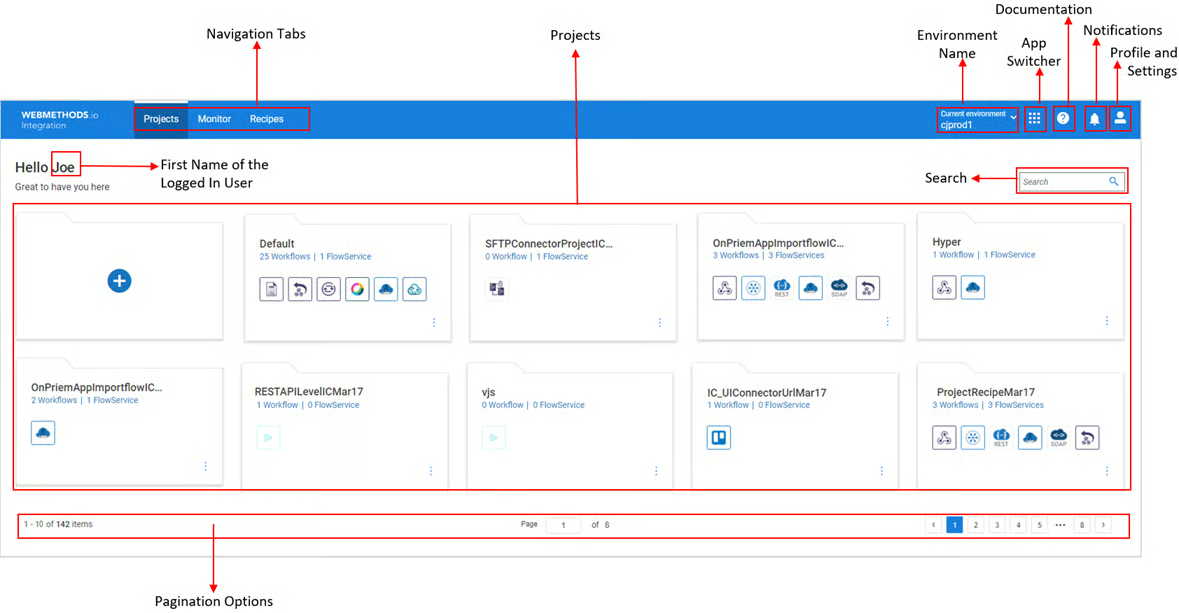
Cloud-native deployment options and multi-cloud governance sit within a single control panel, with practitioners referencing the ability to manage APIs, applications, events, B2B transactions, and file integrations without switching between tools. For your architecture team managing distributed systems, that consolidated visibility simplifies governance across distributed architectures, with access and security scoring 91% on G2.
Real-time data consistency across partner transactions, high-volume synchronization, and legacy-to-cloud connections come up frequently in G2 reviews. Verified feedback points to faster partner onboarding and reduced manual intervention once automated flows replace file-based transfer processes. That consistency compounds over time as more systems connect to the integration layer.
G2 feedback points to one consistent constraint: completing the initial environment configuration requires specialized integration engineers with platform-specific expertise. Mid-market teams without dedicated middleware specialists in-house are most directly affected at this stage. The integration layer’s stability and monitoring depth are consistently recognized as standout strengths once deployment is complete.
Log outputs during troubleshooting are not always specific enough to quickly pinpoint root causes, and documentation for niche legacy scenarios can be scattered across multiple sources. Engineering teams working through complex, first-time legacy integrations are most affected at this stage. However, the platform’s end-to-end monitoring layer and real-time alerting remain strong throughout. Deviations in data flow are surfaced proactively before downstream systems are affected, which limits the operational impact of the diagnostic friction.
Overall, IBM webMethods Integration delivers enterprise-grade hybrid connectivity built for organizations managing complex middleware, legacy system dependencies, and multi-cloud integration at scale. Its strength lies in stability, monitoring depth, and integration breadth rather than lightweight or low-complexity migrations. Enterprises make up the majority of its user base, and I’d say that reflects exactly where its governance controls and real-time data flow reliability add the most sustained operational value.
What I like about IBM webMethods Integration:
- It connects legacy systems, cloud applications, and B2B partner networks within a single platform, removing the need for separate middleware utilities across different integration types.
- Its end-to-end monitoring and alert system gives operations teams proactive visibility into data flow deviations before they affect downstream systems.
What G2 users like about IBM webMethods Integration:
“ What I like most is how smoothly it connects different systems without forcing us to change our existing workflows. The platform handles complex integrations in the background, and once it’s set up, the data just flows reliably. The clear monitoring dashboards make it easy to pinpoint issues before they turn into real problems.”
– IBM webMethods Integration review, Praneeth M.
What I dislike about IBM webMethods Integration:
- Standing up the platform requires integration engineers with specific middleware knowledge, placing the initial rollout out of reach for leaner technical teams. Although operational stability post-setup is a recurring point of praise across user feedback.
- Error messages during troubleshooting lack the specificity needed to isolate root causes quickly, and reference material for uncommon configurations can be hard to locate. Diagnostic proficiency builds progressively with platform experience.
What G2 users dislike about IBM webMethods Integration:
“Troubleshooting can get tricky because logs aren’t always clear, and debugging complex integrations takes longer than it should.”
– IBM webMethods Integration review, Anshika G.
Comparison of the best cloud migration software
Software | G2 rating | Free plan | Ideal for |
Agentforce 360 Platform | 4.5 / 5 | No | Enterprises modernizing applications and data with secure integrations and scalable cloud architecture |
MigrationWiz | 4.7 / 5 | No | Organizations executing structured mailbox and tenant migrations with controlled cutover |
Cloudiway | 4.9 / 5 | No | Cross-tenant Microsoft 365 and Google Workspace collaboration migrations with governance continuity |
HubSpot Data Hub | 4.5 / 5 | Yes | Marketing and sales teams consolidating CRM and customer data for centralized reporting |
AvePoint Confidence Platform | 4.5 / 5 | No | Governance-driven enterprise cloud transitions across Microsoft 365 environments |
IBM webMethods Integration | 4.3 / 5 | No | Enterprise middleware and integration-heavy cloud migrations across complex environments |
*These cloud migration software solutions are top-rated in their category based on aggregated user feedback reflected in G2’s 2026 Winter Grid.
Best cloud migration software: Frequently asked questions (FAQs)
Got more questions? G2 has the answers!
Q1. What are the top-rated cloud migration solutions for large projects?
For enterprise-scale migrations, Agentforce 360 Platform and IBM webMethods Integration are frequently evaluated. Agentforce 360 Platform stands out for scalable architecture and governance depth. IBM webMethods Integration is commonly used in middleware-heavy and legacy system transformations where integration complexity and operational continuity are priorities.
Q2. Which are the top platforms for multi-cloud migration?
Agentforce 360 Platform is commonly evaluated in multi-cloud strategies, supporting integrations across diverse cloud systems and third-party tools. IBM webMethods Integration is also frequently considered, particularly where hybrid and multi-cloud environments require a unified integration control layer across on-premises and cloud architectures.
Q3. What are the best tools for migrating databases to the cloud?
Agentforce 360 Platform is frequently evaluated when database migration is tied to CRM consolidation and workflow modernization. For organizations moving structured operational data into a centralized cloud environment, its data model flexibility and integration depth make it a common choice across mid-market and enterprise deployments.
Q4. Which cloud migration software offers minimal downtime?
MigrationWiz and AvePoint Confidence Platform are often selected when minimizing disruption is a priority. MigrationWiz supports staged and trial migrations in Microsoft 365 environments to validate settings before cutover. AvePoint Confidence Platform enables phased governance-driven transitions, which enterprise teams rely on to maintain compliance and avoid operational downtime during complex migrations.
Q5. What are the top tools for moving workloads to the cloud?
Agentforce 360 Platform and MigrationWiz are commonly evaluated for workload transitions. Agentforce 360 Platform supports application logic, workflows, and operational processes moving into a centralized cloud foundation. MigrationWiz is widely used for email, OneDrive, SharePoint, and archive workload transfers, especially in MSP-driven Microsoft 365 projects.
Q6. Which platform offers AI-driven migration planning?
Among these platforms, AvePoint Confidence Platform is frequently referenced for governance automation and policy-driven controls that support structured migration oversight. While not positioned purely as an AI planner, its risk monitoring, compliance automation, and centralized visibility help organizations plan transitions with stronger predictive control across Microsoft 365 and SaaS environments.
Q7. What are the best tools for secure application migration to the cloud?
Agentforce 360 Platform and AvePoint Confidence Platform are often highlighted for strong security alignment. Agentforce 360 Platform holds high ratings for Data Protection and Access and Security, making it suitable for secure application modernization. AvePoint Confidence Platform adds layered governance, backup, and compliance controls that help reduce risk during SaaS migrations.
Q8. What are the best platforms for hybrid cloud migration?
IBM webMethods Integration is commonly evaluated in hybrid scenarios, supporting coexistence across on-premises and cloud environments through its unified hybrid integration control layer. AvePoint Confidence Platform is also frequently considered where hybrid Microsoft 365 environments require governance continuity and structured data protection across distributed infrastructures.
Q9. Which cloud migration tools are best for Microsoft 365 tenant-to-tenant moves?
MigrationWiz and Cloudiway are frequently referenced for Microsoft 365 transitions. MigrationWiz is known for automated, staged mailbox and document migrations. Cloudiway is often evaluated when structured dashboards, logging visibility, and tenant consolidation oversight are priorities.
Q10. What are the best cloud migration tools for small and mid-sized businesses?
HubSpot Data Hub is commonly adopted by small and mid-market teams, frequently chosen by growth-focused teams that want reliable data syncing, cleanup, and CRM alignment without heavy enterprise-level complexity. MigrationWiz is also widely used by smaller IT teams and MSPs managing recurring Microsoft 365 migrations with structured, repeatable frameworks.
From cloud disruption to business stability
Cloud migration is shifting from a one-time infrastructure project to a recurring operational need. As organizations move faster across multiple cloud environments, the tools that will hold their value over the next few months are those built around governance continuity rather than transfer speed. Speed is increasingly expected. What buyers will scrutinize more is how well a platform handles complex identity structures, cross-system dependencies, and compliance requirements without requiring manual cleanup to close the gaps.
AI-assisted migration is also becoming a more concrete differentiator. Vendors are beginning to embed intelligent validation, anomaly detection during transfer, and early risk flagging into their platforms. Buyers evaluating tools now should ask how much of the post-migration cleanup work a platform actively reduces versus how much it simply reports after the fact.
For near-term decisions, the most useful lens is where your organization is heading, not just its current size. A platform that works cleanly for a single migration may not hold up when your environment expands across regions, adds a compliance requirement, or absorbs an acquisition. The tools worth investing in are those that scale oversight alongside growth, not just data volume.
Want to expand beyond cloud migration software? Explore G2’s best cloud management software for cloud management, monitoring, and performance optimization.