



PBX system (Private Branch Exchange) is a private telephone network that manages internal and external business calls. It connects employees through extensions and routes customer calls using traditional phone lines or Voice over Internet Protocol (VoIP). Modern PBX systems also offer features like call forwarding, voicemail, and automated call routing.
As your company grows, you’ll need a reliable way to keep employees and customers connected. With more businesses moving to cloud-based phone systems, understanding how PBX technology works is becoming increasingly important.
According to Research and Markets, the global hosted PBX market is projected to grow from $21 billion in 2026 to $47.24 billion by 2032. This guide covers how PBX systems work, their features, benefits, costs, and how to choose the right setup for your business.
What Is a PBX Phone System?
A PBX (Private Branch Exchange) is a private telephone system that connects users within an organization (extension-to-extension) and routes external calls through the public phone network or the internet.
It’s made up of hardware (or software, in modern systems) that links a company’s phones to the outside world, and it also provides advanced features like call routing, forwarding, and management for both inbound and outbound calls.

To better appreciate the features and benefits of a commercial-grade PBX, we must first talk about the phone system.
Top-Rated Cloud PBX Phone System: Trusted by 100K+
Get cloud-based VoIP, SMS messaging, and video conferencing in one solution. Take your business communications to the next level with Nextiva.
How Does a PBX System Work?
A PBX system works by connecting internal phone extensions and managing incoming and outgoing calls. It uses call routing rules to direct calls to the right employee, an outside number, or voicemail.
Here’s how it works:
- Incoming calls: When a customer calls the business number, the PBX receives the call through a telephone connection or VoIP service.
- Call routing: The PBX directs the call based on its settings, such as an extension number, auto attendant menu, or business hours.
- Internal calls: Employees can call each other using their extensions without going through an external telephone network.
- Outgoing calls: When an employee calls a customer, the PBX connects the call through the phone service or SIP trunk.
- Call management: Features like call transfers, voicemail, and call forwarding help employees handle calls.
For example, if a customer calls a medical office after business hours, the PBX can automatically forward the call to an answering service or voicemail.
Setting Up Your Phone Network With a PBX Telephone System
Setting up a PBX is no small task. A company may need an experienced telecommunications administrator and physical space for equipment, such as a closet or server room.
The traditional telephone system is known as the Plain Old Telephone Service, or POTS for short. It’s based on the twisted pair of wires from the local phone company to the building. POTS is basic, reliable, and hasn’t changed much in 140 years.
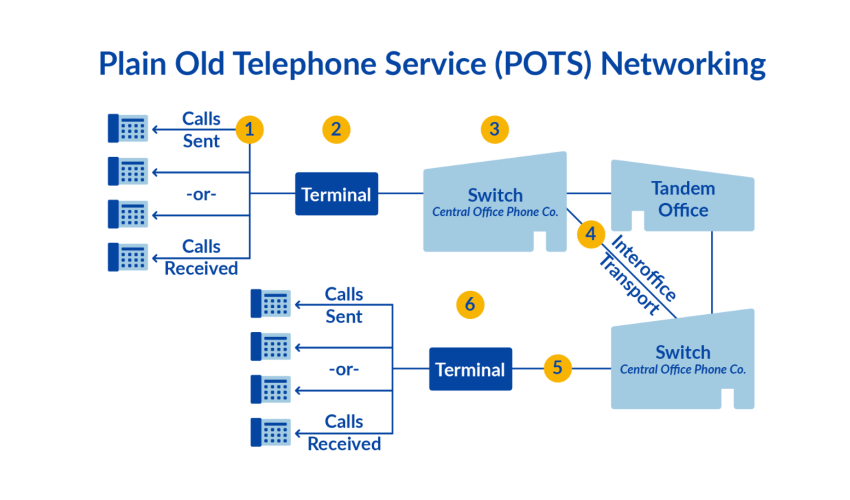
Telephone service providers connect calls through the Public Switched Telephone Network (PSTN). Traditional phone systems may use Integrated Services Digital Network (ISDN) technology to carry voice calls digitally. The PSTN makes it possible for a Verizon customer to call an AT&T customer and connects calls across different telephone networks.
Providing a business with phone service can be expensive. A typical traditional business phone bill can easily be in the thousands every month just for a hundred lines.
So people thought: There has to be a better way! And there is.
PBXs allow a business to manage its own internal VoIP phone service, so employees can call each other through individual extensions without tying up outside lines. For external calls, the PBX routes traffic through a smaller pool of shared phone company lines, which reduces costs. Top PBX systems can manage voicemail, auto attendants, and recorded messages.
PBX analogy: computer networks
You might have heard long ago that the internet was running out of IP (internet protocol) addresses. To solve this predicament, someone would use a router within an office to assign internal addresses to each device.
All those devices would then share the same IP address when interacting with the outside world. Home and business routers have effectively eliminated the concern of running out of IPs and added more security.
The same approach applies to a Private Branch Exchange. It’s a phone network that serves employees but shares the same outbound channel when they dial out. Internally, employees can use any phone extension, but they share a finite set of business phone numbers externally.
A modern alternative
Cloud-based PBX has redesigned how businesses handle phone calls, offering a significant upgrade to past limitations. Before, PBXs were proprietary and very difficult to maintain. Today, we have modern PBX systems that have evolved quite a bit.
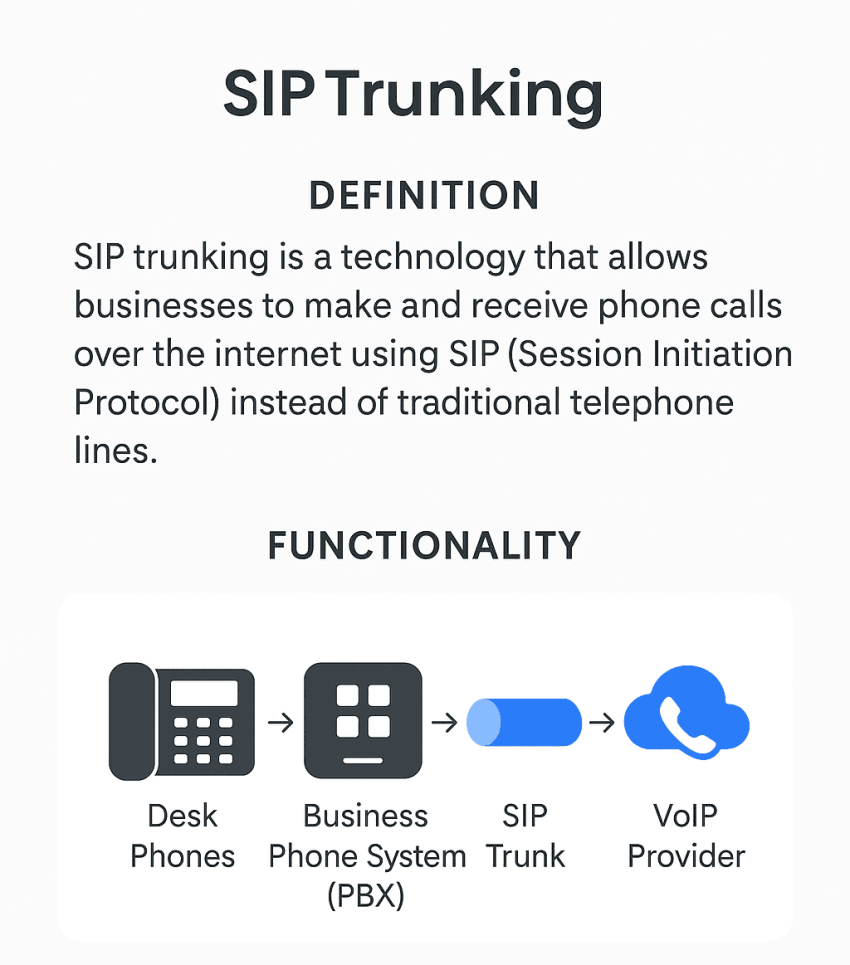
No longer beholden to the local telephone company, calls are made using Voice over Internet Protocol (VoIP) technology. Instead of analog lines, SIP trunking can establish connectivity for a fraction of the cost.
The purpose of a PBX
The primary purpose of a PBX is to serve as a business phone system.
It allows for the internal management of phone calls within a smaller area, such as an office or business. A PBX can handle features such as voicemail, auto attendants, and recorded messages, providing a comprehensive phone system for the organization.
In contrast, the PSTN is a public phone network that connects calls between different providers and handles the routing of calls on a larger scale. It’s not specifically designed for internal business phone systems like a PBX.
PBX systems empower IT leaders to maintain their existing devices with an all-digital backbone by assigning different business phone numbers to different extensions. Alternatively, a cloud PBX blends the best of both worlds with a fully managed phone system deployment.
Now that we know the purpose of a Private Branch Exchange, let’s learn about the key features and benefits of a modern PBX for business communication.
Key Features of a PBX Phone System
Modern PBX systems offer several features to help businesses manage internal and external calls. Available features vary depending on the type of system and provider.
Here are the key features of a PBX phone system:
- Call management – Manage and complete calls on a pre-programmed schedule. For example, a medical office could route after-hours calls to an answering service. Operators can restrict or permit international dialing as needed to avoid high costs.
- Call transfer – Easily transfer calls between users and departments without dropping the call. This is especially useful for customer service and sales teams.
- Custom greetings – Record customized greetings and hold music to create a professional image and alert customers to promotions or issues.
- Call centers – PBX systems enable call center functionality to manage inbound/outbound calls and distribute them to agents. A cloud PBX can scale to handle high call volumes.
- Multi-location connectivity – Connect multiple offices on the same phone system so employees can communicate seamlessly across locations.
- Reporting & analytics – Many modern PBX systems provide detailed reporting on call activity, agent performance, and more. This data helps businesses optimize their communications.
- Unified communications – A PBX can integrate with other communication channels like video conferencing, chat, and email to provide a smooth user experience.
- Auto attendants and IVR. Greet callers with a recorded menu and route them without a live receptionist. Multi-level IVR menus can handle complex routing trees.
- Voicemail and transcription: Some cloud PBX systems can transcribe voicemails into text and email them to recipients, so employees can review messages without listening to each one.
Today, companies aim to configure their PBX as a cloud phone system with managed PBX features across many locations and users. This approach allows for the most flexibility at an affordable price.
Benefits of a PBX System for Businesses
It’s not every day that businesses specifically want to set up their phone system. There has to be something in it for them to move their phone service to the cloud. Here are the main benefits of using a PBX system:
- Lower communication costs: Employees can make internal calls without using external telephone lines. VoIP-based PBX systems can also help reduce costs compared to traditional phone systems.
- Better customer experience: Customers can reach the right department with fewer transfers and shorter wait times. This makes calls easier to manage and improves the customer experience.
- Improved employee productivity: Employees spend less time handling calls manually and more time on their work. This is especially helpful for teams that receive frequent customer inquiries.
- Easier business expansion: Businesses can add users, departments, and locations as they grow. Cloud-based PBX systems make this easier without major hardware upgrades.
- Greater flexibility for remote teams: Employees can make and receive business calls from different locations using compatible devices, as long as their PBX system supports remote access.
- More professional business communication: Even small businesses can offer a professional calling experience with a central business number and organized call handling.
The benefits depend on the type of PBX system you choose. Traditional systems support internal calling, while cloud-based PBX solutions generally offer more flexibility for businesses with changing communication needs.
Types of PBX Phone Systems
As business applications have migrated to the cloud, so have PBXs. PBX phones exist in a few varieties to fit just about any business need.
Comparing on-premises and hosted PBX systems can help you make the right choice for your business. Whether you’re researching PBX systems for yourself or a client, you can recognize the benefits at a glance.
For startups, small businesses, and even enterprise companies in 2026 and beyond, a hosted PBX is the preferred way to set up phone service for your company. You’ll save yourself a ton of stress and budget.
There are a few options to consider for your PBX: hosted, on-premises, and hybrid.
1. Hosted PBX
A hosted PBX, also called VoIP PBX, cloud PBX, or virtual PBX, is often included as part of a unified communications platform that lets you connect and route internal and outside lines in a single system.
IP PBX is a central system that switches and routes calls between the telephone network and VoIP users.

With a hosted PBX system, you can manage your employees’ phones from your web browser.
Because it’s hosted in the cloud instead of on a physical server, almost any device anywhere in the world with an internet connection can use the system, including a computer, cell phone, and IP phone.
Generally, a modern IP PBX system offers additional features you won’t find with landline systems. You can adjust PBX features like call transfer, call recording, voicemail transcription, call routing, auto attendants, interactive voice response (IVR), hold music, call forwarding, and more from an online portal.

For example, a VoIP PBX can connect to your business’s CRM software, route incoming calls to cell phones, handle large conference calls, and integrate with other communication channels like SMS or video conferencing.
Even better, a cloud-based PBX is more cost-effective than an on-premise system. Its features are updated regularly, and you won’t need to spend time setting up and maintaining the network infrastructure.
A top hosted PBX provider typically charges a monthly per-user fee that includes minutes, features, and support. Some also offer metered plans that charge based on usage. Either way, costs are more predictable than with a traditional PBX.
2. On-premises PBX systems
An on-premises PBX is an in-house communication system for handling incoming and outgoing calls. It’s the traditional method used for generations and is essentially an automatic version of the manual switchboard.
An on-premise PBX system requires on-site telecommunications equipment and manual wiring to each business phone. This results in a relatively high upfront cost, plus ongoing occasional maintenance fees. Costs can quickly add up, especially for larger companies.
Whereas once the only option was an on-premise PBX system, today they’re limited and cost-prohibitive for most businesses.
The underlying technology that PBX systems were built on—landlines—is becoming less relevant each year. A traditional PBX system lacks many of the advanced features you’ll have with a modern business telephone system.
They’re also more vulnerable to security threats.
According to the FCC, some phone scams target innocent staff using a legacy or traditional PBX system to relay expensive international calls. On-prem systems are only as secure as the physical location they reside in.
As a business owner, ask yourself, “Does our PBX yield the most value every year, and are we spending too much managing it?” Regarding depreciating assets, on-prem PBX systems are costly to maintain, scale, and configure.
3. Hybrid PBX
A hybrid PBX adapts an on-premise PBX system for use with Voice over IP telephony or VoIP.
It uses SIP trunking technology to provide voice service for your company’s PBX system. This multi-channel voice service is available without changing other PBX features.
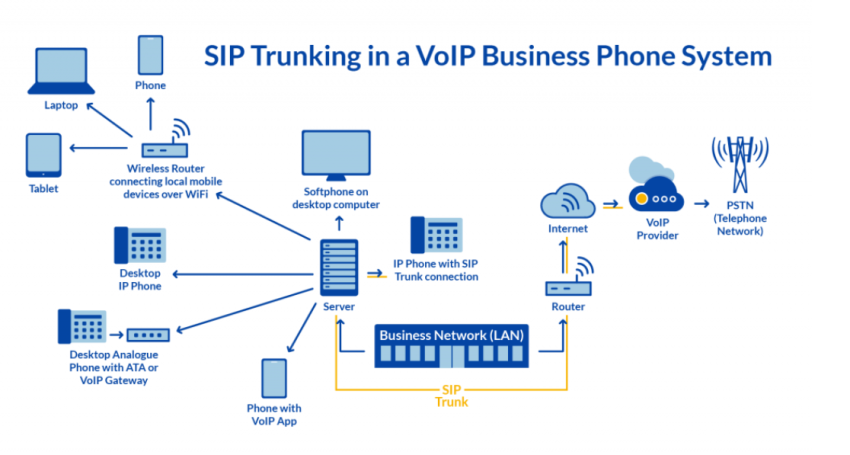
As your company grows, you add more channels without needing to install the wiring an on-premise system requires.
Setting up a hybrid PBX with a top-rated SIP trunk provider is a worthy option for companies that can’t afford a complete overhaul. It provides your PBX with new scalability and lower communication costs with the same hardware.
Despite these benefits, hybrid systems are still limited by the requirements of an on-premises PBX.
They require upfront setup, server space, and ongoing IT maintenance costs. While it’s a good option for transitioning a legacy system to VoIP technology, few businesses would benefit from installing a new hybrid system.
Now, to sum up, here’s a comparison table of hosted PBX vs. on premise PBX systems:
| Feature | Hosted PBX | On-Premise PBX |
|---|---|---|
| Upfront costs | Low, pay-as-you-go model | High, large capital investment |
| Ongoing costs | Predictable monthly fee | Unpredictable maintenance/upgrade costs |
| Scalability | Easily add lines & features | Requires more PBX equipment/wiring |
| Mobility | Supports remote work | Limited or no mobile functionality |
| Integrations | Integrate with CRM, apps | Limited integration options |
| Technology | Modern VoIP/cloud-based | Aging digital/analog PBX |
| IT support | 24/7 vendor handles | In-house IT team |
| Disaster recovery | Built-in failover & redundancy | Requires manual backup/restoration |
| Security | Vendor adheres to strict standards | Risk of unsecured physical access |
| Future-proofing | Automatic platform updates and new features | Hardware and software upgrades may require manual implementation |
Choosing the Right PBX System for Your Business
When choosing a PBX system, consider the following factors:
- Current setup – If you have an existing on-premise PBX, a hybrid system may make sense as a transitional step. If starting from scratch, a hosted PBX is likely the best choice.
- Budget – Hosted PBX systems have lower upfront costs and predictable monthly fees. On-premise systems require a large initial investment. Consider both short-term and long-term costs.
- Company size – Hosted PBX systems scale easily as your company grows by simply adding lines. Traditional PBX systems are harder to expand. Select a system that can handle your expected growth.
- IT resources – With a hosted PBX, the provider handles maintenance and support. On-premise systems require in-house IT expertise. Factor in staffing costs and time.
- Needed features – Cloud PBX systems offer advanced features like CRM integration and mobile apps. Legacy systems are more limited in functionality. Evaluate which features are must-haves for your team.
- Reliability – A PBX system should have built-in redundancy to maintain uptime. Cloud systems generally offer better disaster recovery than on-prem options. Consider a provider’s service level agreement (SLA).
- Security – Look for providers that offer encryption, access controls, and security measures that support your industry’s compliance requirements. Both hosted and on-premises PBX systems need proper security practices.
- Customer support – Choose a PBX provider with 24/7 customer support to quickly resolve any issues that arise. Test out support channels before committing.
- Future plans – Consider not just your current needs but where your business is headed. A flexible, cloud-based PBX system will be easier to adapt as technology evolves.
For most modern businesses, especially those with remote or hybrid workforces, a hosted PBX system will provide the greatest flexibility, cost savings, and ease of use.
However, companies with specific security requirements or existing infrastructure may still opt for an on-site or hybrid setup.
Choose a PBX That Works the Way You Do: Nextiva
No matter what PBX you choose, you should strive to make sure it meets your company’s needs. The way we work has changed so much in two decades. Your PBX should adapt to your business, not the other way around.
Your business needs flexibility, scalability, and advanced features that grow with you. When evaluating options, look beyond cost to consider usability, integration, and the long-term value of communication features.
Nextiva’s PBX solutions give you exactly that: a secure, cloud-based system that keeps your team connected internally while reducing your reliance on costly phone company lines. With built-in tools like voicemail, auto attendants, call recording, and real-time analytics, Nextiva’s business phone system makes it easy to future-proof your communications.
Top-Rated Cloud PBX Phone System: Trusted by 100K+
Get cloud-based VoIP, SMS messaging, and video conferencing in one solution. Take your business communications to the next level with Nextiva.
Frequently Asked Questions About PBX Telephone System
Here are some more things to know about PBX.
PBX refers to the private telephone network within a company. VoIP (Voice over Internet Protocol) is the technology that allows voice communications over the internet. A PBX system can use either traditional phone lines or VoIP to connect calls.
Costs vary depending on the type of system and number of users. Generally, you can expect to pay approx. $500-$1000 per user for an on-premise PBX system, plus ongoing maintenance costs. Hosted PBX systems are typically charged a monthly per-user fee, ranging from $15-$50 per month.
PBX (Private Branch Exchange) and PABX (Private Automatic Branch Exchange) are both private telephone networks. The main difference is that a PABX system uses automation to route calls, while PBX was originally a manually operated switchboard. These days, PABX systems are standard, although many people use these terms interchangeably.
The capacity of a PBX system depends on the specific model and configuration. Most modern systems can support hundreds or even thousands of phone lines. Cloud-based phone systems are especially scalable as they are not limited by physical hardware.
It depends on the type of phone and the PBX system. Many VoIP-based PBXs allow you to use existing IP phones or softphones. However, analog phones may require an adapter or need to be replaced entirely.
When comparing PBX and UCaaS costs, consider:
– A classic PBX requires costly hardware and ongoing maintenance that adds up over time. Additional unexpected costs and outages may occur.
– UCaaS is software-based, eliminating costly hardware. Start with a basic package for a monthly fee and easily upgrade as needs grow.
UCaaS platforms like Nextiva provide easy access to comprehensive, real-time analytics. Users can conveniently log into a secure dashboard to access valuable data instantly. This empowers them to easily monitor call center metrics, gain insights, and make informed business decisions.
Plan your capacity around concurrent calls and include a buffer for peak usage. Prioritize a stable connection with low latency and configure Quality of Service (QoS) on your router so voice traffic is prioritized over general web browsing.
In most cases, yes, through number porting, which transfers your numbers from your current carrier to the new provider. Start the port early, confirm your ownership details match your current bill, and keep your old service active until the port completes to avoid downtime.
Cloud PBX platforms typically support E911 by associating a physical address with each user or device, which is critical for remote staff. Create a process to keep your addresses updated and test your emergency dialing policies, especially when employees frequently change locations.
Enforce strong passwords and multi-factor authentication for your admin and user portals, and restrict international dialing to only the roles that truly need it. Add real-time alerts for unusual calling patterns and limit access by IP address or geography when feasible.
Most businesses use a phased cutover, starting with a pilot group, then moving departments in waves while maintaining a fallback path for critical lines. Document your call flows, auto attendants, and extension mappings in advance, and schedule number porting and training around low-traffic periods.