



Managing business purchases might seem simple until invoices pile up, approvals get delayed, and tracking expenses becomes challenging.
Whether you run a startup or an enterprise, inefficient procurement can lead to unnecessary costs, compliance risks, and supplier disputes. This is where the best procure to pay (P2P) software comes into play. These solutions automate the entire purchasing cycle, from vendor selection and purchase orders to invoice approvals and payments. They help businesses control spending and improve supplier relationships.
This guide includes the key features, benefits, and considerations of the best procure to pay software solutions. I’ve gone through G2’s Spring 2026 Grid Report and hundreds of verified user reviews to find the tools that actually deliver on those promises. My top six picks are SAP Ariba, mjPRO, Procurify, Ramp, Stampli, and Teampay.
6 best procure to pay software for 2026: My top picks
- SAP Ariba: Best for enterprise-grade procurement and supplier collaboration
Deep ERP integration, supplier network access, structured PO management, compliance reporting, and spend visibility. (Custom pricing upon request) - mjPRO: Best procure to pay solution for fast-growing companies
E-tendering, bid submission management, supplier discovery, automated workflows, and real-time spend visibility. (Custom pricing upon request) - Procurify: Best for budgeting and real-time spending visibility
Mobile-first purchase order management, cross-location budget tracking, standardized approval workflows, and ease of setup. (Custom pricing upon request) - Ramp: Best for automated expense management and spend visibility
Expense capture automation, AP bill pay, mobile app, ERP integrations, and department-level spend controls. (Free tier available; Plus at $15/user per month) - Stampli: Best for AI-driven invoice processing and AP automation
AI-powered invoice coding, centralized AP approvals, PO management, ERP integrations, and multi-entity support. (Custom pricing upon request) - Teampay: Best for distributed teams managing spend requests and approvals
Virtual card management, Slack-native approvals, real-time spend tracking, receipt upload, and easy onboarding. (Custom pricing upon request)
*These procure to pay tools are top-rated in their category, according to G2’s Spring 2026 Grid Report. The pricing details for most of these software are available on request.
My top 6 best procure to pay software recommendations for 2026
During my evaluation, I saw how the best procure to pay software solutions streamline procurement through features such as purchase order tracking, invoice matching, and approval automation. These tools help businesses reduce errors, improve cash flow, and simplify supplier management. The global procure to pay (P2P) software market is projected to reach $14.9 billion by 2033, expanding at a CAGR of 9.2% from 2024 to 2033.
Companies like Amazon, Coca-Cola, and Microsoft handle thousands of supplier transactions efficiently, but you don’t need to be a global enterprise to benefit from P2P software. On G2, procure to pay software is used across organizations of all sizes, with customers averaging 19% small businesses, 49% mid-market companies, and 32% enterprise organizations. Even small businesses can cut costs, reduce manual work, and improve financial control.
To help businesses of all sizes, I’ve evaluated G2 reviews and analyzed top P2P tools. Based on automation, ease of use, and overall efficiency, here are my six best picks for 2026.
And if you’re focused on financial workflows, don’t miss my colleague’s guide to the best accounting software in 2026.
How did I find and evaluate the best procure to pay software?
I started by analyzing 20+ procure to pay platforms on G2 and reviewing Grid® Reports to identify the tools most trusted by procurement and finance professionals. From there, I shortlisted the six best platforms that stood out for automating workflows, managing vendor relationships, and optimizing financial operations.
My evaluation considered ease of use, automation depth, integration capabilities, pricing, scalability, and user experience. To enrich this analysis, I used AI to process thousands of G2 reviews, surfacing recurring themes around likes, dislikes, and common pain points.
For tools I couldn’t test directly, I consulted procurement professionals with hands-on experience and validated their feedback with verified G2 reviews. The screenshots featured in this article are either from my testing or vendor-provided materials on G2.
Beyond rankings, I personally explored how well these platforms handle end-to-end procure-to-pay cycles from requisition and purchase orders to invoicing and payment reconciliation. This combined approach ensures the list reflects both real-world performance and user sentiment.
What I look for in procure to pay software
When evaluating the best procure to pay software, I focus on several key features to determine its effectiveness:
- End-to-end procurement automation: I evaluate how well the software automates the full procure to pay lifecycle, from purchase requisition to invoice reconciliation. Multi-tiered approval workflows, custom purchase order (PO) creation, and supplier catalog integration are key markers. A rule-based automation engine maintains procurement policies, while electronic RFQs streamline vendor selection.
- Supplier management: I look at how effectively the software consolidates vendor data, automates risk assessments, and streamlines onboarding. AI-driven supplier analytics help track pricing trends, contract adherence, and delivery performance, while built-in compliance tools ensure vendors meet regulatory and ESG standards.
- Catalog and contract management: A strong contract management module should enforce negotiated terms, maintain audit trails, and trigger automated renewal alerts. Punchout catalogs and real-time supplier pricing ensure procurement teams always have access to current product availability while keeping costs in check.
- Invoice processing and payment automation: I assess how well the system automates three-way matching to validate invoices against POs and receipts, reducing errors and fraud risk. OCR with machine-learning accuracy handles data extraction, while AP integration supports ACH transfers, wire transfers, and virtual card payments. Dynamic discounting capabilities are a plus for teams looking to optimize cash flow.
- Spend analytics and cost control: AI-powered analytics should deliver real-time visibility into procurement spend across categories, suppliers, and budgets. Predictive modeling that surfaces cost anomalies and savings opportunities, presented through clear, interactive dashboards, is what separates strong platforms from basic reporting tools.
- Compliance and risk management: I check for embedded regulatory tracking across GDPR, SOX, IFRS, and ESG requirements. Automated audit trails, customizable approval workflows, and AI-powered fraud detection that flags duplicate invoices, unauthorized transactions, and high-risk vendor activity are all important signals of a mature compliance framework.
- ERP and financial system integration: I evaluate how well the software syncs with leading ERP platforms to maintain real-time data consistency across procurement, finance, and inventory. RESTful APIs and pre-built connectors that support third-party integrations with eCommerce platforms, supplier networks, and analytics tools are essential for eliminating data silos and keeping operations efficient.
If your priority is everyday consumables, look for punchout support and rich catalogs, the best procure to pay software for office supplies makes reordering fast and policy-compliant.
The list below contains genuine user reviews from our best Procure to Pay Software category page. To qualify for inclusion in the category, a product must:
- Consolidate procurement information from multiple data sources
- Manage all or most operations that are part of the procurement cycle
- Create and implement purchasing policies and best practices
- Monitor financial transactions related to procurement
- Define and manage procurement business processes
*This data was pulled from G2 in 2026. Some reviews have been edited for clarity.
1. SAP Ariba: Best for enterprise-grade procurement and supplier collaboration
G2 rating: 4.1/5
SAP Ariba is a spend management tool and one of the most established names in enterprise procurement. From what I’ve seen across G2 reviews, that reputation holds up. The theme that comes through most consistently is how well it integrates with SAP ERP and S/4HANA, giving procurement teams a connected environment where purchasing data, logistics movements, and accounting documents all live in one ecosystem. For organizations already running on SAP, that level of native connectivity is a significant advantage.
Procurement and PO management is another core strength. I’ve seen users highlight how easy it is to create purchase orders from a defined catalog, with the platform guiding buyers toward the right vendor based on company-specific configurations. That kind of structured buying experience helps enforce procurement policies and reduces maverick spending across departments.
Vendor and supplier management also comes through clearly in reviews. The Ariba Network gives teams access to a broad supplier base, and users frequently mention how it simplifies onboarding new vendors and managing existing relationships. For global organizations handling complex supplier ecosystems, centralized visibility makes a real difference.
Automation and workflow efficiency are another recurring theme. Many reviewers describe how approval workflows move quickly once everything is configured, with automated routing reducing the manual back-and-forth that typically slows down procurement cycles. Processes are rated at 89% and purchasing at 88% by G2 reviewers, reflecting strong satisfaction with how the platform handles core procurement execution.
Spend visibility and reporting round out the strengths. Visibility is rated at 88% on G2, and users describe being able to track order status, monitor budget consumption, and access procurement data in real time. For finance and procurement leaders who need clear oversight across categories and business units, that transparency is a meaningful operational advantage.
Compliance and audit trail capabilities also earn positive mentions. SAP Ariba’s structured approval processes and documentation features help organizations maintain clear records across the procurement lifecycle, which is especially valuable for regulated industries or enterprises with strict governance requirements. invoices, approvals, and purchasing activity are all tracked within a single auditable environment.
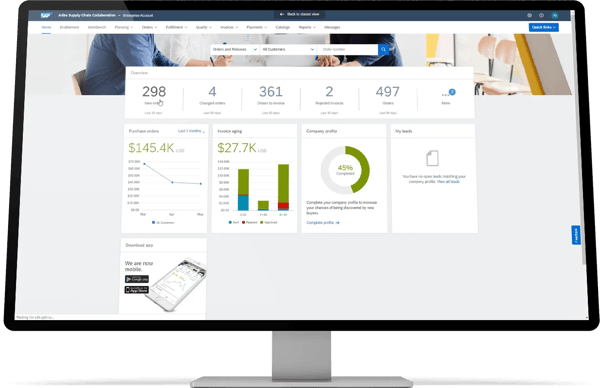
Some G2 reviewers note that the user interface can feel dated and that certain purchasing flexibilities available in SAP S/4 aren’t fully replicated in Ariba, which can require workarounds for complex scenarios. That said, SAP Ariba is built for enterprise-scale procurement, and organizations that invest in proper configuration and training typically find that the platform’s depth and integration capabilities far outweigh the initial usability friction.
Getting fully up and running does take time according to some of the G2 reviews I saw. The platform’s breadth of features means there’s a meaningful learning curve, and teams unfamiliar with SAP ecosystems may need structured onboarding to get the most out of it. For enterprises with dedicated procurement operations teams, however, that investment tends to pay off in long-term process consistency and supplier governance.
Overall, SAP Ariba delivers the most value for large enterprises that need a structured, compliant, and deeply integrated procurement environment. It’s particularly well-suited for organizations already operating within the SAP ecosystem, where its native connectivity and supplier network capabilities create a genuinely unified procure to pay experience.
What I like about SAP Ariba:
- SAP Ariba’s deep integration with SAP ERP and S/4HANA gives procurement teams real-time connectivity across purchasing, logistics, and accounting data, reducing manual effort and improving process consistency.
- The structured catalog buying experience and Ariba Network make it easier for teams to enforce procurement policies, manage supplier relationships, and maintain spend visibility across complex organizations.
What G2 users like about SAP Ariba:
“I like how SAP Ariba seamlessly integrates with the SAP system, which is a big plus for us. This integration allows us to manage logistics movements and gather comprehensive information about our accounting documents directly through the S/4HANA system. This seamless connectivity is a significant advantage as it helps map consumption and receipt data efficiently using Ariba.”
– SAP Ariba review, Anand R.
What I dislike about SAP Ariba:
- Reviewers mention that the UI can feel dated, and certain purchasing flexibilities in SAP S/4 aren’t always fully replicated in Ariba. For enterprises invested in the SAP ecosystem, though, the depth and native connectivity make it a strong long-term choice.
- Teams new to SAP should plan for a meaningful onboarding period, as the platform’s breadth requires structured training. Once configured, most enterprise teams find the workflow consistency and governance capabilities well worth the setup effort.
What G2 users dislike about SAP Ariba:
“The user interface and many of the purchasing flexibilities in SAP S4 are not available. For example, I can’t use multiple vendors in a single PO (i.e., different BPs for goods, tax, delivery costs, etc.).”
– SAP Ariba review, Sarvesh K.
2. mjPRO: Best buy procure to pay solution for fast-growing companies
G2 rating: 4.7/5
mjPRO comes through in G2 reviews as a strong procurement platform for organizations that need structured, end-to-end purchasing workflows. The theme that stands out most is how well it handles the full procurement cycle, from sourcing and e-tendering to bid submission and supplier management, keeping everything organized in one connected system.
One of the clearest strengths I see is the e-tendering and bid submission capability. Users consistently describe how easy it is to submit bids digitally, with all tender-related documents kept in one place. That structure reduces the back-and-forth that typically comes with managing multiple supplier submissions and keeps the process auditable from start to finish.
Automation is another highlight that comes through consistently. I’ve seen users mention features like auto-request for quotation and auto-comparative statements, which cut down on repetitive manual tasks for procurement and finance teams. Those automated workflows and integrated data exchange keep stakeholder communication smooth and ensure that the right information reaches the right people without extra effort.
What also stands out to me is how mjPRO supports supplier discovery and management. The platform helps teams find the right suppliers based on category and buying patterns, which is particularly useful for manufacturing and industrial organizations managing complex vendor ecosystems. Processes are rated at 94% and performance at 94% by G2 reviewers, reflecting strong satisfaction with how the platform executes core procurement workflows.
Spend visibility is another area where mjPRO performs well. Visibility is rated at 95% on G2, among the highest in the Procure to Pay category, giving procurement leaders clear oversight of purchasing activity across categories and business units. That real-time visibility helps teams stay on top of budgets and identify opportunities to optimize spend.
Setup and support round out the strengths. Ease of setup is rated at 99% and quality of support at 97% by G2 reviewers, both well above category averages. Users frequently describe prompt, responsive assistance whenever issues arise, which makes onboarding and day-to-day operations feel well supported.
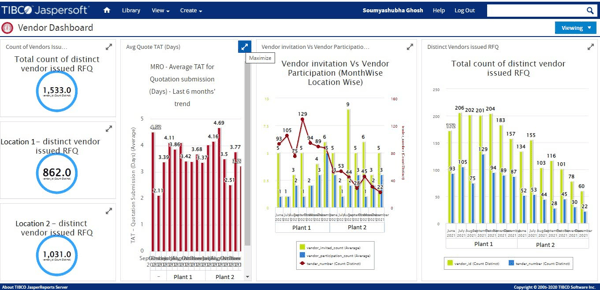
Some G2 users mention that the bid submission process involves multiple steps that can feel complex, particularly for teams new to the platform. The structured workflow is designed to ensure compliance and documentation accuracy, and most users find that once familiar with the process, the added steps support a more organized and auditable procurement experience.
A number of G2 reviewers also note occasional portal performance issues, such as the system freezing or requiring users to log back in during active sessions. These are noted as intermittent rather than persistent, and most users acknowledge that the platform’s overall reliability and the support team’s responsiveness help minimize disruption when they occur.
At the end of the day, mjPRO delivers the most value for manufacturing and industrial organizations that need a structured, compliant procurement platform with strong supplier management, automated workflows, and clear spend visibility across complex purchasing operations.
What I like about mjPRO:
- mjPRO’s e-tendering and automated workflow features keep the full procurement cycle organized in one place, reducing manual effort for both procurement and finance teams.
- The platform’s spend visibility and supplier discovery capabilities give procurement leaders clear oversight of purchasing activity, making it easier to manage complex vendor ecosystems efficiently.
What G2 users like about mjPRO:
“Easy to access, helpdesk team is very supportive.”
– mjPRO review, Hitesh G.
What I dislike about mjPRO:
- Some G2 users mention that the bid submission process involves multiple steps that can feel complex initially. While the system provides clear instructions, the structured workflow is designed to ensure compliance and auditability once teams are familiar with the process.
- A number of G2 reviewers report occasional portal freezing during active sessions, requiring them to log back in. Most note that the support team is responsive when these issues arise, keeping disruption to a minimum.
What G2 users dislike about mjPRO:
“The registration and document upload process could be further streamlined for a smoother user experience.”
– mjPRO review, Gaurav T.
3. Procurify: Best for budgeting and real-time spending visibility
G2 rating: 4.6/5
Procurify comes through in G2 reviews as an intuitive, well-structured procurement platform that makes it easy for teams to manage purchasing without overcomplicating the process. The theme that stands out most is how accessible the platform feels, with users regularly describing it as straightforward to navigate, even for non-finance teams.
The mobile app is one of the most consistently praised features. I’ve seen users highlight how easy it is to submit purchase requests, approve orders, and track spend on the go, without needing to be at a desktop. For distributed teams or organizations where approvers are frequently out of the office, mobile accessibility makes a real difference in keeping procurement moving. Purchasing is rated at 93% by G2 reviewers, reflecting strong satisfaction with how the platform handles core buying workflows.
Procurement and PO management is another clear strength. Many users describe the ability to consolidate purchasing from multiple sources into a single system, with standardized forms that ensure complete information is captured upfront. That structure reduces delays caused by missing purchase details and keeps the approval chain clean and auditable. Processes are rated at 90% on G2, and invoicing follows at 90%, showing consistent performance across the full procurement cycle.
Ease of setup is a theme that comes through consistently in recent reviews. Users frequently describe getting up and running quickly, with the platform’s onboarding experience described as fast and low-friction. Ease of setup is rated at 89% by G2 reviewers, and quality of support at 92%, suggesting teams feel well-supported through implementation and beyond.
Ease of use reinforces the platform’s accessibility. Ease of use is rated at 94% on G2, among the highest in the category, and reviewers regularly note that the interface is approachable for staff across departments, not just procurement specialists. That broad usability helps drive adoption across the organization without requiring extensive training.
Automation and workflow efficiency round out the core strengths. I’ve seen users mention how approval routing, spend controls, and budget tracking work together to enforce procurement policies consistently without manual intervention. For finance leaders who need visibility into company-wide spending across branches, departments, and cost centers, that level of control is a meaningful advantage.
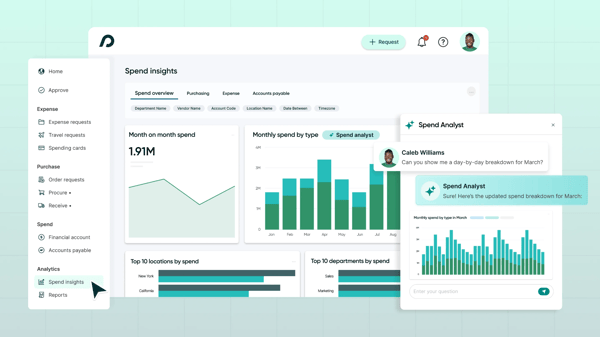
Some G2 users note that the UI has room for improvement in certain areas, particularly around navigation within the approval workflow. The platform’s strength is in structured procurement, and teams that invest time in exploring the layout tend to find the experience smooths out quickly once they’re familiar with where key actions are located.
A smaller number of reviewers mention that approval workflows can feel rigid when handling exceptions or consolidated multi-location orders. For organizations with straightforward procurement needs, the existing workflow structure works well, and teams with more complex requirements tend to find that configuring approval tiers during setup helps address most of these friction points.
For growing teams and mid-market organizations that want structured, visible procurement without a heavy implementation lift, Procurify delivers a clean, well-supported platform that balances control with everyday usability.
What I like about Procurify:
- Procurify’s mobile app and intuitive interface make it easy for teams across departments to submit requests and track approvals without needing dedicated procurement training.
- The platform’s spend visibility and cross-location budget monitoring give finance leaders clear oversight of purchasing activity, helping organizations maintain financial discipline at scale.
What G2 users like about Procurify:
“I like Procurify for its strong internal control mechanism, which helps the organization maintain financial discipline. I also appreciate the fast initial setup and how it enables cross-location budget monitoring, tracking spending across branches, departments, and cost centers. The standardized forms ensure complete data upfront, which tackles delays caused by missing purchase information.”
– Procurify review, Brooke M.
What I dislike about Procurify:
- Some users note that the UI has room for improvement in certain areas, particularly around navigation within approval workflows. Most find the experience smooths out once they’re familiar with the layout.
- A number of G2 reviewers mention that approval workflows can feel rigid when handling exceptions or multi-location orders, though configuring approval tiers during setup tends to address most of these friction points.
What G2 users dislike about Procurify:
“The UI needs improvement because I have to scroll to the right to find the ‘Approve’ button for Purchase Orders.”
– Procurify review, Oleksandr K.
4. Ramp: Best for automated expense management and spend visibility
G2 rating: 4.8/5
From what I’ve seen across G2 reviews, Ramp has built a strong reputation for making expense management feel almost effortless. The theme that comes up again and again is how intuitive the platform is, with users regularly noting that it reduces the time and manual effort involved in managing company spend significantly.
Expense capture is one of the clearest strengths. Reviewers frequently highlight how easy it is to snap a receipt and have Ramp automatically extract the key details, reducing manual data entry. That kind of automation isn’t just a convenience; for finance teams managing high transaction volumes, it directly reduces errors and speeds up month-end close. Processes are rated at 92% and performance at 92% by G2 reviewers, reflecting strong satisfaction with how the platform handles core spend management workflows.
Something else that stood out? The accounts payable functionality. I’ve seen several users mention the ability to simply email a bill to Ramp and have it automatically interpreted, coded, and queued for review and approval. That removes a lot of the back-and-forth that typically slows AP workflows down.
The mobile app also earns consistent praise. Users describe it as clean, responsive, and genuinely useful for on-the-go expense submissions and approvals, which matters for distributed teams where finance tasks can’t always wait for a desktop. Visibility is rated at 91% on G2, giving finance leaders real-time oversight of company spend across departments and cost centers.
Setup and onboarding come through positively as well. Many reviewers describe getting started as quick and low-friction, with ease of setup rated at 94% by G2 reviewers. The platform’s policies feature stands out for allowing teams to set spend automations and controls by department without heavy IT involvement.
Integrations round out the core strengths. Connections with tools like NetSuite and QuickBooks are frequently praised for keeping financial data in sync without manual reconciliation. Ease of use is rated at 95% and meets requirements at 96% on G2, among the highest in the category, reflecting how well the platform delivers on its core promise for finance and operations teams.
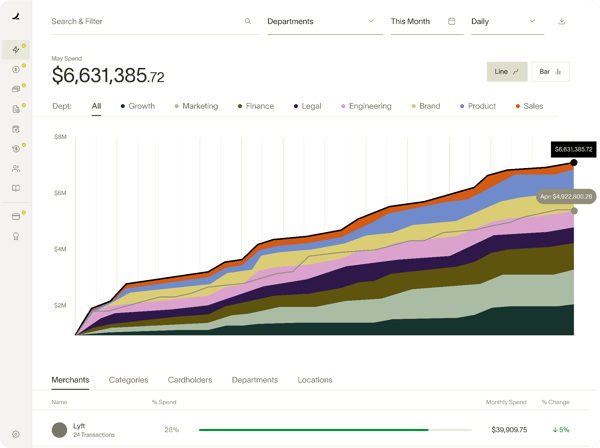
Some G2 users note that the receipt categorization experience can be inconsistent, with the split option not always available when recording certain transactions. This can occasionally require going back and forth to record a transaction correctly. That said, Ramp’s support team is responsive when these issues arise, and the platform’s regular product updates consistently address usability improvements over time.
A number of reviewers also mention that expense tagging still requires multiple manual steps per item, with some users noting it takes five to six clicks to fully record a single expense. For teams processing high volumes of transactions, that adds up. Most users acknowledge, however, that this is a common trade-off in platforms with granular spend controls, and that Ramp’s automation handles the majority of routine transactions without intervention.
Overall, Ramp delivers the most value for mid-market finance and operations teams that want to centralize expense management, automate AP workflows, and gain real-time visibility into company spend without a heavy implementation lift.
What I like about Ramp:
- Ramp’s expense capture and AP automation significantly reduce manual data entry, allowing finance teams to process bills and receipts faster and with fewer errors.
- The intuitive interface and quick setup make it easy for teams to adopt quickly, with spend policies and department-level controls that keep procurement organized without added complexity.
What G2 users like about Ramp:
“I really like that Ramp is very user-friendly and intuitive. It always seems to be releasing updates to make the software even more efficient and easier to use, which I greatly appreciate. I also like using the policies feature in Ramp, because it allows setting up automations for certain transactions in specific departments while also controlling spending limits.”
– Ramp review, Michael F.
What I dislike about Ramp:
- Some users note that the receipt split option for categorizing transactions isn’t always available, which can require going back and forth to record expenses correctly. Most find this eases as they get familiar with the platform’s workflow.
- A number of G2 users mention that expense tagging can require multiple manual steps per item. For high-volume teams, this adds up, though Ramp’s automation handles the majority of routine transactions without intervention.
What G2 users dislike about Ramp:
“The split option to categorize a receipt is not always available, causing me to go back and forth to record the transaction correctly. 24-hour delay when creating a new account in QuickBooks to be recognized by Ramp.”
– Ramp review, Trini U.
5. Stampli: Best for AI-driven invoice processing and AP automation
G2 rating: 4.6/5
Stampli is purpose-built for accounts payable, and that focus comes through clearly in G2 reviews. The strongest theme I noticed is how much users value the way it simplifies invoice processing, from the moment a bill arrives to the point it’s approved and paid.
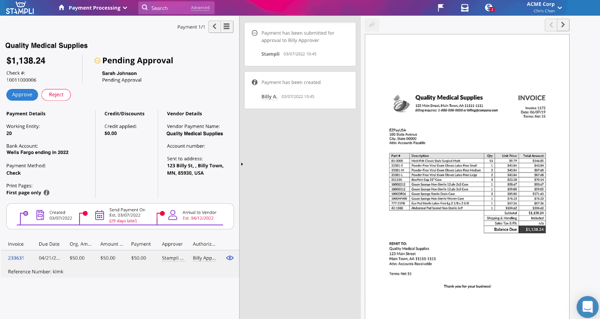
What stood out most is how Stampli centralizes everything around the invoice itself. Reviewers consistently describe being able to view the invoice image alongside the coding and approval workflow in one screen, which eliminates the back-and-forth of switching between tabs or chasing approvals over email. Invoicing is rated at 94% by G2 reviewers, reflecting strong satisfaction with how the platform handles the core AP workflow.
The automation capabilities are another highlight. Users frequently mention Billy, Stampli’s AI assistant, which remembers past vendor coding and populates fields automatically, cutting down repetitive data entry on recurring bills. Visibility is rated at 95% on G2, among the highest in the category, giving AP teams clear oversight of where every invoice stands in the approval chain at any given moment.
Ease of use and setup also come through consistently. Many reviewers describe Stampli as quick to get running, with an interface that feels approachable even for users who don’t work in finance daily. Ease of use is rated at 96% and ease of setup at 95% by G2 reviewers, both well above category averages. That accessibility matters for organizations rolling out AP automation across teams with varying levels of finance experience.
Procurement and PO management round out the core strengths. I’ve seen users highlight how all POs are accessible in one place, with a clear layout that makes it easy to match open invoices to the right purchase orders and track where each one stands in the approval chain. Processes are rated at 94% on G2, reinforcing how reliably the platform handles structured procurement workflows end to end.
Integration with ERP systems is another area where Stampli performs well. Users frequently mention smooth connections with QuickBooks, NetSuite, and other accounting platforms, keeping financial data in sync without manual reconciliation. Ease of admin is rated at 96% by G2 reviewers, suggesting that once set up, the platform is straightforward to manage day to day.
A recurring theme in G2 reviews is that searching for and retrieving historical invoices can be difficult, with users noting the search bar doesn’t always return the expected results, particularly when filtering across multiple vendors or entities. The platform’s core strength is in active invoice processing, and most users find that establishing consistent naming conventions and invoice numbering from the start makes historical lookups significantly more manageable over time.
Notable patterns in G2 reviews also point to Billy, Stampli’s AI assistant, occasionally auto-filling the wrong vendor or failing to learn from repeated corrections on recurring invoices. Most users acknowledge this happens infrequently, and many note that a quick review of auto-coded entries before approval is enough to catch these cases before they create downstream issues.
At its core, Stampli is a strong fit for finance and AP teams that need a dedicated, intuitive invoice processing platform with solid automation, clear audit trails, and a workflow that keeps approvals moving without unnecessary friction.
What I like about Stampli:
- Stampli’s invoice-centric layout keeps all coding, approvals, and communication in one view, significantly reducing the back-and-forth typically associated with AP workflows.
- The AI-powered autofill and automation features reduce repetitive data entry on recurring invoices, helping AP teams process higher volumes with greater consistency and speed.
What G2 users like about Stampli:
“I use Stampli for business purchase order tracking, and I find it pretty streamlined and easy to navigate. It’s really handy to have all POs in one place, and the layout and aesthetic appeal make it easy to navigate. When I open up a PO, I can find all the information I need from the open invoice, and I can also navigate old POs easily. The initial setup was easy and simple.”
– Stampli review, Angel G.
What I dislike about Stampli:
- Some G2 users note that searching for historical invoices can be challenging, as the search function often fails to return expected results across multiple vendors or entities. Most find that consistent invoice naming from the start makes retrieval significantly easier.
- A number of reviewers mention that Billy occasionally auto-fills the wrong vendor or misses coding on routine invoices. Most find that reviewing auto-coded entries before approval is enough to catch these cases before they cause issues downstream.
What G2 users dislike about Stampli:
“The ability to use asterisks in the invoice number field to search via just a fragment of a number would be helpful. I recently needed to pull copies of 60 invoices for the same vendor, and all of them ended with -2025. I could have pulled those more quickly if putting *-2025 in the invoice number field yielded results, but I have found that you cannot start the search term with *.”
– Stampli review, Bob B
Related: Use the best invoicing software to reduce delays and improve vendor relationships with automated workflows.
6. Teampay: Best for distributed teams managing spend requests and approvals
G2 rating: 4.4/5
Teampay consistently comes through in G2 reviews as a practical, easy-to-use spend management platform designed for teams that need structure around purchasing without slowing down day-to-day operations.
The clearest theme across reviews is how accessible the platform feels. Users regularly describe the interface as clean and intuitive, making it easy to submit expense requests, upload receipts, and track the status of purchases without needing much guidance. Ease of use is rated at 96% by G2 reviewers, reflecting how broadly accessible the platform is across teams with varying levels of finance experience.
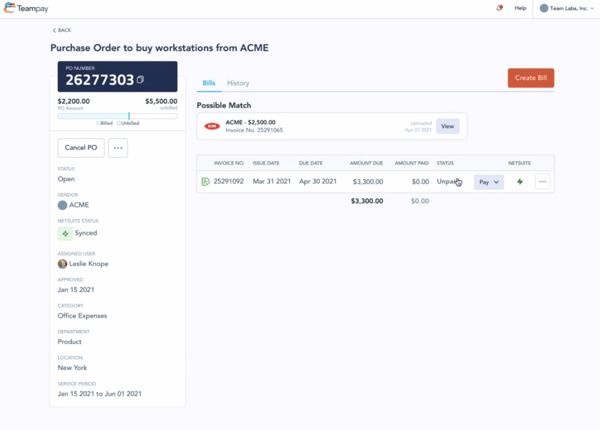
The virtual card feature is one of the most consistently praised capabilities. I’ve seen users highlight how Teampay eliminates the need to spend personal money upfront or wait for reimbursement, with one-time virtual cards issued directly for approved purchases. That structure keeps the company transparent and ensures that any refunds flow back to the organization rather than to individual cards. Purchasing is rated at 93% and invoicing at 93% on G2, reflecting strong satisfaction with how the platform handles core transaction workflows.
The Slack integration is another standout. Many reviewers describe being able to submit purchase requests and receive approvals entirely within Slack, without having to switch between platforms. For organizations already running on Slack, that embedded workflow makes Teampay feel like a natural extension of the tools teams already use rather than a separate system to manage.
Setup and onboarding come through positively across recent reviews. Users frequently describe getting up and running quickly, with ease of setup rated at 90% by G2 reviewers. The platform’s onboarding experience is described as low-hassle, which matters for finance teams that don’t have bandwidth for long implementation cycles.
Spend visibility and real-time tracking round out the core strengths. I’ve seen users mention being able to monitor live card spend across teams, track where purchases stand in the approval chain, and access a full history of transactions in one place. Spend is rated at 91% on G2, giving finance and operations leaders the oversight they need to keep budgets on track across departments. Receipt upload and expense tracking also earn consistent praise, with users appreciating how easy it is to attach receipts directly to transactions without maintaining physical records.
Some G2 users describe the platform’s UI as feeling dated and cumbersome in certain workflows, particularly when submitting expenses that require uploading screenshots or invoices before checkout details are fully confirmed. For teams that primarily use Teampay for straightforward purchase requests and reimbursements, the core experience is smooth and well-supported. Teams with more complex or exception-heavy workflows may want to explore Teampay’s configuration options during setup to ensure the platform aligns with how they operate day to day.
Notable patterns in G2 reviews also point to approval workflows feeling rigid for time-sensitive or last-minute purchases, with some users noting that the structured approval chain can slow things down when exceptions need to be handled quickly. That structure is intentional — it’s what gives finance teams confidence in spend controls — and most users find that once approval tiers are configured to match internal policies, the day-to-day experience is smooth and consistent.
For startups, scale-ups, and mid-market teams that want to bring structure and visibility to company spend without a heavy procurement stack, Teampay delivers a clean, approachable solution that balances control with ease of use.
What I like about Teampay:
- Teampay’s virtual card feature and intuitive interface eliminate the need for personal card spend, giving finance teams clear visibility and control without adding friction for employees submitting requests.
- The Slack integration and straightforward receipt tracking keep purchases organized and documented in one place, reducing reliance on manual processes and email-based approvals.
What G2 users like about Teampay:
“I use Teampay to submit reimbursement requests and make purchase order requests. It simplifies keeping track of receipts and uploading them, and I don’t have to deal with the hassle of using my own credit card. I really like the temporary credit cards feature because it means I don’t need to use my own credit card. It uses company money, and if I get a refund, it goes to the company.”
– Teampay review, Mihir P.
What I dislike about Teampay:
- Some G2 users describe the platform’s UI as feeling clunky in certain workflows, particularly when submitting expenses that require uploading documentation before checkout details are confirmed. Most find the experience improves significantly once familiar with the platform’s flow.
- A number of reviewers mention that approval workflows can feel rigid when handling exceptions or last-minute purchases. For teams that configure approval tiers carefully during setup, most find the structure works smoothly for day-to-day spend management.
What G2 users dislike about Teampay:
“I find using Teampay can be pretty clunky. The user experience feels cumbersome, especially when I have to use Slack chat to send a screenshot or invoice of expenses before I actually know the details during checkout. I’ve also had issues with it not working at certain vendors.”
– Teampay review, Kelsey H.
procure to pay software: Frequently asked questions (FAQs)
Still have questions about procure to pay tools? G2 has the answers!
Q1. What is the best procure to pay solution for fast-growing companies?
For fast-growing companies, Ramp and Procurify stand out as strong fits. Ramp’s intuitive interface, quick setup, and automated expense workflows make it easy for scaling teams to bring structure to spend management without a heavy implementation lift. Procurify is also well-suited for growing organizations, offering mobile-first procurement, real-time budget visibility, and standardized approval workflows that help teams maintain financial discipline as headcount and purchasing volume increase. Teampay is another option worth considering for teams that want lightweight spend controls with Slack-native approvals.
Q2. What is the best procure to pay software for office supplies?
For managing office supply purchases, Teampay and Ramp are both practical choices. Teampay’s virtual card feature allows employees to make approved purchases directly without using personal cards, with refunds flowing back to the company automatically. Ramp similarly supports controlled spending through virtual cards and spend policies, making it easy for teams to purchase what they need within defined limits while keeping everything documented and reconciled in one place.
Q3. What is the best procurement software to streamline payments?
Ramp and Stampli are both strong options for streamlining payments, though they serve slightly different use cases. Ramp excels at automating expense management and AP workflows, with features like bill pay automation and direct integrations with accounting tools like NetSuite and QuickBooks. Stampli is purpose-built for invoice processing, centralizing AP approvals and coding in one place to keep payment cycles moving efficiently. Teampay is also worth considering for teams that need fast, controlled disbursements tied to pre-approved spend requests.
Q4. Which leading P2P software offers easy integration features?
Ramp and Stampli both earn strong marks for integration ease. Ramp integrates with widely used accounting platforms, including NetSuite, QuickBooks, and Xero, with users frequently describing the sync as reliable and low-maintenance. Stampli also connects with major ERP and accounting systems, and its AP-focused workflow means integrations are tightly aligned with invoice processing and payment cycles. SAP Ariba offers the deepest integration for organizations already operating within the SAP ecosystem, with native connectivity to S/4HANA and a broad supplier network.
Q5. What is the most efficient P2P tool for medium-sized enterprises?
For mid-market organizations, Procurify and Ramp are consistently well-regarded options. Procurify delivers structured procurement workflows, mobile-first purchase order management, and real-time spend visibility that works well for organizations with multiple departments or locations. Ramp offers a broader spend management platform that handles expense management, AP automation, and corporate cards in one system, making it a strong fit for mid-market finance teams looking to consolidate tools. Stampli is also worth considering for mid-sized teams with high invoice volumes that need dedicated AP automation.
Q6. What is the top-rated P2P software for small businesses?
For small businesses, Ramp and Teampay are two of the most accessible options. Ramp is free to use at the core tier and offers an intuitive interface that requires minimal training, making it easy for lean finance teams to get started quickly. Teampay is similarly approachable, with virtual cards and Slack-native approvals that fit naturally into how small teams already work. Procurify is also a solid choice for small businesses that need more structured procurement controls as they begin to scale.
Q7. What is the best platform for end-to-end procurement?
For organizations that need a true end-to-end procurement platform, SAP Ariba and mjPRO are the strongest options on this list. SAP Ariba covers the full procurement lifecycle, from sourcing and supplier management through to purchase orders, invoice processing, and compliance reporting, making it especially well-suited for enterprises already running on SAP. mjPRO delivers structured end-to-end procurement for manufacturing and industrial organizations, with e-tendering, bid management, and supplier discovery built into a single connected system. Procurify is a strong mid-market option for teams that want structured PO management with real-time spend visibility.
Q8. What is the best procure to pay platform for cost savings?
Ramp is particularly strong for teams focused on cost savings, with built-in spend controls, automated policy enforcement, and detailed visibility into where company money is going. Its reporting capabilities make it easier to identify spending patterns and eliminate unnecessary purchases. Procurify also supports cost discipline through budget tracking, standardized approval workflows, and cross-location spend monitoring, helping organizations maintain financial control as procurement volumes grow.
Q9. Which procure to pay system is most recommended by professionals?
SAP Ariba consistently ranks among the most recommended P2P platforms for enterprise procurement professionals, with the largest market presence in the category according to G2’s Spring 2026 Grid Report. Ramp earns strong recommendations from finance and operations professionals at growing companies for its ease of use and automation capabilities. Stampli is frequently recommended by AP professionals, particularly for teams that process high invoice volumes and need a dedicated, intuitive AP automation platform.
Q10. Who offers the most reliable procure to pay services?
SAP Ariba is widely regarded as one of the most reliable P2P platforms for enterprise organizations, with a long track record in procurement and deep integration capabilities across complex supplier ecosystems. Ramp is consistently praised for platform reliability and a responsive support team, earning high satisfaction scores across ease of use, setup, and meeting requirements on G2. mjPRO also earns strong reliability marks, particularly for manufacturing and industrial organizations, with quality of support rated at 97% and ease of setup at 99% by G2 reviewers.
Buy smarter, pay faster, and never stress!
Without the right procure to pay software, managing procurement can quickly become inefficient. But after evaluating G2 reviews of different solutions, I’ve seen how automation can streamline approvals, improve supplier management, and enhance cost control.
With so many options available, I’m confident there’s a solution that fits your specific business needs, simplifies purchasing, and strengthens overall procurement efficiency.
Build better supplier relationships and drive efficiency with the best supplier relationship management software.