



Finding the best conversation intelligence software isn’t just about choosing a tool that records sales calls. Today’s AI-powered conversation intelligence platforms can analyze customer conversations, surface deal risks, automate call summaries, track objections, and deliver real-time coaching insights that help revenue teams make smarter decisions faster.
As conversation analytics and AI sales coaching become more important for modern go-to-market teams, I wanted to look beyond basic call recording features and evaluate what actually makes a conversation intelligence platform valuable. Some tools focus heavily on enterprise revenue intelligence and pipeline visibility, while others stand out for AI meeting notes, CRM integrations, conversational analytics, or ease of use for smaller teams.
For this guide, I compared the best conversation intelligence software based on factors such as AI-powered call analysis, sales coaching capabilities, automation, reporting, integrations, usability, pricing, and overall value for teams of different sizes. The platforms covered in this article include Gong, Fathom, Agentforce Sales (formerly Salesforce Sales Cloud), HubSpot Sales Hub, Substrata, Chorus by ZoomInfo, and Otter.ai.
Whether you’re looking for the best conversation intelligence software, the best conversation monitoring software, or the best tool for analyzing customer conversations, this guide compares tools that help teams turn calls, meetings, and buyer interactions into actionable sales insights.
7 best conversation intelligence software in 2026
- Gong: Best for AI-powered deal insights
Analyzes sales conversations to surface trends, coaching opportunities, and forecast risks in real time. (Customizable pricing) - Fathom: Best for call summaries and action items
Auto-generates meeting notes, highlights key moments, and integrates insights directly into your workflow. ($16/mo) - Agentforce Sales (formerly Salesforce Sales Cloud): Best for enterprise pipeline visibility
Combines CRM power with conversational data to help sales leaders understand deal progress and rep effectiveness. ($25/mo) - HubSpot Sales Hub: Best for integrated sales engagement
Brings together CRM, call tracking, and conversation intelligence to support the entire sales process in one platform. ($15/mo) - Substrata: Best for real-time buyer signal analysis
Uses behavioral AI to read tone, silence, and hesitation during calls, offering a new layer of buyer intent intelligence. ($50/mo) - Chorus by ZoomInfo: Best for call recording and team collaboration
Automatically records, transcribes, and analyzes sales calls to surface coaching insights, conversation trends, and deal risks for revenue teams. (Pricing available on request) - Otter.ai: Best for AI-powered meeting transcription
Delivers real-time AI meeting transcription with searchable notes, summaries, and action items to help teams capture and share conversations effortlessly. ($16.99/user/month)
*These best conversational intelligence tools are top-rated in their category, according to the latest G2 Spring 2026 Grid Report. I’ve added their standout features and pricing information for easy comparison.
7 best conversation intelligence software I recommend for smarter sales insights
Conversation intelligence software has evolved from simple call recording tools into AI-powered platforms that help sales and customer-facing teams analyze conversations, improve coaching, and make faster decisions. That shift is happening fast: the market is expected to grow from $21.92 billion in 2025 to $92.54 billion by 2035, underscoring the importance of conversation analytics and AI-driven insights to modern revenue teams.
While evaluating this category, I noticed that buyers now expect much more than meeting transcripts and recordings. The best conversation intelligence software combines AI call analysis, sales coaching, sentiment analysis, conversation analytics, and CRM integrations in one place. Teams want tools that can surface deal risks, identify objections, automate summaries, and turn customer conversations into actionable insights without creating more manual work.
What separates the strongest platforms is how well they fit into everyday workflows. Features like real-time coaching, AI-generated notes, searchable conversation data, and integrations with Salesforce, HubSpot, Slack, and Zoom are becoming standard expectations. Some platforms focus on enterprise revenue intelligence, while others prioritize usability, AI meeting assistance, or sales coaching for growing teams.
The tools in this guide stood out because they help teams move beyond just recording conversations and actually use AI-powered insights to improve sales performance, customer interactions, and team productivity.
How did I find and evaluate the best conversation intelligence software?
To build this list, I started with G2’s latest Grid Reports for conversation intelligence software and revenue intelligence platforms, using market presence, satisfaction scores, and category relevance to identify the best conversation intelligence software and other highly rated conversation intelligence solutions used by sales and revenue teams.
From there, I evaluated each platform based on core capabilities like AI-powered call analysis, meeting transcription, sales coaching, CRM integrations, automation, reporting, and conversation analytics. I also looked at how well each tool supports real-world workflows for teams searching for the best tool for analyzing customer conversations, the best conversation monitoring software, and top conversation intelligence platforms for business.
I also used AI to analyze verified G2 reviews, focusing on recurring strengths, limitations, usability, and overall value. This helped me assess which platforms are the conversation intelligence systems best recommended, the leading conversation analysis software for small business, and the most effective conversation intelligence software to buy for different use cases.
The screenshots featured in this article come from G2 vendor listings and publicly available product documentation.
What I prioritized when evaluating conversation intelligence software
Not every tool in the conversation intelligence space is built for revenue impact. Some just record calls. Others surface actual insight. To narrow it down, I focused on platforms that deliver clear value to sales managers, reps, and RevOps teams alike. Here’s what I prioritized when evaluating the best conversation intelligence software:
- Coaching insights and rep performance analysis: The best conversation intelligence software should help managers coach more effectively, not just monitor activity. I looked for tools that analyze talk-to-listen ratios, objection handling, filler word usage, customer engagement levels, and competitor mentions. Platforms with AI-generated coaching recommendations, rep scorecards, performance benchmarking, and trend analysis stood out because they make it easier to turn sales calls into actionable coaching opportunities.
- AI-powered summaries and searchable conversation data: Reviewing hour-long calls manually slows teams down. I prioritized platforms that offer accurate transcriptions, speaker recognition, AI-generated summaries, and automated follow-up recommendations. Tools that can automatically extract next steps, identify action items, tag keywords, and make conversations searchable by topic, phrase, or sentiment were especially valuable for improving productivity.
- CRM integrations and workflow automation: Conversation intelligence software works best when it connects directly to existing workflows. I favored platforms with strong integrations for Salesforce, HubSpot, Slack, Zoom, Microsoft Teams, and other revenue tools. Features like automatic call logging, CRM syncing, meeting note automation, and workflow triggers helped separate platforms that reduce manual work from those that create extra operational overhead.
- Real-time AI guidance and deal alerts: One of the biggest shifts in this category is the rise of real-time AI sales coaching. Some platforms can now provide live prompts during calls, such as reminders to discuss pricing, ask qualification questions, or respond to competitor mentions. I also looked for tools that send post-call alerts for deal risks, negative sentiment, missing next steps, or stalled conversations. These AI-driven insights can help teams react faster and improve deal execution before opportunities slip away.
- Revenue intelligence and forecasting capabilities: Many modern conversation intelligence platforms are expanding beyond call analysis into full revenue intelligence. I gave additional weight to tools that connect conversation data with pipeline health, forecasting accuracy, win-loss trends, and deal progression insights. Platforms that help teams understand how conversations influence revenue outcomes stood out in this category.
- Scalability and overall user experience: Even the most advanced AI features lose value if the platform is difficult to adopt. I evaluated how intuitive each tool feels for sales reps, managers, and admins, as well as onboarding speed, dashboard customization, reporting clarity, and implementation flexibility. The strongest platforms balance advanced conversation analytics with a user experience that teams can realistically adopt without a steep learning curve.
The list below contains genuine user reviews from the Conversation Intelligence Platform category page. To be included in this category, a solution must:
- Transcribe calls into text and data that can be searched and analyzed
- Analyze the transcription of a call and identify keywords, themes, and possible action items
- Provide statistics of a conversation, including talk ratios, customer interactivity, and total call duration
*This data was pulled from G2 in 2026. Some reviews may have been edited for clarity.
1. Gong: Best for AI-powered deal insights
Gong is heavily adopted by mid-market sales organizations, with 70% of its users coming from that segment, according to G2 Data. It’s a go-to platform for teams that want to move past basic call recording and into the territory where conversation data actually shapes how deals are managed, coached, and forecasted.
What came through clearly across G2 reviews was how central coaching is to the Gong experience. Managers described using the platform to break down talk-to-listen ratios, surface objection-handling patterns, and flag deal risks without needing to sit through every minute of every call. Enablement teams, in particular, lean on these features to benchmark what top performers do differently and to build onboarding programs around real conversations rather than theoretical playbooks.
AI-generated summaries were another theme that consistently appeared. Reviewers valued not having to take notes during meetings and appreciated that Gong automatically captured action items, follow-up tasks, and key discussion points. That kind of automation matters when reps are running multiple calls a day and need to move quickly between conversations without losing track of commitments. On G2, AI text summarization is rated at 90%, which tracks with how often users described the summaries as a daily time-saver.
Based on my analysis of G2 reviews, Gong’s search functionality also earned frequent praise. Users mentioned being able to locate specific calls or jump to relevant sections of a transcript using keywords or timestamps, which saved significant time during deal reviews and follow-up prep.
From an integrations standpoint, reviewers regularly highlighted how well Gong connects with CRMs like Salesforce and HubSpot, as well as dialers and calendar tools, making it easier to keep conversation data flowing into existing workflows without manual data entry.
The platform’s reporting and analytics capabilities also stood out. Reviewers described using Gong’s dashboards to track pipeline trends, rep performance over time, and deal progression patterns, giving sales leaders a data-driven view of what’s working across the team rather than relying on anecdotal feedback.
Beyond the analytics, adoption seems to come easily. Users across different roles reported getting up and running quickly, and G2 reviewers rate ease of doing business with at 95%, suggesting that the onboarding and partnership experience align with the product experience.
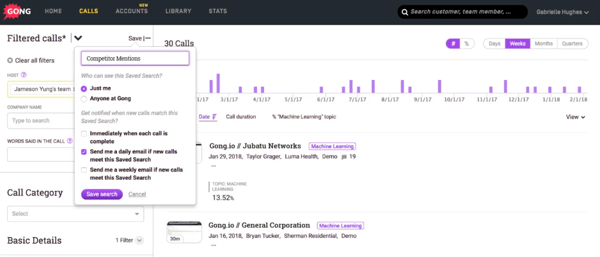
Based on reviews I analyzed, users who want deep call analytics tend to see strong returns from Gong, but teams that rely heavily on AI-generated sentiment tags should be aware that a few reviewers noticed occasional misclassifications of tone or intent. It’s worth keeping in mind as a quality-check step rather than relying on sentiment outputs without review, and most users said the overall accuracy was still strong enough to trust for coaching workflows.
I also came across a handful of comments about call recordings occasionally taking time to process or, in rare cases, not being captured when the meeting setup wasn’t properly configured. It wasn’t a frequent pattern, and reviewers noted that once the integration is set up cleanly, the experience is reliable, so investing time in a smooth initial configuration pays dividends.
Overall, Gong is a dependable conversation intelligence platform that pairs strong usability with real coaching depth for mid-market and growing enterprise sales teams. If your priority is turning conversation data into actionable performance improvements, it belongs on any shortlist.
What I like about Gong:
- I see reviewers frequently highlight the coaching and call review workflows. Based on what I read, managers use Gong to identify deal risks and coach reps with specificity rather than guesswork.
- I also notice that the searchable transcripts and AI summaries come up as consistent positives. Users say these features help them follow up more quickly and avoid rewatching entire recordings.
What G2 users like about Gong:
“What’s most helpful about Gong is the visibility it brings to customer conversations. Having calls automatically recorded, transcribed, and analyzed makes it much easier to capture key insights, track follow-ups, and never miss important details. It’s especially valuable for reflecting on conversations, improving messaging, and sharing context across the team without relying on manual notes.”
– Gong review, Javier N.
What I dislike about Gong:
- Based on G2 reviews, I get the sense that most users find the AI insights reliable for day-to-day coaching, but teams that rely on sentiment tagging for nuanced decisions should plan to review those outputs, since a few reviewers noted occasional tone misclassifications that require a quick manual check.
- I also noticed that while the vast majority of calls are captured smoothly, a small number of reviewers mentioned delayed processing or missed recordings tied to meeting configuration, so investing time in a clean initial setup pays dividends once it’s done.
What G2 users dislike about Gong:
“There are a lot of notifications, and the built-in search features don’t seem very good. I can’t just search for a customer directly; I have to go through a few steps to get there. Also, I don’t find the AI to be very powerful.”
– Gong review, Brittany G.
Related: Want to know why conversation intelligence matters? These sales enablement stats show how data-driven coaching boosts win rates and rep performance.
2. Fathom: Best for call summaries and action items
Fathom has carved out a strong position among small businesses, with 79% of its users coming from that segment, according to G2 Data. It’s especially popular in computer software, marketing, and consulting, where teams need fast, structured meeting outputs without the overhead of a larger platform.
The standout theme across reviews was transcription quality. Users described Fathom’s transcripts as highly accurate, even in fast-paced conversations, and appreciated that the output wasn’t just a wall of text. Reviewers highlighted how the formatting, paired with timestamped highlights, made it easy to find what they needed without replaying an entire recording. That structured approach seems to be what draws people in and keeps them coming back.
Meeting summaries were the other major differentiator. I came across dozens of comments about how much time Fathom saved by automatically generating recaps that included action items and follow-ups. Users said the summaries were formatted clearly enough to share directly with clients or teammates, and many mentioned that they replaced their old note-taking routine entirely. On G2, AI text summarization scores 96%, which lines up with how often reviewers pointed to summaries as the feature that sold them on the tool.
Ease of use was another recurring theme. Even users brand-new to conversation intelligence said they got value right away without needing tutorials or help docs. That low barrier to entry seems to be one of the reasons Fathom has earned such strong word of mouth among small teams.
The integrations reinforced that simplicity. Reviewers frequently praised how seamlessly Fathom integrates with Zoom and HubSpot, enabling them during meetings without switching between tools. A number of users also mentioned that the CRM integration helped with logging call outcomes, making it easier to maintain consistent deal records.
The platform’s collaboration features also stood out. Users liked being able to share specific meeting moments or summaries with colleagues, which accelerated cross-functional alignment, especially for teams that operate across sales, product, and customer success.
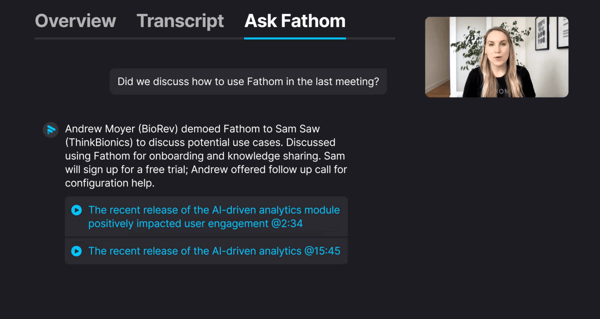
Fathom’s customer support was another area where reviewers had positive things to say. Users described the onboarding experience as smooth and appreciated the follow-up from the support team after initial setup, which helped them get the most out of the tool quickly. The estimated payback period on G2 is just 4 months, which makes sense given how fast teams start seeing time savings once they’re set up.
Based on reviews I analyzed, the experience is strong across most use cases, but teams that operate across multiple languages or have speakers with regional accents may notice occasional dips in transcription accuracy. It’s not something most reviewers flagged as a significant concern, and many noted the overall quality is still excellent for their day-to-day needs. It’s worth testing if your team works in a multilingual environment.
I also came across a few comments about impromptu meetings. If Fathom isn’t added to a call in advance, the recording may not start, which could catch fast-moving teams off guard. It’s a small workflow consideration that’s easy to plan around once you’re aware of it, and users mentioned that setting Fathom to auto-join scheduled calls eliminates the issue entirely.
Fathom is an excellent fit for small teams and individual contributors who want accurate, well-organized meeting records without any heavy lifting. If your goal is to stop taking notes and start acting on what was said, Fathom makes that transition remarkably smooth.
What I like about Fathom:
- I see reviewers consistently highlight how structured and digestible the meeting summaries are. Based on what I read, these aren’t just raw transcripts; they’re formatted well enough to share directly with stakeholders.
- I also notice frequent praise for how easily Fathom fits into daily workflows, especially through the Zoom and HubSpot integrations. Users say it lets them stay present during calls instead of scrambling for notes.
What G2 users like about Fathom:
“It’s very easy to include in any meeting I’m in. On top of that, its AI features do a great job of recording the meeting highlights.”
– Fathom review, Jordan B.
What I dislike about Fathom:
- I came across a few reviews mentioning that impromptu meetings could cause issues if Fathom wasn’t added in advance. That feels like something fast-moving teams might want to watch out for.
- There was also some feedback around transcription accuracy dropping slightly with regional accents. It didn’t seem to be a major issue, but I’d like to test it in a global team environment.
What G2 users dislike about Fathom:
“It’s sometimes difficult when you go to the Fathom site to change settings. So that needs to be better and more intuitive. It’s also difficult to change your plans within Fathom. Very difficult. So that needs to be better and more intuitive as well. More user-friendly. It also needs to be easier to get in touch with Fathom support.”
– Fathom review, Betty H.
Curious how AI impacts sales? Learn how AI is driving smarter conversations, better forecasting, and faster deal cycles.
3. Agentforce Sales (formerly Salesforce Sales Cloud): Best for enterprise pipeline visibility
Agentforce Sales (formerly Salesforce Sales Cloud) remains one of the most widely adopted platforms in the sales tech stack, and while it’s primarily known as a CRM, many teams use it as a conversation intelligence hub through its built-in analytics and integration capabilities. According to G2 Data, it’s a strong fit across company sizes, with 48% of users from mid-market companies and 33% from enterprises.
Customization was the most frequently praised aspect in the reviews I analyzed. Users described being able to tailor nearly everything, from call outcome fields and automation triggers to dashboard layouts, so the platform reflects how their team actually operates. That flexibility matters when the goal is to surface conversation data alongside pipeline metrics in a way that’s useful for both reps and managers.
Reporting was another clear strength. Reviewers liked how straightforward it was to build dashboards that combined call outcomes, contact engagement, notes, and pipeline health into a single view. I read several comments from sales leaders who built custom reports for call follow-ups or used conversation history to identify stalled deals. While Salesforce isn’t a dedicated call analytics engine, when integrated well with conversation tools, it functions as a central nervous system for revenue operations.
The breadth of integrations also earned consistent praise. Users noted that Agentforce integrates with virtually any tool in their stack, including dialers, email platforms, and conversation intelligence add-ons, helping centralize data that would otherwise live in silos. On G2, lead qualification is rated at 91%, reflecting how well the platform ties conversation data into broader pipeline and lead management workflows.
Workflow automation was another area where reviewers saw real value. Teams described using Agentforce’s flow builder and automation features to trigger follow-up tasks, route leads, and surface conversation-related alerts without relying on manual processes. That operational layer seems to be what makes Agentforce more than just a data repository for many organizations.
And once configured, reps said they could review deal activity and surface past conversations without having to jump between systems. The unified activity timeline, which pulls in calls, emails, meetings, and notes, was described by reviewers as a practical advantage for staying on top of complex deals.
Security and governance were also mentioned positively. Reviewers noted that Agentforce’s permission controls, data visibility settings, and compliance features made it easier to scale across departments without sacrificing control. On G2, meets requirements is rated at 91%, which aligns with how reviewers describe the platform’s ability to handle complex organizational needs once it’s properly configured.
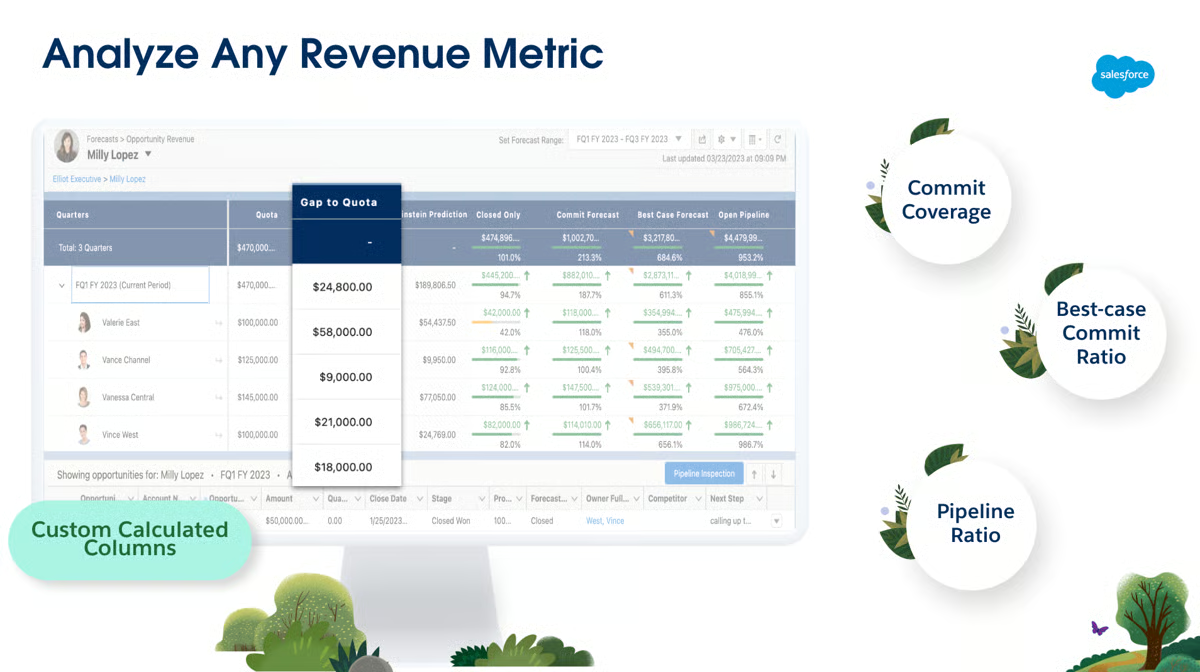
Based on my analysis of user feedback, the depth of Agentforce is a real asset for teams with the resources to manage it, but organizations without a dedicated admin or RevOps lead may find that the initial configuration takes more time and planning than lighter-weight tools. Several reviewers noted that navigating the setup can feel complex to navigate without someone guiding it, which is a natural byproduct of how much the platform can do, and many added that the investment in setup is well worth it once things are running.
I also noticed that cost was a recurring topic. Some reviewers noted that expenses can increase as more features and third-party connectors are added. For teams with defined budgets, it’s worth mapping out which capabilities are essential upfront so the investment stays aligned with actual usage. Many users noted that the ROI becomes clear once the platform is fully adopted across the team.
Agentforce Sales is a strong choice for sales organizations that want conversation insights woven into a centralized, highly customizable CRM, particularly teams that already have the admin resources to support ongoing configuration and optimization.
What I like about Agentforce Sales (formerly Salesforce Sales Cloud):
- I read a lot of praise around opportunity tracking and reporting. Teams seem to appreciate having conversations, contacts, and pipeline data all in one place.
- Customization was another standout. Users consistently mentioned how easy it was to shape Salesforce to fit specific sales motions and call workflows.
What G2 users like about Agentforce Sales (formerly Salesforce Sales Cloud):
“Agentforce Sales excels at unifying customer data and automating the entire sales cycle. Users value its autonomous AI agents for lead qualification, intelligent workflow automation that reduces “busywork,” and real-time, data-driven coaching. These features collectively drive higher productivity, faster deal cycles, and more personalized customer relationships.”
– Agentforce Sales (formerly Salesforce Sales Cloud) review, Rohit K.
What I dislike about Agentforce Sales (formerly Salesforce Sales Cloud):
- The platform’s depth is a major advantage for teams with dedicated admin support, but organizations without an Agentforce admin may find setup and ongoing maintenance more time-intensive than lighter-weight alternatives. Reviewers generally note that the long-term value is worth the effort once everything is configured properly.
- Pricing was another recurring consideration, especially for add-ons and third-party integrations. While many users feel the platform delivers strong overall value, teams with tighter budgets may need to plan carefully before expanding functionality.
What G2 users dislike about Agentforce Sales (formerly Salesforce Sales Cloud):
“How it quickly became outdated versus other CRM in the market, they did not adapt as quickly to AI and limited integrations to lead generation tools.”
– Agentforce Sales (formerly Salesforce Sales Cloud) review, Charles V.
Related: Great calls start with great reps. Use these essential sales skills alongside conversation insights to coach more effectively.
4. HubSpot Sales Hub: Best for integrated sales engagement
HubSpot Sales Hub has built a strong following among smaller and mid-sized teams, with 55% of users from small businesses and 40% from mid-market companies, according to G2 Data. It’s widely used in computer software, IT services, and marketing, where teams want CRM, call tracking, and light conversation intelligence in a single platform rather than stitching together multiple tools.
The most consistent theme across reviews was how natural it feels to log and track calls inside HubSpot. Reps described attaching calls directly to deals or contacts with minimal effort, and the clean activity timeline made it easy to pick up exactly where a conversation left off. That kind of seamless tracking, baked into the CRM rather than bolted on, seems to be what keeps teams coming back.
Email tracking and engagement alerts were another strength reviewers frequently highlighted. Users appreciated knowing when a prospect opened an email or clicked a link, giving them helpful context before making follow-up calls. While that’s not traditional conversation intelligence, it provides reps with the kind of real-time signal that can shape the next conversation.
Sales sequences also earned solid marks. G2 users noted that building multi-step outreach, including email templates and call tasks, was straightforward and helped maintain consistency across the team. This came through as particularly valuable for growing sales organizations that need structure without adding complexity.
Collaboration features also came up positively. Reviewers mentioned how easy it was to share deal activity with managers or cross-functional teammates, and the unified view of customer interactions, spanning emails, calls, meetings, and notes, helped keep everyone aligned without requiring separate tools or manual updates. On G2, ease of use is rated at 90%, which tracks with how often reviewers describe the platform as approachable even for less technical team members.
The platform’s onboarding experience was another area where reviewers had good things to say. Multiple users reported getting their teams up and running quickly, and several noted that even less-technical team members were comfortable navigating the interface within the first week. That speed-to-value seems to be one of the key reasons HubSpot has strong adoption in smaller sales organizations.
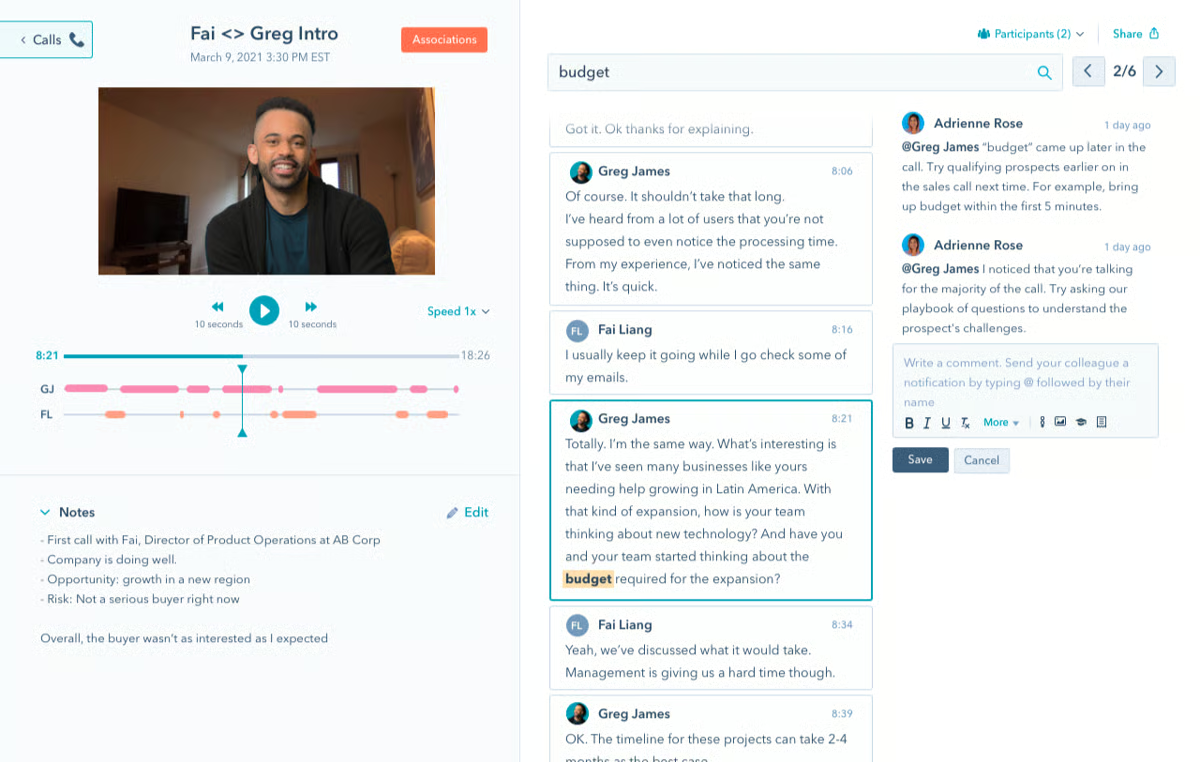
Support quality was also highlighted by reviewers. Users described the help documentation and customer support team as accessible and responsive, especially when troubleshooting integrations or getting guidance on sequence best practices. On G2, quality of support is rated at 90%, which aligns with reviewer descriptions of a reliable support experience when teams need it.
Based on reviews I analyzed, HubSpot is highly regarded for its ease of entry, but several reviewers noted that pricing can escalate as teams grow or unlock additional capabilities. Some essential features for more mature sales operations are reserved for higher tiers, which should be factored in during planning. Many users said that mapping out feature needs early helps avoid surprises later.
I also came across several comments about reporting and dashboard customization. While the built-in options work well for standard use cases, a few users mentioned wanting more granular control over how sales and call data are organized, especially as their workflows became more complex. It’s worth noting that most reviewers still found the reporting adequate for their needs, and the simplicity was often seen as a plus for teams that don’t want to spend time building custom views.
HubSpot Sales Hub is a practical choice for growing sales teams that want conversation context embedded in their CRM without the overhead of managing a separate platform. If simplicity and speed-to-value are priorities, it delivers on both.
What I like about HubSpot Sales Hub:
- Call logging and activity tracking are the features reviewers praise most. That seamless tracking seems to make a tangible difference for teams managing multiple deals simultaneously.
- Email engagement features also get consistent positive feedback. Knowing when a prospect opened an email or interacted with content helps reps plan smarter, more timely follow-ups.
What G2 users like about HubSpot Sales Hub:
“I use HubSpot Sales Hub to manage leads, track sales activities, and automate the sales process in a more organized and efficient way. It’s very user-friendly, and I appreciate its excellent CRM automation capabilities and extensive customization options. The initial setup was very easy for me.”
– HubSpot Sales Hub review, Aryan G.
What I dislike about HubSpot Sales Hub:
- The platform is great to start with, but teams planning for growth should map out their feature needs early since pricing can increase notably as you move into higher tiers or add seats and advanced capabilities.
- A few reviewers also wished for deeper reporting customization options, particularly when their workflows grew more complex, though many added that the simplicity is a net positive for teams that prefer a cleaner interface.
What G2 users dislike about HubSpot Sales Hub:
“One downside is that some of the more advanced features are locked behind higher-tier plans, which can make it expensive as your needs grow. There’s also a bit of a learning curve when setting up more complex workflows and automations – which is a downside.”
– HubSpot Sales Hub review, Jessica L.
5. Substrata: Best for real-time buyer signal analysis
Substrata approaches conversation intelligence from a different angle than most platforms in this category. Instead of focusing primarily on transcription or call recording, it analyzes the behavioral and emotional signals behind conversations, including tone, hesitation, and engagement dynamics. According to G2 Data, 40% of users come from small businesses and 42% from mid-market, reflecting a broad appeal across team sizes.
The most distinctive capability reviewers highlighted was Substrata’s ability to identify intent, emotion, and power dynamics during live interactions. Users described gaining a layer of understanding that goes beyond what someone said and into how it was delivered and received. For sales teams working on high-stakes or complex deals, that kind of visibility can shift how objections are handled and how follow-ups are shaped. On G2, customer scoring is 97%, which aligns with how often reviewers describe the platform’s ability to read and quantify buyer engagement that other tools don’t.
Email tracking stood out as a natural complement to the live conversation analysis. Reviewers noted that the platform helped them understand not only when a message was opened but also how it might have been interpreted. G2 users mentioned using the email extension to track buyer sentiment and engagement patterns, which informed the tone and timing of follow-ups in ways that standard open-rate tracking doesn’t offer.
Customer support was another area that came up consistently well. Reviewers described the support team as responsive and easy to work with, whether they were onboarding for the first time or troubleshooting a specific use case. The platform’s documentation and onboarding resources were also noted as well-structured, which seems to help teams new to behavioral intelligence tools.
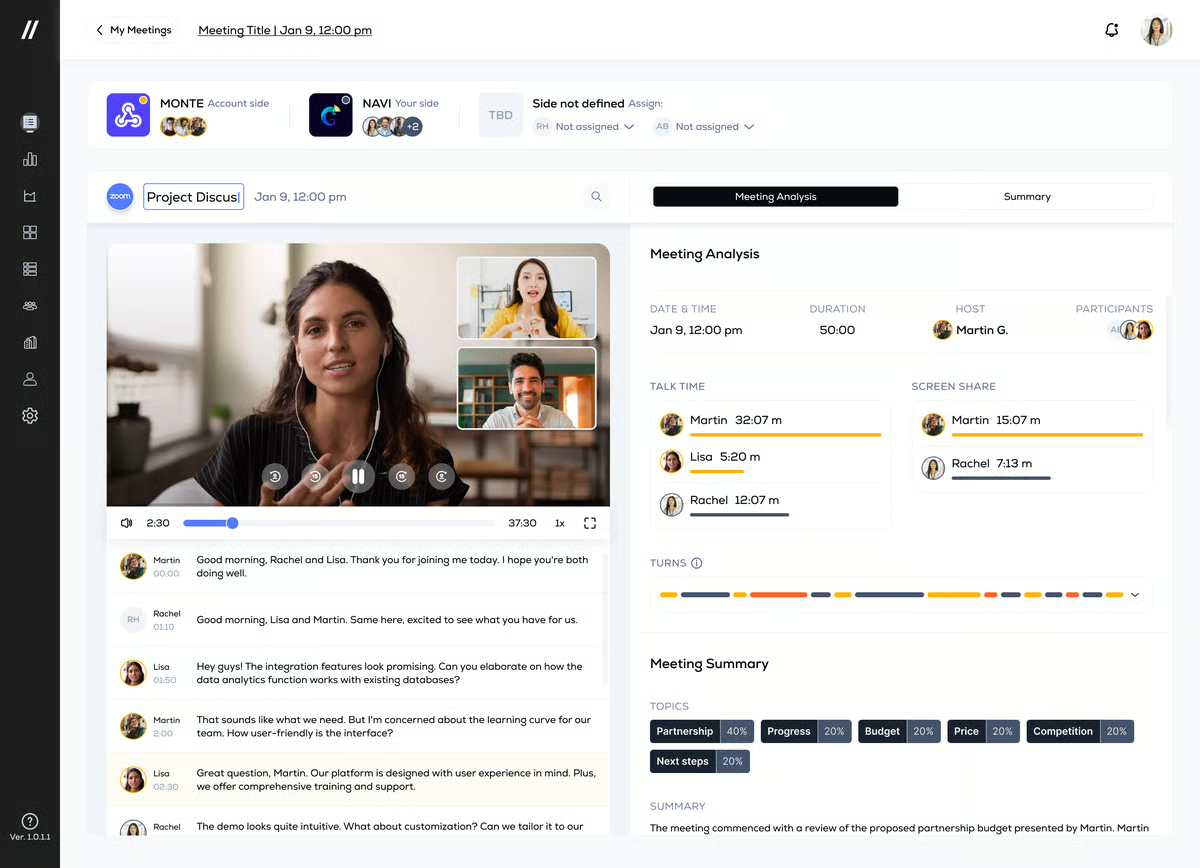
Cross-functional alignment was another theme that surfaced in reviews. Several users mentioned that the behavioral insights helped bridge communication gaps between technical and non-technical teams, making it easier to keep everyone on the same page during multi-stakeholder deals.
The platform’s sales coaching capabilities also earned praise. Reviewers described using Substrata’s feedback on tone and delivery to refine how they communicate with different buyer personas. That coaching layer, grounded in behavioral data rather than just call metrics, gave teams a different lens for improving their approach to negotiations and customer engagement.
The overall adoption experience rounds out the picture. Users across roles described getting started quickly, and on G2, ease of setup is rated at 98%, which makes sense given how often reviewers said they didn’t need technical support to begin seeing value.
Based on the reviews I analyzed, behavioral insights are highly valued, but some users noted it takes a bit of time to fully trust the platform’s recommendations. A few reviewers noted that feedback can feel counterintuitive initially, so teams should plan for a brief adjustment period as they learn to interpret the signals alongside their own deal intuition. Most users said the accuracy improved significantly as they gained familiarity.
I also came across some feedback about the complexity of the advanced features. While the core experience is accessible, a few users mentioned that certain advanced capabilities took longer to set up and integrate into their specific workflows, particularly at the enterprise level, where customization needs tend to be more varied. It’s worth noting that the core platform delivers strong value right away, and the advanced features are more of a scaling consideration.
Substrata is a compelling choice for teams that want to go deeper than transcripts and recordings and understand the emotional undercurrents shaping their deals. If reading buyer signals in real time is a priority, it fills a gap that most conversation intelligence platforms don’t address.
What I like about Substrata:
- Sentiment and behavioral analysis are the features reviewers highlight most. It reveals buyer signals that would be invisible in a standard transcript
- Support quality also earns frequent praise. Reviewers describe a responsive, hands-on team that makes onboarding and adoption noticeably smoother.
What G2 users like about Substrata:
“I like that it gives context behind conversations and not just surface-level feedback, and it helps me understand how buyers are reacting over time instead of judging one single email or call.”
– Substrata review, Mark Gene L.
What I dislike about Substrata:
- Most users find value quickly, but teams should expect a brief adjustment period as they learn to interpret behavioral feedback, since a few reviewers mentioned that the AI-generated signals can feel counterintuitive before the patterns become familiar.
- Some advanced features also take more time to configure, particularly for enterprise teams with specific workflow requirements, though users noted the foundational experience delivers value right from the start.
What G2 users dislike about Substrata:
“The biggest downside is the learning curve. It’s not a simple plug-and-play tool; you need time to understand what the signals mean and how to act on them.”
– Substrata review, Himanshu J.
6. Chorus by ZoomInfo: Best for call recording and team collaboration
Chorus by ZoomInfo is especially popular among mid-market and enterprise teams, with 64% of users from mid-market companies and 25% from enterprises, according to G2 Data. It’s widely adopted in software, IT services, and marketing, where sales leaders want conversation data to flow directly into broader revenue workflows.
The first thing that stood out in reviews was how consistently users praised the call recording and summarization experience. Reviewers described being able to quickly review calls, access AI-generated summaries with action items, and jump to the most relevant sections without having to sit through entire recordings. For teams running a high volume of customer conversations, that time savings was repeatedly cited as one of the biggest practical benefits. On G2, call recording is rated at 94%, which tracks with how central this capability is to the Chorus experience.
Transcription quality also earned positive marks. Users said the transcripts were clear and reliable, even in fast-paced discussions, and the ability to search by keyword or topic made it easier to locate specific moments across calls. Several reviewers highlighted the search transcript feature as especially valuable when preparing for follow-ups or pulling context for coaching sessions.
Sales coaching came through as another strength. Reviewers mentioned that managers used Chorus to review talk-to-listen ratios, identify buying signals, and provide feedback based on actual conversation data rather than memory. That approach to coaching, grounded in real interactions, seemed to resonate with teams focused on structured enablement.
The integration ecosystem was also well-received. Reviewers frequently noted how well Chorus integrates with CRMs such as Salesforce and HubSpot, as well as communication platforms like Microsoft Teams and Zoom. Multiple users mentioned that call summaries automatically synced to Slack, which helped keep broader teams informed without extra manual effort.
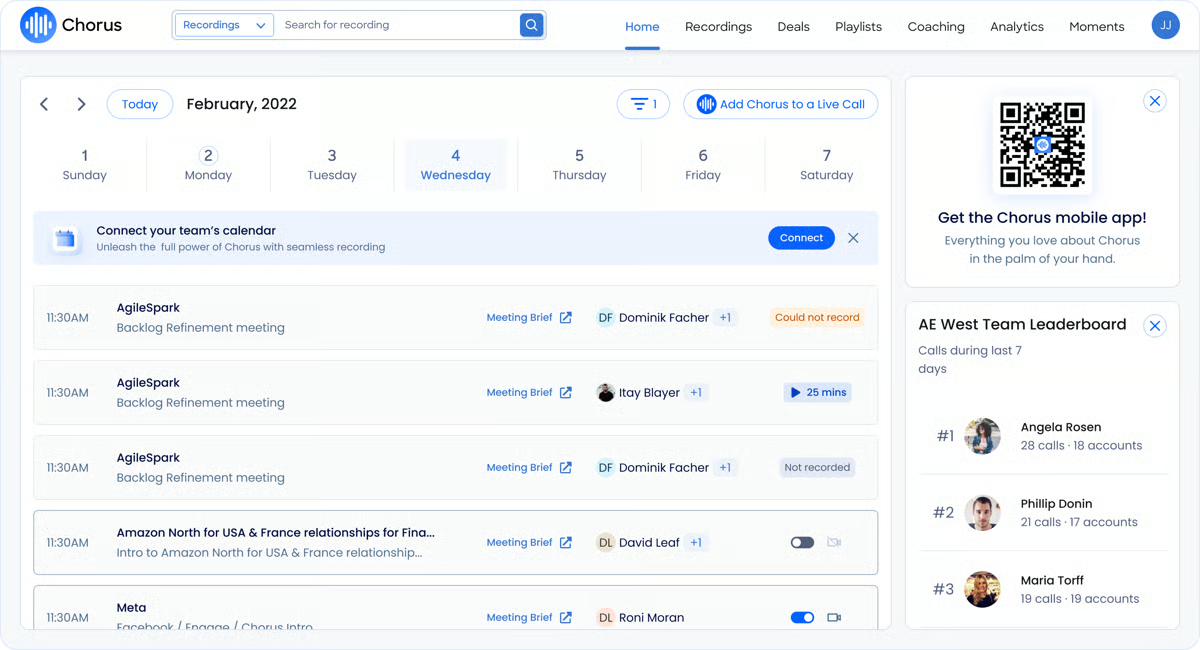
Collaboration features were another positive theme. Users described sharing call recordings and snippets across departments, whether for training new hires, aligning with product teams on customer feedback, or keeping leadership updated on deal progress. That visibility across the organization was seen as a meaningful advantage beyond the sales floor.
The platform’s note-taking automation was also valued by reviewers. Users mentioned that Chorus captured meeting notes and action items reliably, freeing them to focus on the conversation itself. The combination of automated notes with CRM logging meant less time on post-call admin and more time on follow-through. On G2, the estimated payback period is 8 months, reflecting a platform that delivers solid ROI once teams integrate it into their day-to-day sales motion.
Based on reviews I analyzed, most users find the platform capable and well-integrated, but some noted that the keyword-based search could be more intuitive when trying to locate past recordings. A few reviewers mentioned that searching for calls by client name rather than meeting title didn’t always return results as expected, and most suggested that refining naming conventions and tagging practices makes the search experience significantly better over time.
I also came across a handful of comments about the onboarding experience. While most users found the platform straightforward once they were up and running, a few mentioned that the implementation process, particularly with CRM integrations, took longer than expected. Reviewers who planned for a structured rollout said the process went smoothly, so building in that lead time upfront helps set the right expectations.
Chorus by ZoomInfo is a solid fit for mid-market and enterprise teams that want a mature call recording platform tightly connected to their CRM and collaboration stack. If the goal is to make conversation data accessible across the organization, not just within sales, Chorus handles that well.
What I like about Chorus by ZoomInfo:
- The AI summaries and searchable transcripts are the features reviewers mention most often. Teams use these daily to prep for follow-ups and share coaching moments across the organization.
- Integration quality is the other consistent highlight. Users appreciate that call data flows into CRMs and messaging tools like Slack without requiring manual logging.
What G2 users like about Chorus by ZoomInfo:
“The AI-generated call notes and summaries save me a ton of time after discovery calls. I don’t have to manually jot everything down. Chorus captures key moments, action items, and topics automatically, which lets me focus on actually running the conversation instead of scrambling to take notes.”
– Chorus by ZoomInfo review, Alex P.
What I dislike about Chorus by ZoomInfo:
- Search and call retrieval work well for routine use, but teams that rely heavily on locating specific recordings may want to refine their tagging and naming conventions, since a few reviewers noted that keyword search doesn’t always surface results intuitively.
- The initial implementation, especially around CRM integrations, also took more time and coordination than some users anticipated, though those who planned a structured rollout said the process went well.
What G2 users dislike about Chorus by ZoomInfo:
“Sometimes I find it difficult to locate the recordings done after adding to live calls. This could be improved. Having separate sections for recording and UI improvements could be better.”
– Chorus by ZoomInfo review, Thribuvan B.
7. Otter.ai: Best for AI-powered meeting transcription
Otter.ai is primarily used by small businesses, with 80% of its users coming from that segment, according to G2 Data. It’s a popular choice across industries where fast, accurate meeting records are more important than deep sales-specific analytics, making it particularly useful for cross-functional teams, project managers, and individual contributors who want meeting intelligence without enterprise-level complexity.
The most praised feature across reviews was real-time transcription. Users consistently described the transcripts as accurate and clear, even during longer meetings, and appreciated that the platform automatically identified speakers and organized the output in a way that was easy to scan. For people who spend large portions of their day in meetings, having a reliable automated note-taker was frequently described as a significant time saver.
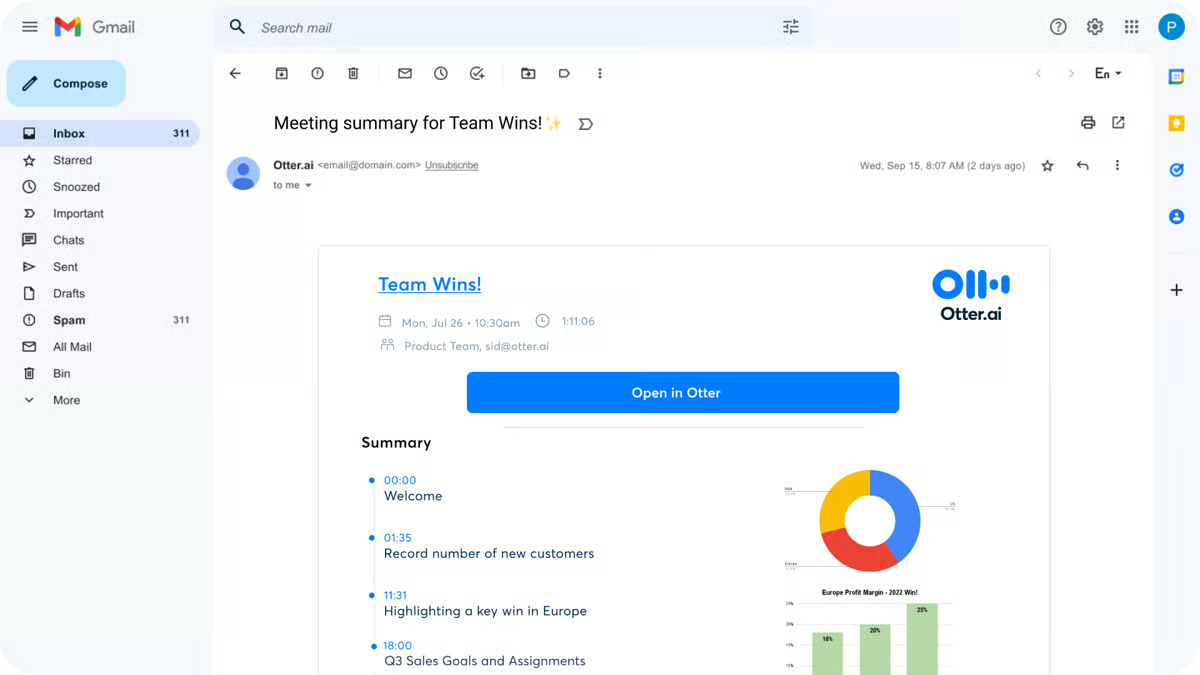
Meeting summaries and action item extraction were another major strength. Reviewers noted that Otter generated structured recaps with decisions, next steps, and key discussion points, making it easy to share meeting outcomes with teammates who weren’t on the call. Several users mentioned that these auto-generated summaries replaced their entire note-taking routine and helped them stay fully engaged during conversations. On G2, AI text summarization is rated at 89%, indicating how well it holds up across different meeting types and formats.
Integration support was another positive theme. Reviewers noted smooth integration with Zoom, Google Meet, Microsoft Teams, Slack, and Google Calendar, allowing Otter to join meetings automatically without additional setup for each call. That hands-off experience came through as a meaningful benefit for people who move between different meeting platforms throughout the week.
The ability to ask the AI questions about past meetings also surfaced as a standout capability. Users appreciated being able to query their meeting history and get accurate answers about what was discussed, decided, or assigned, without scrolling through transcripts manually. That interactive layer adds practical value beyond static transcriptions.
The platform’s collaboration tools rounded out the positive feedback. Users described sharing transcripts, tagging colleagues in specific sections, and adding comments directly within meeting records. That made it easier for distributed teams to stay aligned, especially when decisions were made in meetings that not everyone attended.
Getting started with Otter was also described as straightforward. Users said the setup process took minutes rather than hours, and the platform didn’t require technical expertise to configure. On G2, ease of setup is rated at 94%, and the estimated payback period is just 4 months, which reflects how quickly teams start seeing value from automated meeting records.
Based on the reviews I analyzed, the experience is strong for most English-language meetings, but teams with speakers with strong accents or in environments with background noise may notice occasional dips in accuracy. A few reviewers mentioned needing to proofread transcripts in those cases, which adds a small step but doesn’t undermine the overall value, and most noted the quality is still strong enough for day-to-day use.
I also came across some feedback about the automatic note-sharing feature. A few users noted that meeting summaries were sent to participants by default, requiring them to manually disable the setting to avoid sharing notes before they’d been reviewed. For teams that handle sensitive conversations, it’s a configuration step worth addressing during setup, and users who adjusted the setting early said it resolved the concern entirely.
Otter.ai is a practical, lightweight meeting intelligence tool that delivers strong transcription and summaries without the sales-specific infrastructure required by larger conversation intelligence platforms. If your priority is keeping clean, accurate records of every meeting across your organization, it’s a reliable and fast choice.
What I like about Otter.ai:
- Real-time transcription accuracy is what reviewers appreciate most. The automatic speaker identification and structured formatting make it easy to find key moments without having to replay entire meetings.
- The auto-generated summaries and action items are the other consistent highlight. Users say these outputs replace manual note-taking and make it simple to share meeting outcomes with anyone who wasn’t present.
What G2 users like about Otter.ai:
“I use Otter.ai for recording and transcribing conversations, and it saves me time from manually transcribing interviews. I like that it makes it easy to record and transcribe conversations, and it also provides a nice summary of what was discussed. I like the ability to easily pull quotes from the conversations. These features make it easy to take notes and capture key takeaways, and it is a huge time-saver. The initial setup was very easy and intuitive.”
– Otter.ai review, Erica B.
What I dislike about Otter.ai:
- Transcription quality holds up well for most standard meetings, but teams with speakers who have strong accents or meetings with significant background noise should plan for occasional proofreading, since a few reviewers noted accuracy dips in those conditions.
- Otter’s default setting also automatically sends meeting summaries to participants, which caught some users off guard. For teams that handle sensitive discussions, it’s worth adjusting this configuration during initial setup, and users who did so early said it was a quick fix.
What G2 users dislike about Otter.ai:
“I don’t like how Otterbot tries to attend meetings because it should be seamless and join with me silently without notifying others. In my team, we’ve been criticized for auto-joining, and it’s looked down upon.”
– Otter.ai review, Dr. Akshay M.
Frequently asked questions about the best conversation intelligence software
Got more questions? We have the answers.
Q1. What is the best conversation intelligence software for sales coaching and rep enablement?
If you’re prioritizing sales coaching and rep development, Gong and Chorus by ZoomInfo stand out. Gong offers detailed performance insights, talk ratio analysis, and coaching libraries that help managers improve rep behavior over time. Chorus provides call recording, AI-generated summaries, and team collaboration features that make it easy to share coaching moments across the organization.
Q2. Which conversation intelligence platform is best for small businesses?
For small teams that want lightweight tools with strong AI, Fathom and Otter.ai are excellent choices. Fathom delivers high-quality meeting summaries and action items with almost no setup. Otter.ai stands out for its real-time transcription and speaker-tagged summaries, making it one of the best meeting intelligence tools for small businesses.
Q3. What’s the most user-friendly conversation intelligence software for non-technical teams?
According to G2 Data, Substrata and Fathom stand out as the most user-friendly options. Substrata leads with a 98% ease-of-use rating, while Fathom follows closely at 97%. Both tools are frequently praised in reviews for their intuitive design, minimal setup, and ability to deliver value without requiring deep technical knowledge.
Q4. What conversation intelligence tool helps detect buyer hesitation or emotional signals?
Substrata is the best conversation intelligence software for nonverbal signal detection. It analyzes tone, hesitation, and engagement dynamics to help sales teams understand how buyers actually feel during calls or email exchanges. It’s especially useful in long deal cycles where sentiment shifts can be hard to catch.
Q5. Which software offers the best CRM integration with conversation intelligence features?
If CRM integration is a priority, Agentforce Sales (formerly Salesforce Sales Cloud) and HubSpot Sales Hub are top choices. Agentforce Sales connects deeply with your existing CRM workflows, making it easy to log calls, track deals, and layer in insights. HubSpot offers a unified experience with calling, email tracking, and conversation history all in one place.
Q6. What is the best AI meeting assistant for capturing call summaries and next steps?
Fathom is widely rated as one of the best AI meeting assistants for automatic call summaries. It delivers timestamped highlights, action items, and clean transcripts that can be shared instantly. Otter.ai is another strong option, offering real-time transcription and auto-generated meeting recaps with minimal friction.
Q7. Which conversation intelligence tools work best for mid-market sales teams?
Gong, Chorus by ZoomInfo, and Agentforce Sales (formerly Salesforce Sales Cloud) are heavily adopted in the mid-market. Gong offers detailed analytics and rep performance tracking. Chorus provides call recording, summarization, and strong CRM integrations for broader team collaboration. Salesforce gives larger teams a flexible platform that can be customized around CRM data and conversation insights.
Q8. What conversation intelligence software integrates with Google Meet and Zoom?
Fathom and Otter.ai both integrate well with Google Meet and Zoom. Otter.ai offers seamless call recording and real-time transcription across major conferencing platforms. Fathom can auto-join meetings and generate summaries right after the call ends, making it ideal for remote or hybrid teams using calendar-based conferencing.
Q9. What’s the best tool for building a call library for sales training?
Gong and Chorus by ZoomInfo are excellent for building internal call libraries for sales onboarding and coaching. Both platforms allow tagging key call moments, sharing recordings, and highlighting widely used examples across the team. This makes it easier to reinforce learning and scale training efforts.
Q10. What’s the top-rated conversation intelligence software?
The top-rated conversation intelligence software depends on your team’s needs. Gong is a strong choice for AI-powered deal insights, Chorus by ZoomInfo works well for call recording and coaching, and Fathom or Otter.ai are better fits for AI meeting notes and transcription.
Q11. Which conversation intelligence app is the best?
The best conversation intelligence app depends on your workflow. For enterprise revenue teams, Gong and Chorus by ZoomInfo stand out. For smaller teams that need fast summaries and transcripts, Fathom and Otter.ai are easier to adopt.
Q12. What is the most effective conversation intelligence software to buy?
The most effective conversation intelligence software to buy is the one that matches your sales process, CRM setup, and coaching needs. If you need deep pipeline visibility, choose Gong or Agentforce Sales (formerly Salesforce Sales Cloud). If you need simpler meeting intelligence, Fathom or Otter.ai may be more practical.
Q13. What is the leading conversation analysis software for small business?
For small businesses, Fathom and Otter.ai are strong options because they offer easy setup, AI summaries, transcription, and meeting notes without the complexity of enterprise revenue intelligence platforms.
Make every conversation count
The right conversation intelligence software doesn’t just record calls; it helps you understand them. Whether you need real-time guidance, structured call libraries, or AI-powered summaries, the tools on this list reflect what sales and RevOps teams actually use and recommend.
From lightweight options like Fathom and Otter.ai to coaching-first platforms like Gong and Chorus by ZoomInfo, each product brings something unique to the table. Ultimately, the best platform depends on your team size, sales motion, and how deep you want to go with analysis. But one thing’s clear: with more conversations happening virtually and fewer opportunities for hallway coaching, visibility into what’s being said (and how it’s said) is no longer optional.
Calls are just the start. Browse the top-rated sales analytics software to layer even deeper insights on top of your conversations.
Want to turn conversation insights into measurable revenue impact? Check out the 7 Best Sales Analytics Software on G2 to find tools that help teams track performance, forecast sales, and optimize pipeline decisions.