



Choosing the best software testing tools determines how reliably teams catch defects, validate releases, and maintain delivery confidence at scale.
When the fit is wrong, execution slows, signal quality drifts, and delivery confidence erodes into ongoing operational drag.
As delivery speeds increase across SaaS and enterprise environments, the cost of weak tooling rises quickly. The global software testing market is estimated at around USD 57.7 billion in 2026, reflecting how critical testing has become as teams push quality earlier into development cycles.
In this guide, I map tools to distinct problems inside software testing workflows. My conclusions are based on patterns across large volumes of user reviews and what I’ve seen from teams running testing workflows under real delivery pressure. Strong tools consistently show depth in environment coverage, clarity in ownership, and discipline in automation execution.
The goal is to help you identify which tools fit best based on how your testing workflows actually operate.
9 best software testing tools for 2026: My top picks
- BrowserStack: Best for real-device cross-browser testing at scale
Used by teams that need reliable cross-browser and real-device coverage without managing device labs or infrastructure. (Paid plans start at $29/month billed annually) - Postman: Best for API testing, collaboration, and workflow standardization
Used to build, test, and validate APIs in a shared workflow across development and QA teams. (Paid plans start at around $9/user/month billed annually) - Salesforce Platform: Best for testing within complex Salesforce environments
Supports testing of custom objects, automations, and app logic within Salesforce environments. (Pricing available on request) - ACCELQ: Best for codeless test automation across web and APIs
Enables web and API test automation without heavy code ownership. (Pricing is available on request) - Apidog: Best for design-first API development and testing
Combines API design, documentation, mocking, and testing in one workspace. (Paid plans start at $9/user/month, billed annually) - QA Wolf: Best for outsourced E2E automation with ongoing maintenance included
Delivers end-to-end test automation with ongoing maintenance included. (Pricing is available on request) - Qase: Best for modern test case management and QA reporting
Helps teams manage test cases, runs, and reporting with clear release visibility. (Paid plans start at $24/user/month, billed annually) - Testlio: Best for crowdsourced testing across devices and locales
Provides global testing across real users, devices, and locations. (Pricing is available on request) - BlazeMeter Continuous Testing Platform: Best for CI-based performance testing
Supports load testing, service virtualization, and performance testing at scale. (Paid plans start at $99/month billed annually)
*These software testing tools are widely recognized in their category based on G2’s Winter Grid Report. I’ve included their primary strengths and available pricing details to help you choose software that aligns with your needs.
9 best software testing tools I recommend
Software testing tools help turn uncertainty about product quality into something structured, repeatable, and measurable. The right platform does more than run tests. It helps teams validate behavior early, surface gaps before they spread, and move changes forward with confidence instead of hesitation.
What I’ve found is that the strongest testing tools go beyond basic pass-fail results. They help teams understand coverage, spot risk patterns, and see how changes affect real workflows. Whether that comes from automated checks, API validation, performance testing, or user feedback, good tools reduce guesswork. They replace scattered signals with clear evidence about what is ready and what still needs attention.
This value is not limited to large engineering organizations. G2 Data shows adoption is well distributed across small teams, mid-market companies, and enterprises. Many teams adopt testing tools incrementally, starting with a narrow use case and expanding as confidence grows. That flexibility matters. It lowers the barrier to adoption and allows teams to improve quality without slowing delivery.
Effective software testing tools provide what modern development workflows depend on: visibility into how the product behaves, consistency in how quality is evaluated, and confidence that changes are supported by evidence, not assumptions.
How did I find and evaluate the best software testing tools?
I started by using G2’s Grid Reports to shortlist leading software testing tools based on verified user satisfaction and market presence across small teams, mid-market companies, and enterprise environments. This helped narrow the field to platforms that are actively used at scale, not just frequently marketed.
Next, I used AI to analyze a large volume of verified G2 reviews and focused on recurring patterns tied to real testing workflows. That included feedback around test coverage and reliability, automation depth, setup and maintenance effort, CI/CD integration quality, collaboration between QA, developers, and product teams, and how clearly results translate into release decisions. This step made it easier to separate tools that reduce uncertainty from those that introduce friction as testing scales.
I have not personally used all these platforms. I validated these review-based findings against publicly shared insights from software engineering, QA, and product teams who actively rely on these tools. All visuals and product references in this article are sourced from G2 vendor listings and publicly available product documentation.
What makes the best software testing tools worth it: My criteria
After reviewing thousands of G2 user reviews and analyzing how software testing appears in real development and QA workflows, the same themes kept recurring. Teams rarely struggle because they lack tests. They struggle because their testing tools don’t line up with how they build, ship, and validate software.
Here’s what I prioritized when evaluating the best software testing tools:
- Clarity of feedback, not volume of output: The best software testing tools make results easy to interpret. They surface what changed, why it matters, and what action is required next. Tools that overwhelm teams with logs, dashboards, or raw data tend to slow decisions and push judgment calls downstream. Clear feedback keeps momentum intact.
- Alignment with real development cadence: Strong tools adapt to how teams ship, not how testing theory says they should. Whether teams release daily or in larger cycles, testing needs to fit naturally into that rhythm. Misalignment here often causes tests to be skipped, delayed, or ignored under pressure.
- Sustainable automation and maintenance effort: Automation only helps when it stays reliable over time. The best platforms balance coverage depth with maintainability, so tests don’t become brittle or expensive to keep running. When maintenance effort grows faster than value, testing quickly turns into a liability.
- Collaboration across roles without friction: Software testing is rarely owned by one role. Effective tools support clean handoffs between QA, developers, product, and sometimes design. When collaboration breaks down, defects bounce between teams, accountability blurs, and confidence erodes.
- Signal strength over false confidence: Good tools reduce uncertainty. Others can create a sense of reassurance that isn’t always supported by underlying signals.. Platforms that make it hard to tell whether a pass truly means “safe to release” introduce hidden risk. Strong tools help teams trust results, not question them during the final hours before launch.
- Integration depth that preserves context: Testing does not exist in isolation. The best tools connect meaningfully with CI pipelines, issue tracking, version control, and deployment workflows. Shallow integrations force manual stitching and context switching, which slows response time when issues appear.
Based on these criteria, I narrowed down the tools that consistently help teams reduce uncertainty, move faster, and trust their release decisions. Not every platform excels in every area. The right choice depends on whether your priority is speed, depth, collaboration, or control.
Below, you’ll find authentic user reviews from the Software Testing Tools category. To appear in this category, a tool must:
- Support the validation of software behavior through manual, automated, performance, API, or user-focused testing
- Be used as part of active development, QA, or release workflows
- Integrate with modern engineering and delivery stacks
- Provide visibility into testing results, coverage, and quality signals
This data was pulled from G2 in 2026. Some reviews may have been edited for clarity.
1. BrowserStack: Best for real-device cross-browser testing at scale
BrowserStack is a real-device testing platform designed to let software teams validate applications across browsers, operating systems, and mobile devices without managing physical hardware. Its value comes from providing immediate access to production-like testing environments while keeping setup, device management, and maintenance out of everyday workflows.
G2 reviewers repeatedly point to the breadth of device coverage as one of BrowserStack’s strongest advantages. Users highlight access to a broad range of physical iOS and Android devices, multiple OS versions, and browser combinations that mirror real user environments. This depth of coverage helps teams catch device-specific issues that emulators or simulators often miss.
The platform’s interface and testing flow are also described as easy to work with during day-to-day QA tasks. Reviewers frequently mention that uploading APKs or app builds is straightforward and that selecting devices feels quick and intuitive. That familiarity reduces setup friction, especially for teams running frequent manual test cycles.
Beyond manual testing, BrowserStack is frequently described as fitting well into automated workflows. Multiple reviewers mention integrating BrowserStack into CI pipelines using tools like Jenkins, where tests are triggered via APIs instead of manual device selection or installation steps. That emphasis on automation helps explain why autonomous task execution (79%) stands out as its highest-rated feature on G2.
Reviewers also call out features such as location changes, resolution testing, and access to the latest device versions, which support distributed teams and remote testing scenarios without relying on physical hardware.
BrowserStack’s accessibility testing features help teams quickly scan websites for WCAG issues like color contrast, missing labels, and ARIA problems. Users highlight that scans can run across multiple pages without heavy setup, catching accessibility gaps beyond just the homepage. This built-in capability supports compliance-focused teams who need to validate accessibility standards as part of their regular testing cycles.
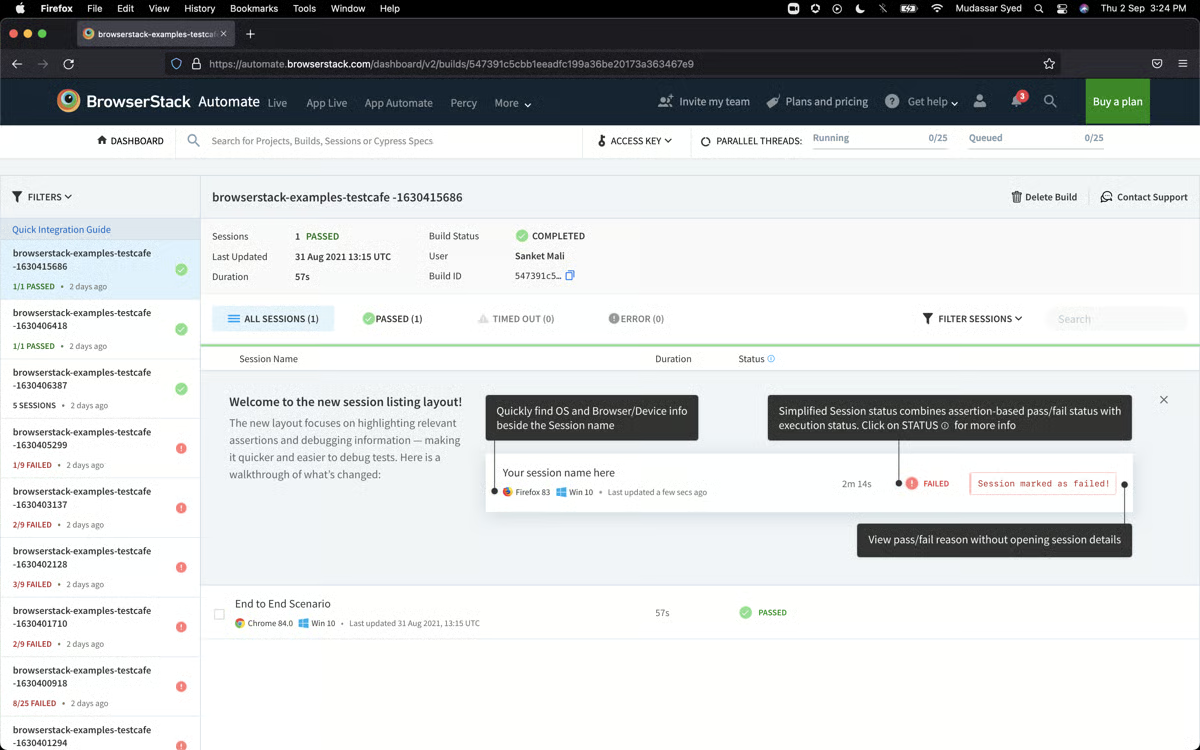
The platform supports testing mobile apps on both iOS and Android simultaneously, which reviewers frequently mention as valuable for catching platform-specific issues quickly. Teams can compare how features, graphics, and interactions behave across both ecosystems in real-time, reducing the back-and-forth typically required when validating cross-platform mobile experiences.
BrowserStack integrates seamlessly with Selenium and Java-based test setups, which reviewers describe as saving significant setup time and reducing configuration overhead. Teams running existing Selenium scripts can execute tests on BrowserStack’s device cloud without rewriting code or managing complex environment configurations, making it especially practical for QA teams with established automation frameworks.
BrowserStack is designed for steady, planned testing workflows, which means teams running many concurrent sessions during peak usage periods may experience variability in session speed and device responsiveness. This is more noticeable in high-concurrency environments, while moderate test loads or staggered testing schedules align more naturally with the platform’s performance profile.
Advanced debugging capabilities, including iOS log access and device-level diagnostics, reflect a structured approach to test analysis. Teams expecting immediate, deep log exploration may find the debugging interface more navigation-driven, while standard testing workflows focused on functional validation and visual verification align well with the platform’s consistency and stability.
Taken together, BrowserStack is viewed as a dependable, automation-ready testing platform with strong real-device coverage. For teams that want to support both manual and CI-driven testing without maintaining device inventories, it continues to stand out as a scalable and practical choice within the software testing tools category.
What I like about BrowserStack:
- It provides instant access to a wide range of real iOS and Android devices, OS versions, and browsers, removing the need for physical device labs while enabling testing in production-like environments.
- It integrates smoothly with manual and automated workflows. CI tools and API-driven test execution reduce repetitive setup and shorten overall testing cycles.
What G2 users like about BrowserStack:
“BrowserStack provides various features that help in testing software efficiently. It becomes easy to test on different devices, even to integrate and test locally, which reduces the time of checking in physical devices, and also the availability of devices is reduced. This is being used in daily tasks, and it also helps to work remotely. It provides location change, resolutions, latest versions, and many more features. It is user-friendly to use; to implement, just add the link on which to test and select a device, which reduces the time of understanding. It has good customer support, ready to help at any time.”
– BrowserStack review, Nishanth N.
What I dislike about BrowserStack:
- High concurrent sessions can lead to variable performance, which is more noticeable in peak, high-volume testing environments. Moderate or staggered testing aligns more naturally with the platform’s performance model.
- Debugging tools follow a structured interface, which may feel more navigation-driven for deep diagnostics. Standard functional and visual testing workflows align well with this approach.
What G2 users dislike about BrowserStack:
“I find the mobile testing takes time to load and keeps refreshing. iOS mobile testing sometimes gets an error when opening, and when we upload the files in each browser, it takes time to upload. The initial setup was a little bit difficult.”
– BrowserStack review, Swetha S.
2. Postman: Best for API testing, collaboration, and workflow standardization
Postman is an API testing tool designed to validate, debug, and automate API behavior ahead of application code. Reviews consistently highlight its ability to test endpoints, inspect responses, and run automated checks early in development, helping teams identify issues before they reach production.
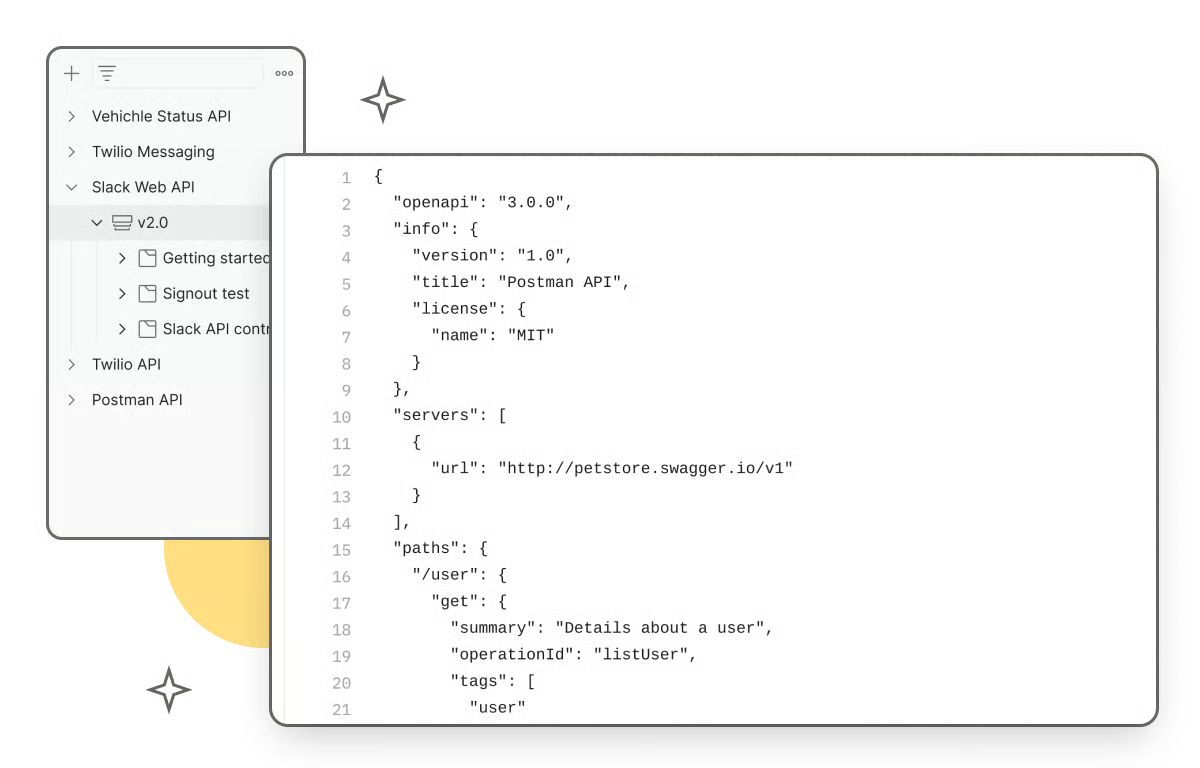
Postman centralizes API testing activities that are often scattered across scripts, documentation, and ad hoc tools. Users note that collections and environments make structuring test cases easier to manage and reuse, which becomes critical as test coverage grows beyond a handful of endpoints.
The automation layer further strengthens its testing utility. Built-in scripting allows teams to validate responses, assert conditions, and catch breaking changes automatically, which reduces manual testing effort and accelerates debugging.
The interface is clean and structured around testing workflows, so even complex API suites stay manageable. Setup is quick, and the ability to work both locally and in the cloud supports different testing environments without adding friction. Adoption across company sizes is also well balanced, 33% small business, 37% mid-market, and 30% enterprise, showing that it scales from individual testers to larger QA and engineering teams.
Reviewers also frequently highlight how Postman helps teams organize and reuse API work. The collections and environment features allow related requests to be grouped, variables reused, and test suites shared across teams, which streamlines API workflow and reduces duplication of effort.
Another distinct strength mentioned in user reviews is Postman’s support for complex request workflows and flexible protocol handling. Users note that the tool supports a variety of API types, makes it easy to send HTTP requests with parameters and headers, and enables teams to design and verify rich API interactions without writing custom tooling.
The platform supports pre-request scripts for handling authentication token generation and post-request scripts for automated response validation, which reviewers describe as eliminating repetitive manual steps when running multiple API calls. This scripting capability helps teams chain complex API workflows together efficiently, reducing the need to validate responses manually after each execution.
Collaboration and versioning in Postman are centered around shared collections and team workflows, which align well with centralized API testing environments. This model differs from Git-style branching and diff-based version control, making it more structured for teams accustomed to repository-driven change tracking. For organizations using Postman as their primary collaboration layer, the shared collection approach supports consistency and coordinated testing without relying on external tools.
Postman is built as a comprehensive API testing platform, which can feel more resource-intensive in lower-spec environments or for simple, single-endpoint checks. This is more noticeable for lightweight use cases, while teams running structured QA workflows with collections and automation align well with the platform’s depth and capabilities.
With a 4.6/5 G2 rating, Postman remains one of the most practical tools for API-centric software testing. Its combination of structured organization, automation, and clear feedback makes it especially valuable for teams that treat API reliability as a core quality signal. Despite those considerations, the depth of testing control and proactive guidance it offers is why users continue to see Postman as a go-to platform for API testing in modern software teams.
What I like about Postman:
- It centralizes API testing, debugging, and automation, letting teams validate responses and automate checks without switching tools.
- The platform is accessible and easy to scale. Its clean interface, quick setup, and support for local and cloud testing make API workflows efficient as projects grow.
What G2 users like about Postman:
“I really like Postman’s ability to centralize API development, testing, and collaborative workflow. I use it a lot as a software developer, especially when working with APIs in our software. It helps me avoid directly implementing APIs in code by first checking API responses in Postman, making it easier to use them in production. I find the collections and environment features very valuable for organizing testing. The initial setup was straightforward, with installation and setup being really quick.”
– Postman review, Rakshit N.
What I dislike about Postman:
- Collaboration and versioning rely on shared collections and team workflows, which differ from Git-style branching and diff-based tracking. This is more noticeable for teams used to repository-driven version control, while the shared model supports consistent, centralized API testing without external dependencies.
- Postman’s comprehensive feature set can feel more resource-intensive for simple or low-volume API checks. This is most relevant in lightweight use cases, while structured QA workflows with collections and automation align well with the platform’s depth.
What G2 users dislike about Postman:
“Sometimes applications are quite resource-intensive, causing it to lag or consume a lot of memory when handling a large collection of APIs.”
– Postman review, Juhil K.
Need a broader view of API workflows? Compare these Postman alternatives for teams, scaling collaboration, and testing.
3. Salesforce Platform: Best for testing within complex Salesforce environments
Salesforce Platform is best suited for testing CRM-centric applications built on complex automation, integrations, and shared data models. Teams validate Flows, Apex logic, Lightning Web Components, APIs, and end-to-end business workflows inside the same system where those applications run, which keeps testing closely aligned with production behavior.
G2 reviewers repeatedly mention that Salesforce supports multiple testing paths depending on complexity. When declarative tools like Flows are sufficient, teams test logic quickly at that layer. When requirements go beyond that, they can shift to Apex or custom LWCs without leaving the platform.
From a testing perspective, that layered approach reduces blockers. Reviewers highlight that they’re rarely constrained by tooling limits, even when validating complex business rules or edge cases.
Testing becomes more efficient when data, automation, and CRM features all live in one ecosystem. Teams test changes in context rather than in isolation, which is especially valuable when validating end-to-end workflows like order capture, cart logic, approvals, or customer lifecycle processes.
Built-in compliance controls, security tooling, and Hyperforce infrastructure are frequently cited by teams operating in regulated environments. These capabilities allow testing to proceed without compromising data controls or organizational standards.
System guidance and built-in assistance further support testing at scale. Proactive assistance is rated at 90% on G2, reflecting how much users value in-platform feedback when validating large, interconnected orgs. Clear system cues help teams identify issues earlier and reduce trial-and-error during testing cycles.
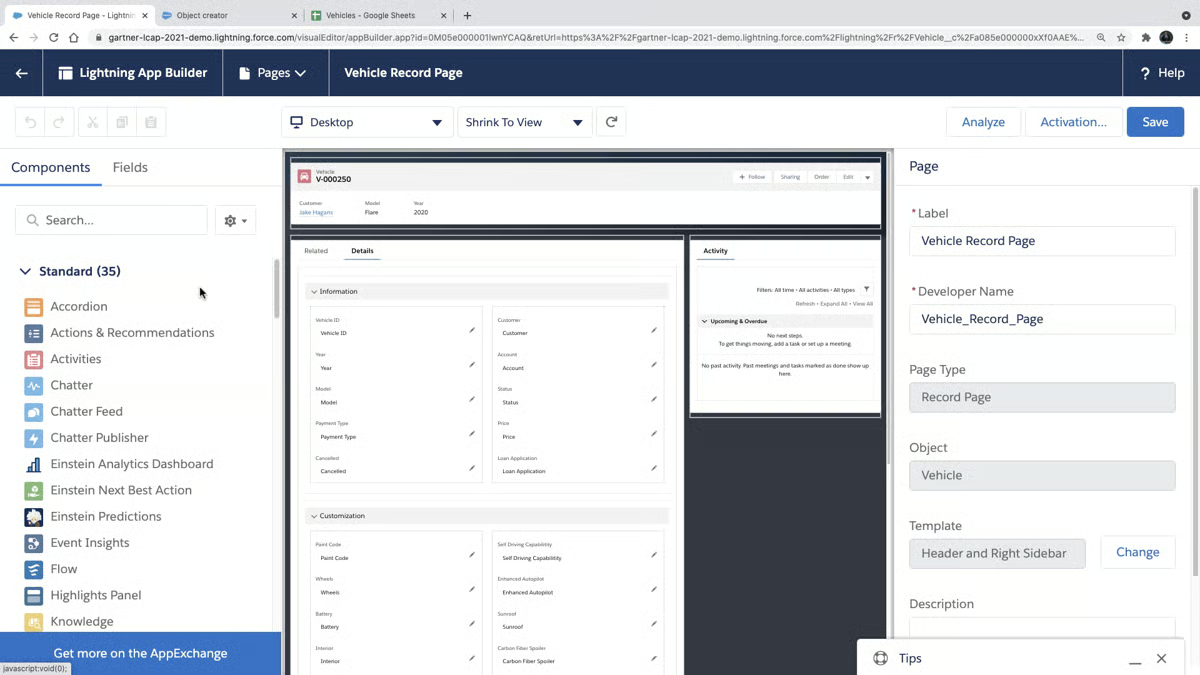
The platform supports both low-code (Flows, Process Builder) and code-based (Apex, Lightning components) development, allowing teams with varying technical skill levels to contribute to testing and customization. Reviewers highlight how this flexibility prevents teams from hitting capability limits, as they can shift from declarative tools to custom code when requirements exceed standard functionality.
Performance can be more sensitive during peak usage in large or highly customized environments, particularly with enterprise-scale testing and complex automation. This is most noticeable in high-volume, interconnected systems, while standard testing workflows align well with the platform’s performance profile.
Advanced Flows and automation provide deep customization, which can feel more configuration-heavy for teams expecting simple, out-of-the-box testing. This is most relevant for lightweight use cases, while teams building complex, scalable testing workflows benefit from the platform’s flexibility without relying on custom code.
Salesforce Platform is best suited for software testing in complex, CRM-driven environments where automation, integrations, and data integrity must be validated together. For mid-market and enterprise teams already operating at scale within Salesforce, it remains a trusted testing foundation. Its flexibility, centralized architecture, and enterprise-grade system support continue to make it a strong fit for production-critical testing workflows, supported by an overall G2 Score of 91.
What I like about Salesforce Platform:
- It supports testing across the full CRM stack, letting teams validate Flows, Apex, Lightning components, and integrations in production-like environments.
- The platform’s flexibility lets teams move from no-code to code-based testing seamlessly, handling edge cases and advanced automation as systems scale.
What G2 users like about Salesforce Platform:
“I appreciate the Salesforce Platform’s flexibility, which stands out as a significant advantage. Whether I need to automate a process, test a feature, or build a small customization, the platform provides multiple ways to achieve it without facing complications. This flexibility is valuable to me because when Flows can’t accomplish something, I always have the option to build it in Apex or create a custom Lightning Web Component (LWC), ensuring that, regardless of how complex the requirement may be, I have a reliable backup option.”
– Salesforce Platform review, Aniket C.
What I dislike about Salesforce Platform:
- Performance can be more sensitive in large, highly customized environments during peak usage. This is most noticeable in high-complexity deployments, while standard testing workflows align well with consistent performance expectations.
- Advanced Flows and automation provide deep customization, which can feel more configuration-heavy for teams expecting simpler workflows. This is most relevant for lightweight use cases, while teams building complex automation benefit from the platform’s flexibility.
What G2 users dislike about Salesforce Platform:
“Not many. But sometimes we have seen instances being compromised by hackers, but that can happen to any platform. Also, sometimes customers find it too costly.”
– Salesforce Platform review, Ankur S.
4. ACCELQ: Best for codeless test automation across web and APIs
ACCELQ is a low-code software testing platform that combines frontend and backend automation into a unified test flow. It’s designed to handle complex application testing while remaining accessible to QA teams that don’t want to rely heavily on custom scripts.
By supporting UI, API, and end-to-end testing in one place, ACCELQ positions itself as a tool for teams looking to scale automation without limiting ownership to developers alone.
ACCELQ adds the most value at the point where UI and API testing usually get split across tools. By allowing teams to design tests that span frontend actions and backend validations in one flow, it makes it easier to represent how applications are actually used in production.
Reviewers consistently mention that this leads to earlier defect detection, with issues surfacing during scheduled runs rather than late in release cycles. That level of consistency matters even more for teams that need tests to execute on their own infrastructure, where data control and compliance are non-negotiable.
ACCELQ’s low-code approach, supported by predefined commands and natural language–style test creation, makes it accessible to testers and developers with varying technical backgrounds.
The platform consistently receives high praise for proactive assistance, which is rated at 100%. Users often highlight how quickly support helps them resolve blockers or refine test scenarios, reinforcing the sense that the platform is designed to guide teams.
Users also frequently highlight that ACCELQ supports smart test maintenance and reduces manual effort. Its codeless, model-based automation reduces the need for scripting, which simplifies regression test upkeep over time. This capability helps teams minimize maintenance work and focus on expanding coverage rather than fixing brittle tests.
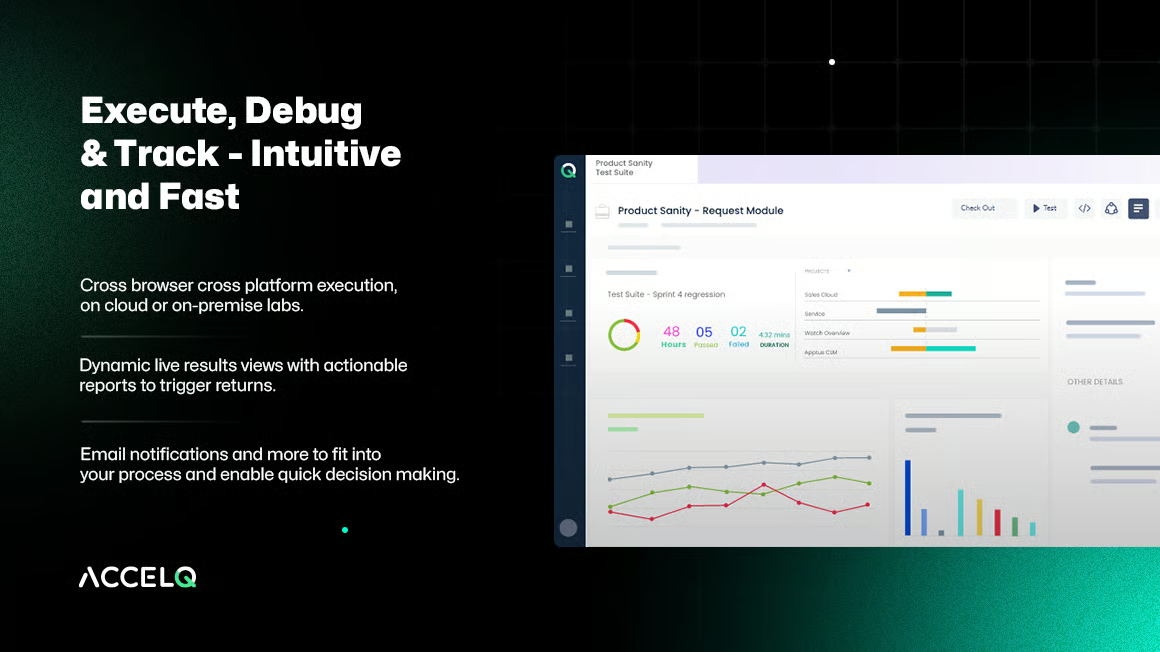
Reviewers often point to how easily they can identify over-tested and under-tested areas of an application, then use that insight to plan more deliberate test coverage. This visibility helps teams shift effort toward high-risk areas, improving coverage without increasing overall testing workload.
The platform integrates smoothly into mature CI/CD pipelines and supports cloud-based setups that minimize infrastructure overhead. Reviewers often mention seamless execution with tools like Jenkins, Jira, and other development workflow systems, which helps test teams embed automated validation deeply into delivery cycles.
Another distinct strength cited in user feedback is ACCELQ’s broad test support across different technology stacks and AI-driven helpers like self-healing components. Users note that self-healing tests reduce flakiness and improve reliability, while reusable test logic speeds up creation and adaptability as applications evolve.
Reporting and dashboards provide detailed coverage, which aligns well with larger test programs and enterprise-level visibility needs. In expansive test suites, navigation can feel more layered compared to tools designed for simpler reporting, while moderate test volumes align naturally with clear, actionable insights.
Configuration flexibility and integrations support complex environments and varied toolchains. Teams expecting a plug-and-play setup may find the platform more configuration-driven, while organizations with established automation frameworks align well with its integration depth across CI/CD pipelines.
ACCELQ is purpose-built for teams that need structured, end-to-end automation across complex applications without relying heavily on custom code. For organizations focused on improving test coverage, predictability, and cross-team collaboration at scale, ACCELQ remains a robust and efficient test automation platform.
What I like about ACCELQ:
- ACCELQ automates frontend and backend testing in a single flow, helping teams validate real user journeys and catch issues earlier in the release cycle.
- Its low-code model, predefined commands, and proactive assistance make automation accessible across skill levels while supporting enterprise testing and governance.
What G2 users like about ACCELQ:
“We needed both frontend and backend testing, and all the scheduled tests needed to run locally on our own servers, due to safety concerns for customer data, and AccelQ could give us that.
Been easy to learn, and little technical insight is needed to also cover more detailed and backend testing on my own with predefined commands. Whenever I’ve run into problems or needed assistance on how to solve a task, I’ve always gotten quick help from support to find a solution. Scheduled tests are predictable, and we are catching more bugs than before at an earlier stage, with an average of 1-3 per week.”
– ACCELQ review, Anniken Cecilie L.
What I dislike about ACCELQ:
- Reporting shows detailed coverage for governance, though extensive suites can feel visually dense. This is most noticeable in large test environments, while teams with moderate test volumes align well with the platform’s reporting clarity.
- Configuration supports complex environments and integrations, which can feel more configuration-driven for teams expecting immediate plug-and-play workflows. This aligns well with organizations operating structured CI/CD pipelines and integrated toolchains.
What G2 users dislike about ACCELQ:
“If you are unable to interact with the element or create logic, the ACCELQ support team will help, but you will need to be more patient.”
– ACCELQ review, Ankit K.
5. Apidog: Best for design-first API development and testing
Apidog is positioned around API testing as a primary testing workflow within software testing. Apidog combines API design, automated testing, and team collaboration in one place, which matches how QA and engineering teams validate APIs in day-to-day development rather than treating testing as a separate or isolated step.
Apidog’s biggest strength is how much manual effort it removes from API validation. Built-in automatic API testing allows you to define test cases once and run them repeatedly without re-sending requests or writing CURL commands every time. That consistency reduces uncertainty around endpoint behavior and shortens feedback loops during development and regression testing. It’s not surprising that autonomous task execution is its highest-rated feature on G2 at 86%, since a lot of the repetitive execution work simply runs in the background once configured.
API testing is rarely a solo activity, and Apidog’s shared workspaces make it easy to keep specs, environments, and test results aligned across frontend, backend, and QA. Reviewers frequently mention that coordination is smoother because changes sync automatically instead of living across disconnected tools. The interface reinforces this by keeping projects clearly organized, which helps when you’re managing multiple APIs or environments at once.
G2 reviewers describe the interface as clean, modern, and easy to navigate, with project organization built into the structure itself. Frontend, backend, and QA contributors can move between collections, environments, and documentation without losing their place. That clarity scales well as API counts grow.
Apidog consolidates API design, real-time documentation, mock servers, and test scripting in a single platform. Teams working across the full API lifecycle avoid switching between Postman, Swagger, and separate doc tools. That consolidation reduces version drift and keeps specs consistent.
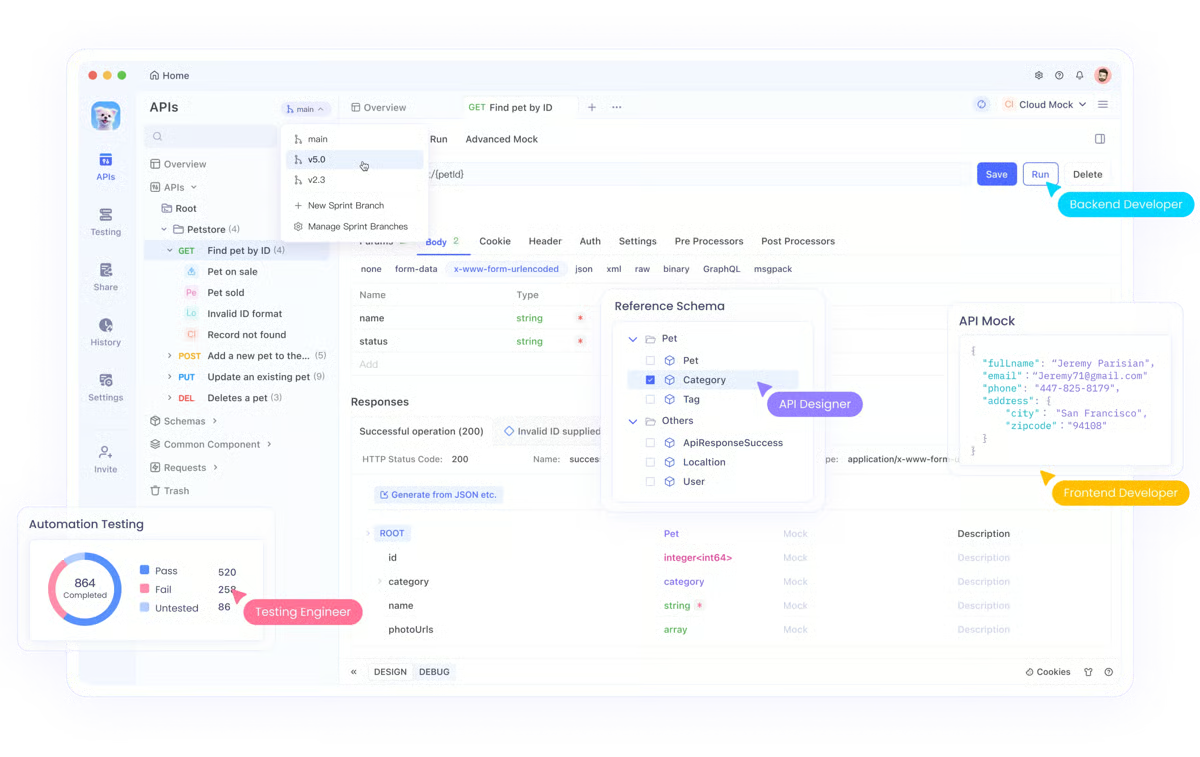
G2 reviewers highlight the ability to connect directly to a database and create test cases at the individual API level. The separation between the APIs view and the Runner keeps execution organized without cluttering the design workspace. Teams managing large API surfaces find that this structure reduces confusion during active testing.
Initial setup is smooth, and the free tier is usable for real API testing workflows without immediate cost pressure. That accessibility makes Apidog a practical starting point for smaller teams or those evaluating whether to consolidate their API toolchain.
Apidog’s environment configuration is built for structured, project-level workflows rather than ad-hoc or highly dynamic setups. G2 reviewers in active development contexts note that variable management and environment settings reflect a more controlled configuration model as APIs evolve. This aligns well with teams operating organized development workflows, while more fluid testing approaches may find the structure more defined.
Apidog’s feature set is broad, and accessing specific capabilities such as mock servers or role-based settings can feel more layered compared to lighter, single-purpose tools. This is most noticeable for teams transitioning from simpler platforms, while organizations working across multiple features align well with the platform’s comprehensive and well-organized interface.
All in all, Apidog is best suited for teams that treat API testing as a core part of their software QA strategy and want built-in automation and collaboration.
What I like about Apidog:
- Combines API design, automated testing, and execution in one interface, reducing repetitive requests and manual validation.
- Built-in automation and team coordination, including autonomous task execution, help run reliable API tests at scale.
What G2 users like about Apidog:
“I really like Apidog’s built-in automatic API testing, which removes a lot of manual work and uncertainty for me. Instead of repeatedly sending requests to see if an endpoint works, I can define tests once and let Apidog run them, which is great. Another feature I appreciate is the real team coordination, as API work is rarely done alone. Furthermore, Apidog uses tools that sync automatically and coordinate within, making it a seamless experience. The initial setup was also smooth and straightforward.”
– Apidog review, Peter M.
What I dislike about Apidog:
- Environment configuration is designed for structured API workflows, so variable management can feel more controlled in fast-changing setups. This aligns well with teams managing organized API environments, while simpler testing workflows may find the structure more defined.
- Feature navigation reflects the platform’s broad capability set, particularly around advanced settings like role management. This is more noticeable for teams transitioning from lighter tools, while the organized interface supports teams working across multiple features.
What G2 users dislike about Apidog:
“The environment configuration could be easier to maintain and less distracting. Additionally, I would really like to have Apidog as a VSCode extension.”
– Apidog review, Ahmed Mohammed Ahmed Abdullah A.
6. QA Wolf: Best for outsourced E2E automation with ongoing maintenance included
QA Wolf is a managed end-to-end testing solution built around ownership and reliability. It emphasizes consistent responsibility for test creation, execution, and maintenance, which supports dependable regression coverage without shifting the ongoing operational load onto internal QA or engineering teams.
QA Wolf focuses on replacing manual regression testing with maintainable, production-grade end-to-end tests. Reviews consistently point out that the tests catch meaningful regressions early in the SDLC, which improves release confidence and reduces last-minute testing pressure. This isn’t automation designed merely to inflate coverage numbers; the emphasis is on signal quality and long-term reliability.
QA Wolf owns test creation, execution, maintenance, and flake investigation, which keeps results consistent and actionable over time. That ownership model shows up in its strongest G2-rated capability, autonomous task execution at 83%, where tests continue to run and stay up to date without constant internal intervention.
Reviewers frequently describe the QA Wolf team as an extension of their own QA or QE group, highlighting communication, transparency, and predictable delivery once expectations are aligned.
G2 reviewers describe QA Wolf as proactive; the team asks clarifying questions to maximize test coverage rather than waiting on internal direction. Reviewers note they actively flag issues that weren’t explicitly scoped, which strengthens the overall reliability of the test suite over time. This initiative reduces the coordination burden on internal QA or engineering leads.
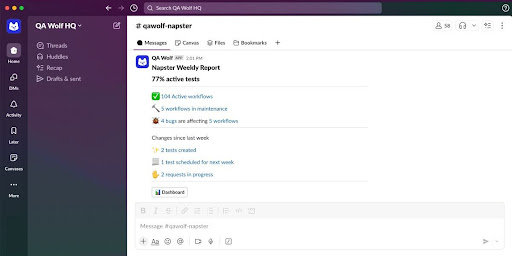
QA Wolf builds and maintains tests integrated directly into CI pipelines, running before every production deploy. That position in the delivery cycle means regressions surface before they reach production rather than after. Teams with frequent release cadences find this placement adds measurable confidence at each deployment gate.
G2 reviewers note that QA Wolf can take teams from minimal automation coverage to a functioning end-to-end suite without requiring significant internal infrastructure build-out. The partnership model accelerates time-to-coverage, which matters for product teams that have deprioritized automation investment. Reviewers describe the ramp from engagement to active test coverage as faster than building in-house from scratch.
QA Wolf resonates most with teams that need reliable automation quickly, without building and staffing a full in-house automation function. The score reflects a service that is still expanding its footprint but already delivering at a level that earns strong repeat confidence from the teams using it.
As an external delivery partner, QA Wolf builds product context outside of day-to-day team workflows. G2 reviewers working with rapidly shifting priorities note that alignment can be more noticeable in environments with frequent product changes. This model aligns well with teams that operate structured communication and documentation practices, while highly fluid development environments may experience more coordination overhead.
For organizations with an established internal automation function, QA Wolf’s service model can overlap with existing capabilities. G2 reviewers in mature QA environments describe stronger alignment for teams building automation processes from the ground up, while organizations with well-developed internal frameworks may find the scope more complementary than core.
QA Wolf is a strong fit for teams that want dependable end-to-end regression coverage without carrying the ongoing burden of building and maintaining automation internally. For organizations prioritizing reliable regression outcomes, QA Wolf remains a practical and well-reviewed option in the software testing category.
What I like about QA Wolf:
- It handles end-to-end testing, including creation, execution, maintenance, and flake investigation, reducing manual regression work.
- I feel like it’s clear communication and accountable execution help teams catch regressions earlier and ship with confidence.
What G2 users like about QA Wolf:
“They are extremely communicative, and their test quality is very high. On more than one occasion, they have prevented us from shipping important regressions by reporting bugs to us early in our SDLC. When we’ve needed to request information or changes to our tests, they have always been prompt and easy to correspond with.”
– QA Wolf review, Eric D.
What I dislike about QA Wolf:
- As an external delivery partner, QA Wolf builds product context outside of day-to-day team workflows. This is more noticeable in fast-changing environments, while teams with structured communication and documentation practices align more naturally with this model.
- QA Wolf’s service model can overlap with existing capabilities in organizations with mature internal automation functions. This aligns more strongly with teams building QA automation from the ground up, where the service model complements evolving processes.
What G2 users dislike about QA Wolf:
“While we had a great experience with QA Wolf, it’s possible that an organization with an already robust automated test engineering culture/processes might not have as much use for their services. We found their expertise key to building those processes and culture within our organization.”
– QA Wolf review, Olivia W.
7. Qase: Best for modern test case management and QA reporting
Qase is a test management tool designed to help teams create, organize, and execute test cases without adding process overhead. It gives QA teams a central place to document test scenarios, run manual and regression tests, and maintain consistent coverage across projects, keeping test management practical rather than heavy.
It centralizes test case management while staying lightweight. Teams can structure test cases, group them logically, and execute runs without complex workflows or excessive configuration. This makes it easier to maintain coverage across releases while keeping the test management approachable for day-to-day QA work.
G2 reviewers point to faster test case creation, clearer documentation, and less repetitive rework when maintaining similar test suites across releases. These AI-driven elements help teams spend more time executing and validating tests rather than rewriting or duplicating assets.
Qase is frequently described as dependable for routine execution, particularly for recurring regression suites and onboarding new contributors into existing test libraries. That consistency supports predictable QA cycles and reduces uncertainty during release validation.
The interface is familiar. Its Jira-like layout makes navigation intuitive for teams already working in agile environments, which directly impacts onboarding speed. New users can move from reading test cases to executing them with minimal ramp-up, and the structured format, steps, expected results, and supporting documentation help formalize testing as a repeatable process rather than an ad-hoc task.
That emphasis on clarity also shows up in how teams use Qase to solve real testing problems. Reviewers often mention using it to organize and document test cases across modules, making it easier for colleagues to understand what to test, even in areas they don’t work on every day. For teams juggling multiple features or shared ownership, this kind of visibility reduces handoffs and misalignment.
About 65% of users come from small businesses and 27% from mid-sized organizations, reflecting its focus on speed, usability, and structured execution rather than heavyweight process enforcement. Enterprise usage is smaller, suggesting the platform is optimized for teams that want strong fundamentals without added operational overhead.
From a feature standpoint, its highest-rated capability, Natural Language Interaction, reflects how users engage with its AI-driven elements. Many testers appreciate being able to work in more natural, descriptive ways when creating or reviewing test cases, which supports faster execution while maintaining accuracy.
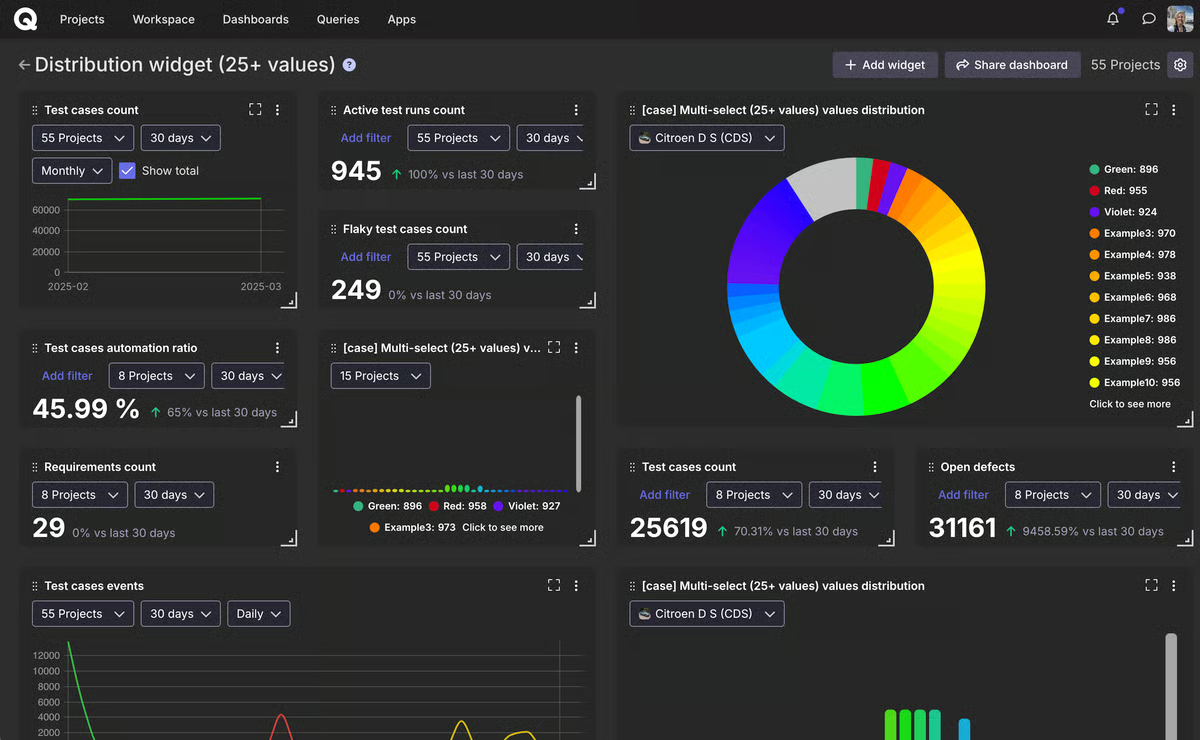
Qase’s reporting layer covers the core metrics most QA teams need for day-to-day workflows, though customization for deeper analytical views is more streamlined than some teams expect. This is most noticeable for teams with specific reporting requirements or those working in data-heavy testing environments, while standard test run tracking and progress visibility align well across a wide range of workflows.
Qase’s flexible structure for test case organization and attachments supports fast-moving teams, though larger collections can feel more open-ended as scale increases. G2 reviewers managing extensive test suites across multiple modules note that this flexibility is more noticeable in environments without consistent organizational patterns, while teams operating with shared structures align well with the platform’s adaptability.
Qase is a well-balanced software testing tool for teams that value clarity, speed, and AI-assisted documentation over complexity. Despite these considerations, its intuitive workflow, familiar interface, and strong natural-language capabilities make it a platform well-suited to fast-moving QA teams looking to standardize testing without slowing down delivery.
What I like about Qase:
- Test case documentation is structured yet fast, letting teams formalize QA steps without slowing work.
- AI-assisted workflows reduce time spent on repetitive test cases, supporting consistent regression coverage under tight deadlines.
What G2 users like about Qase:
“As for me, about Qase, it is a very effective AI test management software which helps and reduces the time in checking the quality of the work and projects, or even the task, and is very efficient in giving assured results.”
– Qase review, Shivani S.
What I dislike about Qase:
- Reporting covers essential QA metrics clearly, but teams that rely on highly customized dashboards or advanced analytical views may find the current options constrained. Standard execution tracking and progress reporting work well across most workflows.
- Flexible test case organization suits fast workflows, but large test libraries benefit from deliberate naming and grouping conventions. Teams that establish those early tend to scale their coverage without friction.
What G2 users dislike about Qase:
“I would like a way to make native test case attachments mandatory, but this is not possible without workarounds.”
– Qase review, Eric C.
8. Testlio: Best for crowdsourced testing across devices and locales
Testlio provides access to a global network of vetted professional testers, allowing teams to validate web and mobile applications under real-world conditions. By supporting testing across real devices, regions, languages, and payment systems, it helps product teams surface issues that lab-based or internal testing often misses.
Testlio delivers realistic, in-market testing coverage across devices, regions, and payment systems. Teams regularly use the platform to test local payment methods, regional cards, e-wallets, currencies, and language-specific user flows. Reviewers highlight how access to local testers removes blind spots during global launches, helping teams validate experiences as real users encounter them.
The quality of support feature is rated at 97%, while the ease of doing business with feature reaches 98%, reflecting how smoothly teams coordinate with Testlio’s testing network. G2 reviews frequently mention responsive communication and clear execution, which reduces operational friction during active testing cycles.
Core usability metrics on G2 remain strong, with ease of setup, ease of admin, and meets requirements each rated at 94%. These scores align with feedback describing minimal setup effort and the ability to start testing without heavy internal process changes or tooling overhead.
Several G2 reviewers emphasize the structured QA education and clearly defined testing procedures that Testlio provides. For developers and product teams, this goes beyond executing test cases; it helps build a deeper understanding of QA practices that can be applied across web and mobile projects. Some G2 reviewers also note that this learning component creates opportunities to participate in paid testing through Testlio’s ecosystem, which reinforces the platform’s community-driven model.
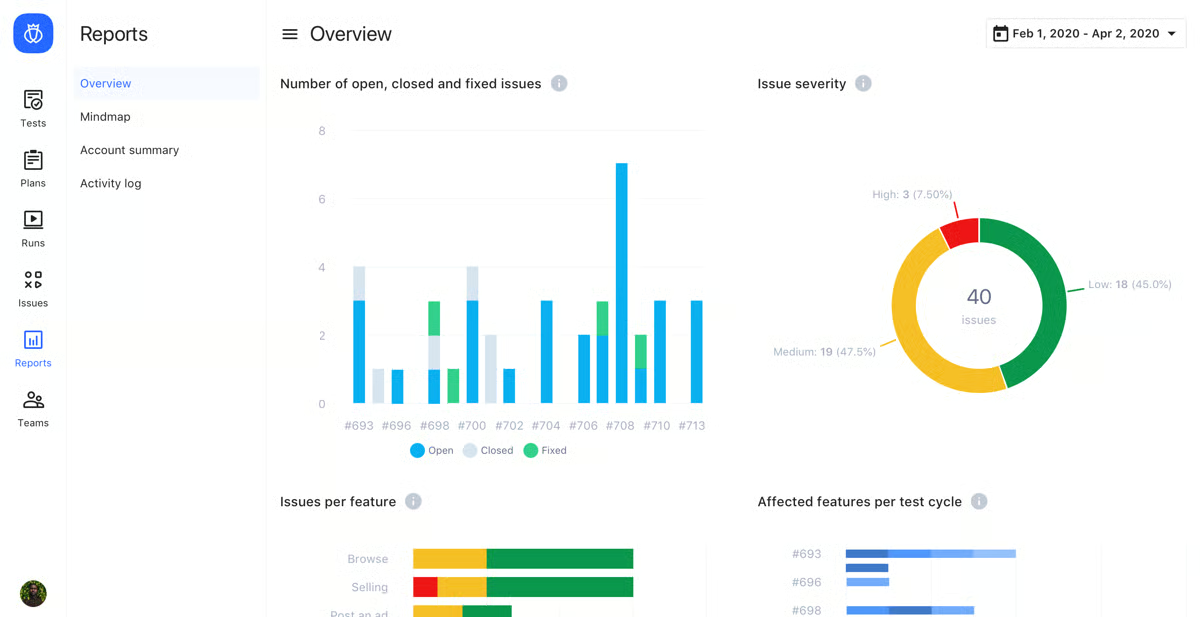
G2 reviewers describe Testlio’s resourcing model as one that scales with release demand rather than running at a fixed capacity. Teams can increase testing volume ahead of major launches and pull back during quieter periods without the overhead of managing headcount. Reviewers from lean engineering organizations specifically highlight how this elasticity lets internal teams stay focused on development while Testlio absorbs the surge in testing load.
Testlio’s onboarding process reflects its emphasis on tester quality and network integrity, resulting in a more structured engagement model than fully self-serve platforms. This is more noticeable for teams transitioning from lightweight, on-demand tools, while organizations that value curated tester networks and coordinated onboarding align well with this approach.
Testlio’s service model is built around account-managed engagements, which differ from fully independent, tool-level control over test execution. G2 reviewers oriented toward internal ownership of testing infrastructure note this distinction most clearly, while teams prioritizing partnership and coverage breadth align more naturally with the platform’s managed model.
Taken together, Testlio stands out in the software testing tools category for teams that need confidence in how their product performs in real conditions, not just controlled environments. With an overall G2 Score of 69, its combination of global tester coverage, highly rated support, and consistent ease-of-use makes it particularly effective for companies expanding into new markets or validating consumer-facing experiences at scale.
What I like about Testlio:
- Gives access to a global network of vetted testers, enabling validation across devices, regions, and languages.
- Coordination and execution feel smooth, with reviewers highlighting high Quality of Support and Ease of Doing Business With.
What G2 users like about Testlio:
“I love that Testlio offers comprehensive QA testing education, which greatly enhances my understanding and skills in quality assurance testing. This aspect is particularly valuable as it prepares me for diverse testing needs and potential career prospects. I appreciate the opportunity Testlio provides for learning detailed procedures involved in QA testing, which is essential for my roles in web and app development. The fact that Testlio teaches QA testing well is a standout feature for me, as it equips me with the necessary skills that are not only applicable to my personal projects but also hold promise for generating income if I get the opportunity to work with Testlio.”
– Testlio review, Daniel D.
What I dislike about Testlio:
- Testlio’s onboarding is structured and quality-driven, which involves more upfront coordination than instant-access tools. Reviewers consistently describe the experience as smooth once the engagement is underway.
- The managed service model suits teams that want coverage and partnership over direct tool control. Teams expecting hands-on platform access will find the operating model works differently than a self-serve solution.
What G2 users dislike about Testlio:
“The only real downside was our increased documentation requirements, but even then, Testlio has handled our testing needs with minimal to no documentation.”
– Testlio review, Dan F.
9. BlazeMeter Continuous Testing Platform: Best for CI-based performance testing
BlazeMeter is a continuous testing platform that brings performance, API, web, and mobile testing into a single environment, built for teams that want testing embedded directly into their development and delivery workflows.
One of the strongest themes in user feedback is how accessible the platform is given its scope. BlazeMeter scores highly for ease of setup (89%) and administration (86%), which indicates that teams are able to get meaningful tests running without prolonged onboarding. Reviewers often mention that creating, scaling, and automating tests are straightforward, even as test coverage grows across environments. That balance between capability and usability is a big reason it shows up in mid-market and enterprise stacks.
Across G2 reviews, BlazeMeter is frequently described as a shared testing layer that helps QA, developers, and DevOps validate mobile apps, web applications, and APIs in parallel. That unified approach reduces handoffs and makes testing feel like a continuous process rather than a bottleneck at the end of a sprint. Its strong scores for ease of use (85%) and meeting requirements reflect how well it fits into existing workflows without heavy process changes.
With 84% satisfaction for the quality of support, many reviewers call out responsive assistance and quick follow-ups. For teams running automated tests as part of CI/CD pipelines, having reliable support in the background adds confidence when issues surface under real delivery pressure.
BlazeMeter’s browser extension makes API recording straightforward, capturing requests without requiring manual scripting and saving them in usable formats. That recording capability reduces setup friction for new test scenarios and shortens the path from workflow to executable test. Teams building out regression coverage quickly find this a practical starting point.
G2 reviewers point to BlazeMeter’s native JMX file support as a meaningful advantage for teams already running JMeter-based tests. Scripts recorded or generated in BlazeMeter can be exported and used directly in JMeter, giving teams flexibility in how they manage and execute performance tests across environments. That portability reduces lock-in and makes BlazeMeter easier to fit into existing toolchains.
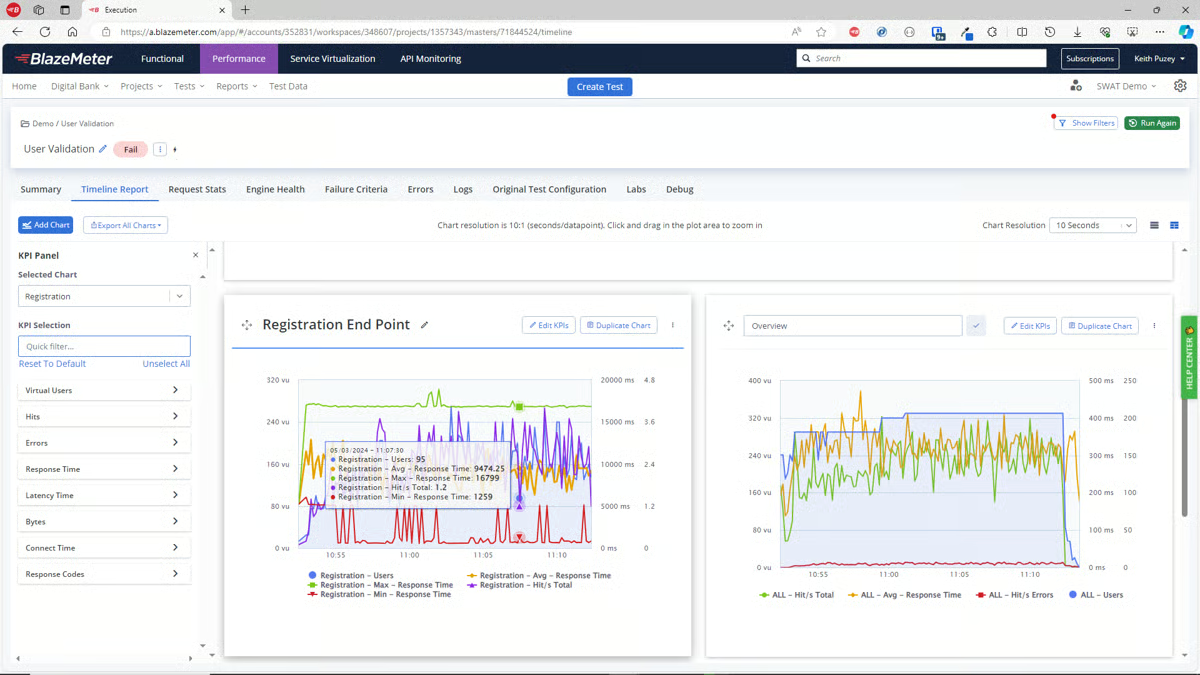
BlazeMeter’s reporting interface is clear and organized, giving teams a centralized view of performance test scenarios and results without needing to reconstruct data from multiple sources. That visibility helps QA leads and DevOps teams track test outcomes across runs and identify where performance degrades under load. The reporting structure is consistently described as readable and actionable for teams monitoring test trends over time.
BlazeMeter is designed for teams running large, frequent test cycles as part of mature delivery pipelines, which means the platform’s investment level reflects that scale. G2 reviewers at earlier stages of their testing program note that the scope and cost can feel more extensive than what simpler or less frequent workflows require, while teams with established automation programs align closely with the platform’s depth.
Integrating BlazeMeter with highly customized CI/CD configurations reflects a more configuration-driven approach than standard pipeline setups. G2 reviewers working with complex toolchains note that this is more noticeable in highly customized environments, while teams operating within standardized pipelines align well with the platform’s test execution and delivery integration capabilities.
BlazeMeter is best suited for software teams that view testing as a continuous, shared responsibility across roles. Its ability to unify multiple testing types, scale with growing applications, and support collaborative workflows makes it a strong fit for mid-market and enterprise organizations that need reliable, automated testing as part of modern software delivery, supported by a G2 Market Presence Score of 70 .
What I like about BlazeMeter Continuous Testing Platform:
- BlazeMeter unifies performance, API, web, and mobile testing, letting QA, Dev, and DevOps teams work from a single platform without switching tools.
- Reviewers highlight its ease of setup and administration, making it simple to create, automate, and scale tests even across multiple environments and pipelines.
What G2 users like about BlazeMeter Continuous Testing Platform:
“BlazeMeter is one of the best tools that I have used so far for Testing. It helps QA engineers, developers, and the DevOps team in our organization to streamline, scale, and automate the testing process. I love its efficiency, functionality, and ease of use. Customer support is also very active and provides instant support.”
– BlazeMeter Continuous Testing Platform review, Aashish K.
What I dislike about BlazeMeter Continuous Testing Platform:
- BlazeMeter is built for mature, high-volume testing programs, so teams at earlier automation stages may find the platform’s scale exceeds their current needs. Teams that have grown into complex pipelines tend to find the depth well worth the investment.
- Integrating with customized CI/CD pipelines takes additional setup and troubleshooting time. Once the configuration is stable, reviewers describe the execution as consistent and reliable across environments.
What G2 users dislike about BlazeMeter Continuous Testing Platform:
“It has complex integration with existing CI/CD pipelines and tools. Complex means taking time and troubleshooting.”
– BlazeMeter Continuous Testing Platform review, Rohit K.
Comparison of the best software testing tools
Software | G2 rating | Free plan | Ideal for |
BrowserStack | 4.5/5 | Free trial available | Cross-browser and real-device UI testing at scale without managing device labs |
Postman | 4.6/5 | Free plan available | API testing, collaboration, and standardized backend workflows |
Salesforce Platform | 4.5/5 | Free trial available | Testing highly customized Salesforce apps, automations, and business logic |
ACCELQ | 4.8/5 | Free trial available | Codeless, enterprise-grade automation across web, API, and backend systems |
Apidog | 4.9/5 | Yes. Free plan available | Design-first API development with built-in testing and documentation |
QA Wolf | 4.8/5 | No | Teams outsourcing end-to-end test automation with ongoing maintenance |
Qase | 4.7/5 | Yes. Free plan available | Modern test case management and QA reporting across releases |
Testlio | 4.7/5 | No | Managed crowdsourced testing across devices, locales, and release cycles |
BlazeMeter Continuous Testing Platform | 4.0/5 | Yes. Free plan available | Performance and load testing integrated into CI pipelines |
*These software testing tools are top-rated in their category, based on G2’s Winter Grid® Report. All offer custom pricing tiers and demos on request.
Best software testing tools: Frequently asked questions (FAQs)
Got more questions? G2 has the answers!
Q1. What is the best software testing tool for automated regression testing?
QA Wolf stands out for automated regression testing. It focuses on reliable end-to-end regression coverage, with full ownership of test creation, execution, and ongoing maintenance, helping teams catch regressions early without increasing internal QA overhead.
Q2. What is the top-rated software testing platform for enterprises?
ACCELQ is the most enterprise-aligned platform in the list. It is widely adopted by large QA organizations and is designed for structured, scalable automation across web, API, and backend systems with strong governance and coverage visibility.
Q3. Which software testing platform offers the widest browser and device coverage?
BrowserStack offers the widest browser and real-device coverage. Reviews consistently highlight its extensive access to real iOS and Android devices, multiple OS versions, browsers, and resolutions without requiring teams to manage physical device labs.
Q4. Which solution supports multi-environment testing?
Postman supports multi-environment testing through its use of environments, variables, and collections. Teams commonly use it to test APIs across development, staging, and production environments within the same workflow.
Q5. Which vendor provides AI-powered test case generation?
Qase provides AI-assisted test case creation. Its AI workflows help teams generate, review, and maintain test cases faster, especially for regression suites and repeated testing scenarios.
Q6. Which vendor offers real-time bug tracking in testing tools?
Qase supports real-time visibility into test execution results and failures during test runs. Its test management and reporting features help QA teams track issues as they are discovered during manual and regression testing cycles.
Q7. What is the most affordable software testing software for SMBs?
Apidog is one of the most affordable options for SMBs, with a free plan and low-cost paid tiers. It combines API design, testing, and automation in a single workspace, making it cost-effective for small teams focused on API quality.
Q8. Which tool supports testing for compliance-heavy industries?
Salesforce Platform is best suited for compliance-heavy environments. Reviews highlight its built-in governance, auditability, access controls, and suitability for regulated industries where testing must align closely with production data and business logic.
Q9. What platform integrates testing tools with CI/CD systems?
BlazeMeter Continuous Testing Platform integrates deeply with CI/CD pipelines. It is designed to run automated performance, API, and load tests as part of continuous delivery workflows using tools like Jenkins and other CI systems.
Q10. What platform provides analytics on test coverage?
ACCELQ provides strong analytics and visibility into test coverage. Reviewers frequently mention its ability to identify under-tested and over-tested areas, helping teams plan and optimize coverage across complex applications.
From test noise to release confidence
Choosing software testing tools is less about filling gaps and more about shaping how quality is owned and sustained. The best outcomes come when testing fits naturally into how teams build, ship, and learn. When that alignment is missing, teams lose time managing flaky results, fragmented signals, and eroding confidence around releases.
Across real environments, the impact of this decision compounds quietly. Tools that reduce handoffs, clarify ownership, and keep feedback tight tend to stabilize delivery under pressure. Poor fits push teams into reactive modes, where testing becomes friction rather than protection. Over time, that drag shows up as slower releases, higher rework, and skepticism in results meant to create trust.
I treat this category as an operating model choice, not a one-time purchase. The right fit reinforces discipline and keeps execution simple when pressure rises. The wrong one adds cognitive load and forces workarounds. Start from your existing failure modes and look for consistency under real conditions. When quality conversations get simpler, not louder, you’re choosing with confidence.
Ready to strengthen your QA program? Explore leading test management tools on G2 to improve coverage, streamline test cycles, and ship with confidence.