



I’ve reviewed enough G2 data on cloud infrastructure to know that the best cloud data security software is where sensitive data either gets controlled or gets exposed. Data sprawl, misconfigured access, and weak visibility across shared environments surface fast in audits and incident reviews.
This shows up across security operations, platform engineering, and compliance teams that share accountability but not always tooling. Market signals reinforce the urgency. The cloud data security market was estimated at $4.75B in 2024 and is projected to reach $11.62B by 2030. Choose the wrong tool and detection slows, ownership drifts, and response work leaks across teams.
My conclusions come from aggregating patterns across large volumes of user reviews. Strong platforms show clear data visibility, low-friction policy enforcement, and controls that align with how teams actually operate in cloud environments. Weaker tools add more alerts without helping teams make better decisions. Those costs compound quietly. Once data access and protection processes harden around the wrong system, reversal becomes slow and expensive.
In this guide, I map tools to the problems teams are most often trying to solve. The top 10 cloud data security tools include Acronis Cyber Protect Cloud, Druva Data Security Cloud, Sprinto, Coro Cybersecurity, Check Point Harmony, Rubrik, IBM Guardium, Check Point CloudGuard CNAPP, Cisco Duo, and CrashPlan Platform.
10 best cloud data security software for 2026: My top picks
- Acronis Cyber Protect Cloud: Best for cloud backup and cyber protection
Combines data protection, cybersecurity, and management into a single platform for MSPs and IT teams. (Pricing available on request -custom quotes on MSP-based licensing models) - Druva Data Security Cloud: Best for SaaS-native data protection and governance
Cloud-based backup, ransomware recovery, and sensitive data visibility across endpoints, SaaS, and cloud workloads. (Free tier available; paid tiers vary: pricing depends on plan and features) - Sprinto: Best for fast-growing teams building repeatable cloud security
Automates evidence collection, controls monitoring, and risk management for SOC 2, ISO 27001, and other frameworks. (Pricing available on request) - Coro Cybersecurity: Best for unified cloud security for small and mid-market teams
All-in-one platform covering cloud data protection, endpoint security, email security, and threat detection. (Starts at $9.50/user/month, billed annually) - Check Point Harmony Email & Collaboration: Best for cloud email and collaboration security
Advanced phishing prevention, malware detection, and data loss protection for email and SaaS collaboration platforms. (Pricing available on request) - Rubrik: Best for enterprise-grade cloud data security and cyber recovery
Zero Trust architecture with backup, ransomware detection, and sensitive data monitoring across hybrid environments. (Pricing available on request) - IBM Guardium Data Detection and Response: Best for governance-led cloud data security
Real-time visibility into data access, risks, and anomalies across cloud and hybrid data stores. (Usage-based pricing, starts at ~$1,200/year for 100 Resource Units; multi-year contracts available) - Check Point CloudGuard CNAPP: Best for prevention-led multi-cloud security
Secures cloud data, workloads, identities, and posture across multi-cloud environments. (Free trial available; pricing available on request) - Cisco Duo: Best for identity-first cloud data security anchored in strong MFA
Multi-factor authentication and zero-trust access controls to protect cloud applications and data. (Free for up to 10 users; paid plans start at $3/user/month) - CrashPlan Platform: Best for reliable SaaS backup and fast recovery
Continuous backup and fast recovery for endpoints to prevent data loss from ransomware or device failure. (Pricing available on request)
*These cloud data security platforms are top-rated in their category based on G2’s Winter 2026 Grid® Report. I’ve highlighted their core strengths and pricing availability to help you choose the right solution for protecting sensitive data across cloud applications, endpoints, and infrastructure.
10 best cloud data security software I recommend
The best cloud data security tools give teams a clear visibility into data flows across cloud apps, highlight risky behaviors, and enforce governance policies without slowing teams down.
This isn’t only an enterprise problem, either. G2 Data shows adoption spread across small teams, mid-market companies, and large organizations alike. As more businesses rely on cloud-native tools, teams of all sizes need ways to secure data without heavy infrastructure or complex setup.
The best cloud data security software does this thing really well. It tells you where your sensitive data is, who has access to it, and whether that’s a problem, before it becomes one.
How did I find and evaluate the best cloud data security software?
I used G2’s Winter 2026 Grid® Report to shortlist leading cloud data security platforms based on verified user satisfaction scores and market presence across small teams, mid-market companies, and enterprise organizations.
Next, I used AI to analyze hundreds of verified G2 reviews and pulled out recurring themes around what matters most in real-world cloud security environments. This included visibility into data across SaaS apps, effectiveness of data loss prevention policies, and more.
I also validated my analysis by cross-checking insights from security, IT, and compliance teams who actively use these tools in production environments. All visuals and product references included in this article are sourced directly from G2 vendor listings and publicly available product documentation.
What makes the best cloud data security tools worth it: My criteria
In reviewing a large volume of verified G2 feedback, examining how teams protect and govern data across cloud environments, and gathering input from security, IT, and compliance professionals, clear patterns began to emerge. Those patterns guided my evaluation of the most reliable cloud data security software.
- Visibility across cloud data, not just alerts: Strong cloud data security software gives teams a clear, continuous view of where sensitive data actually resides, how it moves, and who can access it. Tools that only surface isolated alerts tend to create noise rather than clarity. The best platforms make it easy to answer practical questions quickly: what data is exposed, why it’s exposed, and whether the risk is increasing or contained.
- Policy enforcement that aligns with how teams work: Security policies that look good in theory often break down in day-to-day operations. I look for platforms that let teams enforce controls without forcing rigid workflows or constant manual intervention. When policies adapt to real usage patterns, rather than fighting them, security teams spend less time managing exceptions and more time reducing actual exposure.
- Actionable context, not just detection: Finding sensitive data or risky behavior is only half the job. The difference between average and strong cloud data security software is how clearly it explains the next steps. Tools that connect detections to business context, such as ownership, data type, and access pathways, help teams respond faster and with more confidence, instead of escalating everything as a critical incident.
- Scalability across users, apps, and data volume: What works for a small cloud footprint often falls apart at scale. I pay close attention to whether platforms maintain performance and clarity as data volumes grow and SaaS usage expands. Tools that slow down, delay results, or break into disconnected views as they scale tend to create gaps exactly when teams need control the most.
- Practical automation that reduces manual effort: Automation is valuable only when it meaningfully reduces repetitive work. I favor platforms that automate classification, policy enforcement, and remediation in ways teams can trust. Over-automation without transparency often creates hesitation, while thoughtful automation frees teams to focus on higher-risk issues instead of routine clean-up.
- Integration with existing cloud ecosystems: Cloud data rarely lives in isolation. Effective cloud data security software fits naturally into existing SaaS, identity, and governance stacks rather than operating as a disconnected layer. When integrations are shallow or unreliable, teams end up exporting data and reconciling issues manually, which increases both risk and operational cost.
Based on these criteria, I narrowed the list to cloud data security software that consistently delivers strong visibility, operational clarity, and the ability to scale alongside growing cloud environments. Not every platform is designed to solve the same problems equally, so the right choice depends on your organization’s priorities, whether that’s centralized governance, automated enforcement, deep cloud integrations, or enterprise-grade compliance controls.
Below, you’ll find authentic user reviews from the cloud data security software category. To appear in this category, a tool must:
- Protect sensitive data stored in or shared through cloud applications.
- Control access, data usage, and storage based on defined security policies.
- Track cloud environments to catch data exposure, misuse, or compliance risks.
- Offer reporting and insights that support governance, risk, and regulatory needs.
This data was pulled from G2 in 2026. Some reviews may have been edited for clarity.
1. Acronis Cyber Protect Cloud: Best for cloud backup and cybersecurity management
Acronis Cyber Protect Cloud treats cloud data security as a single, continuous system, combining backup, protection, and recovery into one operational model. For IT teams and managed service providers that want backup, cybersecurity, and endpoint management to work together without stitching separate tools, the platform is built around exactly that need.
Teams describe the administrative load as lighter once backup, security, and monitoring run from a single console. Data security scores 93% on G2, matching the category average, consistent with how G2 reviewers describe predictable oversight across endpoints.
Recovery workflows are described as stable enough to support business continuity rather than serving only compliance needs. That dependability is often highlighted when devices fail or incidents require rapid recovery. G2 users rate data encryption and security at 93%, above the category average, which aligns with how reviewers describe confidence during failure scenarios where restores need to work reliably.
Consistent policy enforcement, automated ransomware protection, and active threat detection are repeatedly mentioned as ways to scale coverage without adding headcount. For IT teams and MSPs, that combination supports consistent protection across many systems. Data loss prevention scores 92% on G2, reflecting how consistently G2 reviewers describe protection holding up at scale.
Real-time email notifications during attacks and vulnerability assessments that catch outdated or risky components early are frequently highlighted in G2 reviews. AI-based threat detection adds another layer of confidence against both known and emerging threats. For MSPs managing many client environments, this proactive visibility helps address issues before they grow.
The platform is straightforward enough that IT admins without specialist certifications can use it confidently. G2 reviewers describe being able to delegate tasks across the team without risk of errors, with no extensive training needed to get started. For MSPs managing staff at different skill levels, accessibility reduces onboarding time and keeps operations running smoothly.
About 73% of users come from small businesses, with another 25% from the mid-market and limited enterprise adoption. That mix aligns with the platform’s positioning as enterprise-grade protection delivered in a format that smaller IT teams and service providers can realistically run.
The platform’s depth means initial setup can feel technical, particularly for new users working through backup, security, and management settings for the first time. Teams with lighter technical experience may need extra time during rollout, especially when expanding into additional modules. Once configured, G2 reviewers describe the platform as reliable and straightforward to manage day to day.
Built-in reports cover core backup and security needs but do not extend to detailed or customizable analytics. Teams running heavy backup schedules or managing many endpoints may find the standard views too broad to get the specific breakdowns they need. For administrators focused on operational control and monitoring rather than deep reporting, the built-in coverage handles day-to-day oversight well.
Overall, Acronis Cyber Protect Cloud fits teams that want backup, security, and recovery to run as one coordinated system. Based on G2 reviews and satisfaction signals, it’s especially well-suited for small and mid-market IT teams and MSPs managing many endpoints without juggling separate tools. For organizations prioritizing dependable recovery and streamlined day-to-day operations, Acronis reads like a practical, high-confidence choice.
What I like about Acronis Cyber Protect Cloud:
- Users say Acronis brings backup, cybersecurity, and endpoint management into one platform, so teams can manage everything from a single console instead of juggling multiple tools.
- Backup and recovery reliability stands out across reviews. Fast restores and strong ratings for encryption and data security reinforce trust beyond basic backup use.
What G2 users like about Acronis Cyber Protect Cloud:
“ What I like most about Acronis Cyber Protect Cloud is how everything is managed from a single, easy-to-use dashboard, which lets us manage backups, security, and monitoring from one place instead of switching between different tools. The backup and recovery process is very reliable, providing confidence that our data is always protected. I really appreciate the built-in security tools, like anti-malware and vulnerability assessments, that help us take a more proactive approach.
The anti-malware adds an extra layer of protection without needing separate software for basic endpoint security. The vulnerability assessments help identify outdated or risky components early on, preventing small issues from becoming bigger problems. Altogether, these features save us time and make our overall management process much more efficient.”
– Acronis Cyber Protect Cloud review, Mohamed A.
What I dislike about Acronis Cyber Protect Cloud:
- The platform’s depth means initial setup can feel technical for new users, particularly when working through backup, security, and management settings for the first time. Once configured, G2 reviewers describe it as reliable and straightforward to manage day to day.
- Reporting covers backup and security basics well, which suits operational oversight but may feel limited for teams running heavy backup schedules in smaller environments.
What G2 users dislike about Acronis Cyber Protect Cloud:
“One area that could be improved is that some integrations with third-party tools require extra configuration, which can take time. However, once everything is set up, the platform works seamlessly and delivers excellent protection.”
– Acronis Cyber Protect Cloud review, Moses Afotey N.
2. Druva Data Security Cloud: Best for SaaS-native data protection and governance
Mid-market and enterprise teams running SaaS-heavy environments often struggle to keep data protected without adding infrastructure overhead. Druva Data Security Cloud solves this by delivering backup, ransomware recovery, and sensitive data visibility entirely in the cloud, with no servers, hardware, or maintenance cycles to manage.
Everything runs as SaaS, removing the need for on-premises hardware, storage management, or upgrade coordination. Once connectors are configured, backups and protections run quietly without requiring daily attention from IT teams. Data security scores 99% on G2, which reviewers connect to a platform that stays stable and trustworthy once deployed in production environments.
Druva brings endpoint data, SaaS platforms such as Microsoft 365 and Google Workspace, and cloud workloads into one view. G2 reviewers describe this as removing the need to manage separate tools for backup, compliance, and recovery. Having everything in one place makes it easier for smaller IT teams to stay on top of protection as their environments grow.
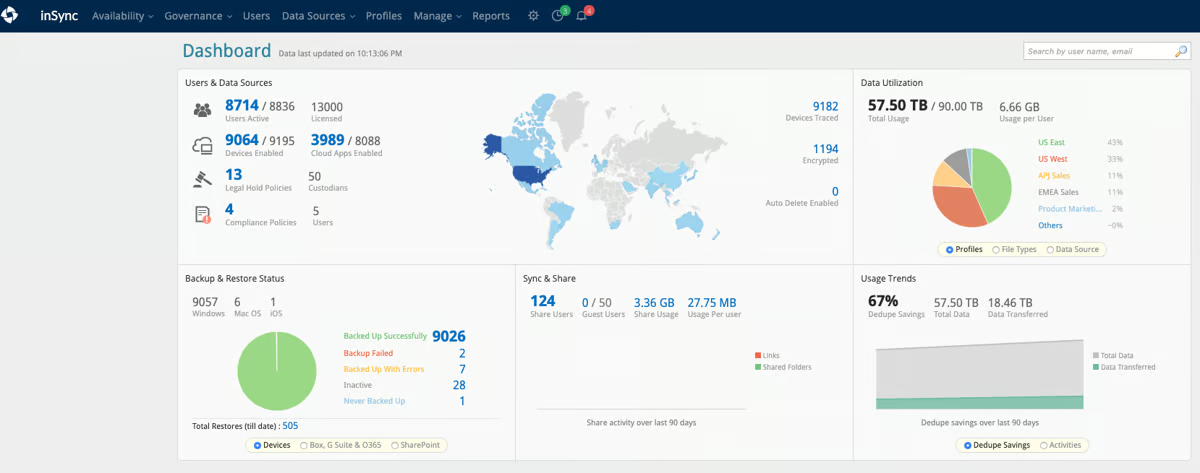
Fast, predictable restores are frequently highlighted in G2 reviews, particularly in situations where access needs to be restored quickly. That consistency is a key reason teams feel confident relying on Druva during high-pressure incidents.
Druva’s support team is a recurring positive across G2 reviews. Reviewers describe account managers who check in regularly, take time to understand the customer’s environment, and offer guidance that goes beyond generic fixes. For teams running security tools tied closely to business risk, that level of support builds long-term confidence.
The backups are designed so they cannot be changed or deleted after creation. G2 reviewers connect this directly to ransomware resilience, describing confidence that data stays recoverable even after an attack. Data loss prevention scores 98% on G2, well above the category average of 91%, which aligns with how G2 reviewers describe protection holding up during high-stakes incidents.
G2 reviewers describe setting up backup for services like Google Workspace as straightforward, with restores working reliably every time they were needed. Data encryption and security scores 98% on G2, reflecting consistent confidence in how data is kept safe at rest and in transit.
Druva surfaces all events by default, with no automatic filtering by priority. Teams with busy environments may find the volume of alerts broad to sort through before adjusting notification settings. Once preferences are set, G2 reviewers describe the system as reliable and easy to manage day to day.
The dashboard grows as new features are added, with no simplified view for users who only need core functions. Teams that log in less frequently may need time to find updated sections when new capabilities appear. G2 reviewers describe the overall structure as consistent, and most find navigation straightforward once familiar with the layout.
Druva Data Security Cloud is well-suited for teams that want reliable data protection without managing infrastructure. Based on G2 reviews, it fits especially well for mid-market and enterprise teams that need consistent protection across endpoints, SaaS applications, and cloud workloads. For teams that want security to run quietly in the background without constant oversight, Druva would be a good fit.
What I like about Druva Data Security Cloud:
- Druva’s cloud-native architecture removes much of the operational overhead from data security. No hardware, patching, or infrastructure planning keeps protection running quietly in the background.
- The strength of Druva’s data protection capabilities consistently stands out in reviews. Immutable backups, strong encryption, and data loss prevention support fast, reliable recovery for SaaS and endpoint data.
What G2 users like about Druva Data Security Cloud:
“I appreciate Druva Data Security Cloud for its ease and speed in setup, which makes the initial configuration process very straightforward. I love how I can monitor the status of my backups from any internet-connected device, providing flexibility and rapid updates on the system’s status. I find the solution stable and robust, which gives me confidence in its reliability and consistent performance, ensuring that data backup and recovery processes are efficient and hassle-free.”
– Druva Data Security Cloud review, B S.
What I dislike about Druva Data Security Cloud:
- All alerts come through by default, with no built-in way to filter by importance. Busy teams may need to spend time adjusting settings before the volume feels manageable. Most G2 reviewers find it easy to stay on top of once set up.
- New features keep getting added, and the dashboard grows with them. Users who don’t log in often may need a moment to find their way around. G2 reviewers say the layout stays predictable enough to pick up quickly.
What G2 users dislike about Druva Data Security Cloud:
“While the platform is user-friendly, the reporting features could be more customizable for detailed compliance needs. Customer support is knowledgeable, but response times for advanced queries can sometimes be slower than expected.”
– Druva Data Security Cloud review, Aijaz L.
3. Sprinto: Best for fast-growing teams building repeatable cloud security
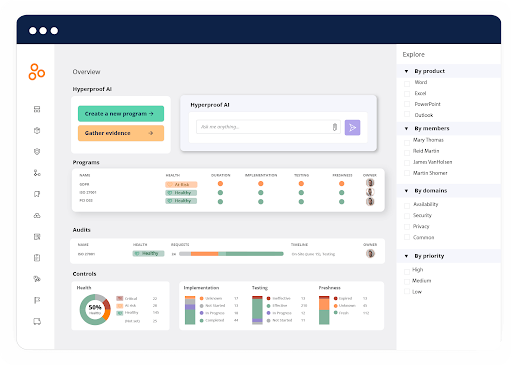
Sprinto is built for teams that want to manage security and compliance as a continuous process, not just during audit season. Instead of spreading controls, evidence, and reviews across disconnected tools, the platform brings them into a single workflow that mirrors how modern SaaS teams manage risk, access, and accountability in cloud environments.
Security auditing scores 95% on G2, above the category average of 92%. G2 reviewers describe clearly mapped controls, visible ownership, and easy progress tracking as reasons security programs feel more manageable as teams grow. That visibility helps security and engineering teams stay aligned without needing constant check-ins.
Sprinto explains why each control matters and how it connects to broader security requirements. For teams without deep compliance experience, this turns complex standards into clear, actionable tasks without needing outside help. G2 reviewers describe this guidance as especially useful when working through a framework for the first time.
Integration with existing cloud tools supports day-to-day use without disrupting normal operations. SSO support scores 94% on G2, above the category average of 91%, consistent with how G2 reviewers describe compliance workflows running smoothly alongside the tools teams already use. This means security work fits into existing routines rather than sitting outside them.
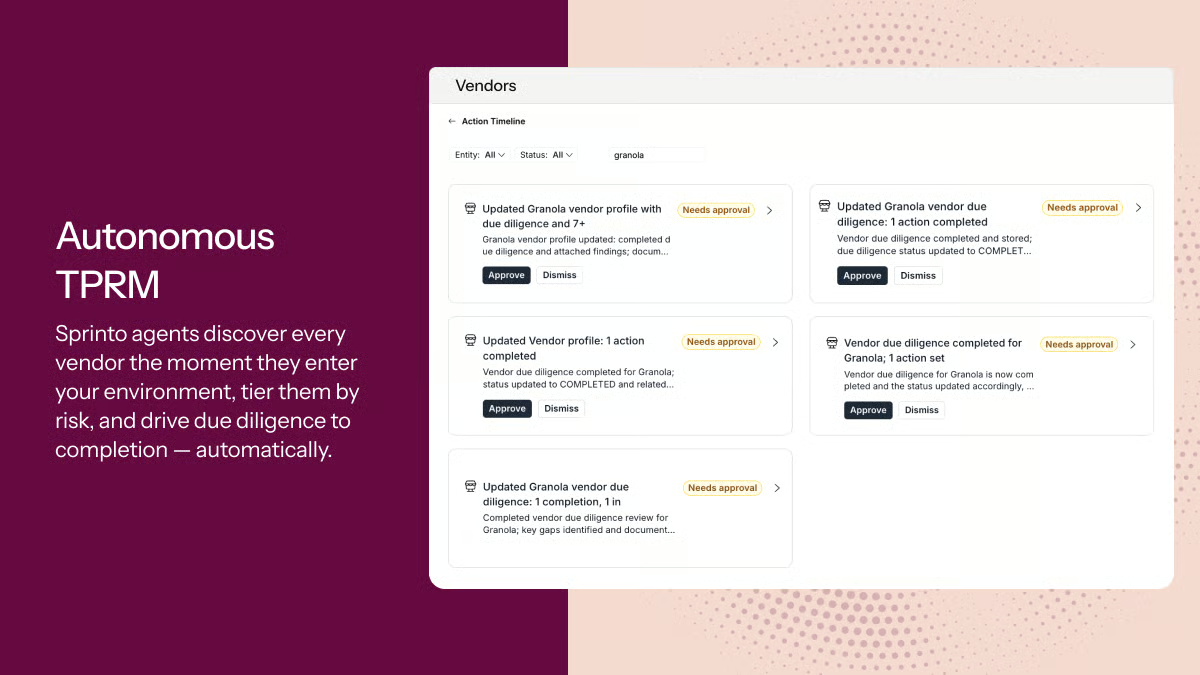
Evidence collection, reminders, and status tracking run continuously, helping teams avoid last-minute audit pressure. G2 reviewers frequently describe this steady rhythm as a reason certification feels more predictable over time. Teams that previously relied on spreadsheets and email threads describe the shift as a significant reduction in manual work.
Compliance monitoring scores 94% on G2, above the category average of 91%. Over time, Sprinto becomes part of how teams demonstrate trust externally, not just manage it internally.
Sprinto’s support team is frequently highlighted as a standout across G2 reviews. Account managers and implementation teams walk users through each stage of the compliance process, explain the reasoning behind controls, and stay available when issues arise. For smaller teams without dedicated compliance staff, that level of hands-on guidance makes a measurable difference to how quickly they reach certification.
About 58% of G2 users come from small businesses and 40% from mid-market teams, with limited enterprise adoption. That mix reflects where Sprinto fits best, growing SaaS teams that need structure and guidance rather than a self-serve compliance tool. The platform’s design assumes teams are building their compliance program for the first time, not maintaining one that already exists.
As teams engage with formal frameworks for the first time, some terminology and structure may need explanation for non-technical or executive stakeholders. Teams new to compliance frameworks may find certain sections easier to navigate with support from Sprinto’s implementation team, which G2 reviewers consistently describe as responsive and hands-on. Once familiar with the layout, most users describe the platform as straightforward to work through independently.
Sprinto’s documentation is written to cover a broad range of compliance frameworks, which means it does not always go deep on industry-specific requirements. Teams in highly specialized sectors may find that certain controls need manual adaptation to fit their exact context. G2 reviewers note that the platform’s breadth works well for most use cases, and the support team helps fill gaps where documentation falls short.
Taken together, Sprinto fits organizations that want compliance to run as a repeatable system rather than a reaction to audit deadlines. Its auditing, monitoring, and guidance capabilities make it especially relevant for SaaS teams building trust as they grow. For companies that treat security readiness as a business advantage rather than a box to check, Sprinto consistently delivers on that expectation.
What I like about Sprinto:
- Sprinto replaces fragmented compliance workflows with one shared workspace. Controls, evidence, policies, and audit tasks stay connected and easy to track.
- Its structure supports different compliance roles without separate tools. Security, operations, and leadership can each work from the same workspace with clear visibility.
What G2 users like about Sprinto:
“One of the things I love most about CompliSpace is that it’s clearly been built with
Sprinto offers a comprehensive and user-friendly platform for managing various compliance requirements. Its automated workflows and clear guidance simplify the process, making it easier to achieve and maintain certification standards.
I appreciate Sprinto’s intuitive interface and its ability to integrate with a range of tools and systems, enhancing overall efficiency and effectiveness in managing compliance. Sprinto’s support team is highly responsive and knowledgeable, providing valuable assistance across different compliance frameworks.”
– Sprinto review, Manikandan M.
What I dislike about Sprinto:
- Some terms and structures are written for technical users. Non-technical stakeholders may need extra context when starting out. G2 reviewers note that the support team helps bridge this quickly.
- Documentation covers many frameworks but doesn’t always go deep on industry-specific needs. Teams in specialized sectors may need to adapt some controls manually. The support team helps fill those gaps.
What G2 users dislike about Sprinto:
” Because the platform covers many frameworks and use cases, the documentation can sometimes feel a bit generic. More context-specific examples for different types of companies or industries would make it easier for new users to get started.”
– Sprinto review, Sinh L.
4. Coro Cybersecurity: Best for unified cloud security for small and mid-market teams
Coro Cybersecurity is most often adopted by teams that want cloud data security without stitching together multiple point tools. Its positioning fits squarely within the cloud data security category, where visibility, policy enforcement, and user behavior monitoring matter alongside threat detection. The product’s G2 footprint reflects this focus, with most users coming from small and mid-market organizations rather than large enterprises.
The platform combines email security, endpoint protection, data governance, and SASE into one view, so you don’t have to switch between different tools for daily security work. Data security scores 91% on G2, consistent with how G2 reviewers describe staying on top of protection across a unified view.
Teams running Microsoft 365 or Google Workspace say it’s easier to manage cloud data protection when everything lives in one place. G2 reviewers describe the dashboard as simple enough to understand quickly, with whitelists, blacklists, and alert management all handled from a single screen. This helps smaller IT teams stay in control as their environments grow.
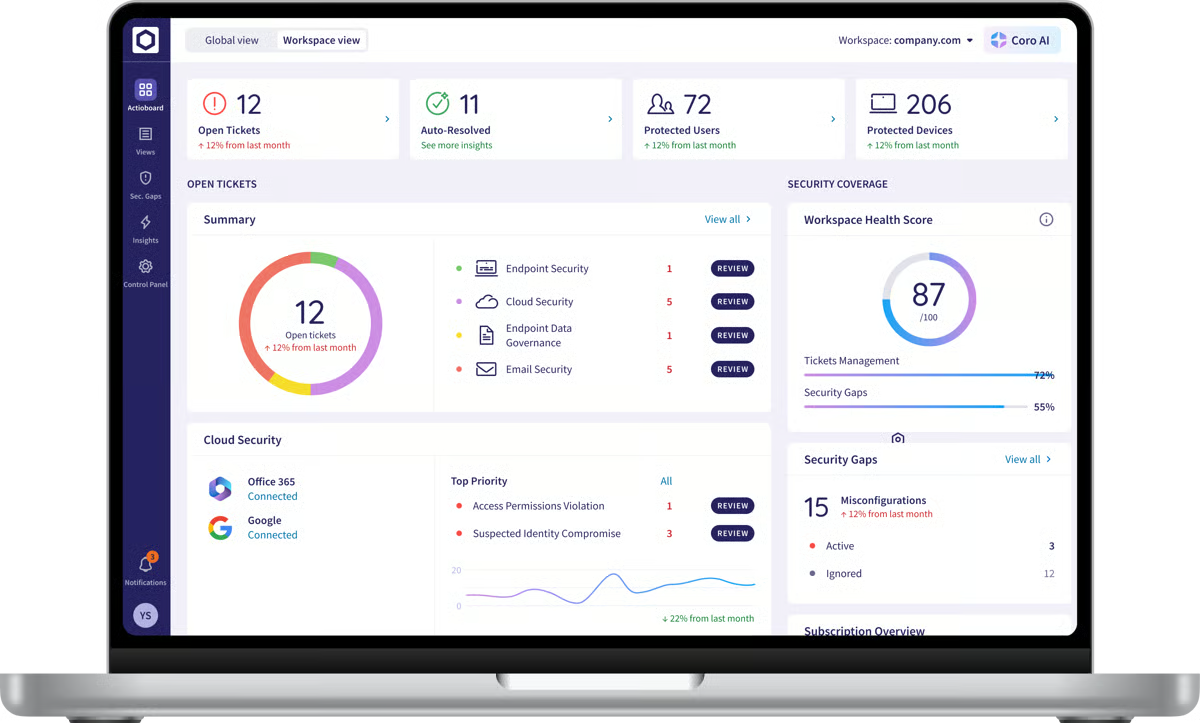
Sensitive data compliance scores 94% on G2, above the category average of 91%. G2 reviewers describe catching credit card data in emails, flagging spoofed senders, and receiving instant notifications about phishing attempts before they reach users. That proactive visibility supports a security approach focused on stopping threats early rather than responding after the fact.
Rollout is frequently described as fast and minimally disruptive across G2 reviews, with agents running quietly in the background once deployed. It is described as being able to see vulnerabilities across email accounts and devices within minutes of setup. For distributed teams across multiple locations, that speed makes it easier to extend protection without interrupting day-to-day work.
Remote investigation and response further strengthen operational confidence. Smaller IT teams often highlight the ability to review alerts and resolve issues without direct device access. Compliance monitoring scores 93% on G2, above the category average of 91%, and reviewers describe security operations becoming more predictable as smaller IT teams get comfortable resolving issues remotely.
Coro’s support and account teams are frequently highlighted in G2 reviews as a reason teams feel confident adopting the platform. Reviewers describe account managers who walk them through each feature, an onboarding process that moves quickly, and a support team that responds fast when issues arise. For small IT teams managing security alongside other responsibilities, that level of support makes a practical difference day to day.
The endpoint scanning and Bitdefender agent actions are managed through the web console rather than directly on the device. Teams that prefer to run on-demand scans or schedule tasks locally may find this adds steps to their workflow. G2 reviewers note the web console is straightforward to use and keeps security management consistent across all devices.
The Coro add-in for Outlook has version-specific requirements, which means some end users may not be able to flag suspicious emails directly from their inbox. Teams running mixed Outlook versions across their environment may find that this limits user-level reporting. G2 reviewers note that admin-level controls remain fully functional regardless of the add-in status.
Its strength lies in its ability to manage sensitive data compliance, offer fast deployment, and provide hands-on support, making it especially valuable for IT teams that require dependable coverage without dedicated security personnel. For organizations that want security to work without constant attention, Coro delivers on that promise.
What I like about Coro Cybersecurity:
- Coro brings email security, endpoint protection, data governance, and network access control into one dashboard. G2 reviewers describe being able to manage alerts, whitelists, and quarantined emails from a single screen without switching tools.
- Fast deployment and responsive support stand out across G2 reviews. Reviewers describe setup as completing within minutes, and account managers are available to walk them through every feature.
What G2 users like about Coro Cybersecurity:
“From start to finish, working with Coro has been a great experience. Their sales and support teams are highly responsive and proactive, ensuring we receive the support and service we need.
Coro goes beyond just endpoint protection for our on-premises environment. It provides a geofence to monitor for unusual traffic from outside the country, provides user data governance, and email security for both our Google Workspace and Microsoft 365 environments.”
– Coro Cybersecurity review, Jeremy S.
What I dislike about Coro Cybersecurity:
- Endpoint scans and agent actions are managed through the web console rather than directly on the device. G2 reviewers note that the console is easy to navigate and maintains consistent management across devices.
- The Outlook add-in has version-specific requirements that can prevent end users from flagging suspicious emails directly from their inboxes. Admin controls remain fully functional regardless of add-in status.
What G2 users dislike about Coro Cybersecurity:
“The only thing I can say I dislike is how Coro handles spam filtration. It would be nice if you could approve a message from quarantine directly in the email with a single click, but you still have to log in to the admin portal and approve it there. Kind of annoying, but not the end of the world either.
The SASE agent does not yet have the ability to list trusted networks, so we need to toggle the VPN connection off and on as needed.”– Coro Cybersecurity review, Jaxon F.5. Check Point Harmony Email & Collaboration: Best for unified email and collaboration security
Check Point Harmony Email & Collaboration is built for teams that treat email and collaboration tools as one connected security risk. By extending protection across Microsoft 365, Teams, SharePoint, and OneDrive, it covers the point where communication and file sharing overlap. Most users come from mid-market teams (61%) with a strong enterprise presence (23%), reflecting where the platform fits best.
Phishing attempts, business email compromise, and account takeover attempts are blocked before messages reach users. G2 reviewers describe this as giving peace of mind, with threats stopped silently in the background while employees continue working normally. Data Discovery scores 94% on G2, above the category average (89%), consistent with how G2 reviewers describe improved visibility into how messages and files move across the organization.
Protection goes beyond email into collaboration workflows. The platform scans attachments, shared files, and collaboration channels using threat emulation and sandboxing, catching unknown malware that standard tools often miss. G2 reviewers highlight Microsoft Teams, Microsoft SharePoint, and Microsoft OneDrive as areas that previously had blind spots, which are now covered by a single solution.
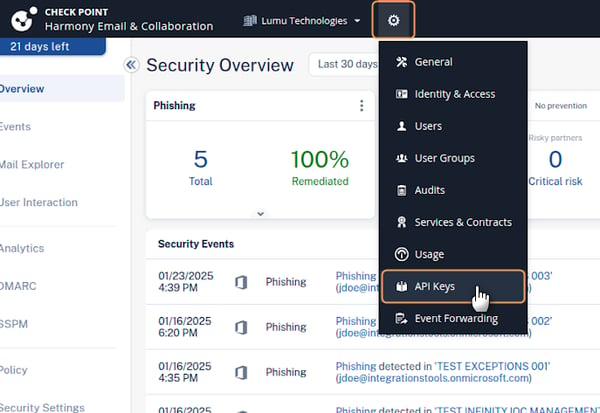
Email, collaboration, and related security controls surface together in one view, making it easier for teams to assess risk without switching between tools. For security teams overseeing large user bases, having everything in one place simplifies monitoring and response. Anomaly Detection scores 94% on G2, and reviewers describe the platform catching unusual behavior before it becomes an incident.
Harmony applies DLP-style inspection across messages, attachments, and shared files, supporting audit and data protection requirements without disrupting workflows. G2 reviewers describe the platform as helping them meet compliance requirements and detect unusual file movement without adding manual work.
The platform connects cleanly with Microsoft 365, allowing security controls to run in the background without interrupting daily work. G2 reviewers describe the integration as straightforward to set up and consistent in how it performs across departments. This means security stays effective without becoming visible or disruptive to end users.
AI-assisted detection gives teams a clear view of how files and messages move between users and applications. G2 reviewers describe suspicious links and attachments being caught automatically, reducing the risk of employees clicking on harmful content. For teams without dedicated security staff monitoring every alert, this automated layer provides reliable ongoing protection.
Policy configuration is detailed and flexible, which suits security-focused teams. Those who prefer a simpler out-of-the-box setup may need extra time adjusting granular controls to match their workflows. G2 reviewers note that once policies are tuned to the organization’s needs, the platform runs reliably with minimal ongoing adjustment.
Harmony’s reporting and dashboard structure covers broad security needs but is not highly customizable. Teams that need specific or detailed reports may find the standard views require extra steps to get the exact information they need. G2 reviewers note that the core reporting covers day-to-day security monitoring well for most use cases.
In day-to-day use, the business impact shows up clearly. Teams report reduced phishing exposure, stronger protection against account takeovers, and increased confidence in cloud collaboration environments. For organizations that treat email and collaboration security as a unified risk area, Check Point Harmony Email & Collaboration is a dependable, well-aligned solution.
What I like about Check Point Harmony Email & Collaboration:
- Harmony covers email, Teams, SharePoint, and OneDrive from one platform. G2 reviewers describe threats being blocked silently in the background while users continue working without interruption.
- AI-assisted detection and DLP-style inspection give security teams clear visibility into how files and messages move. G2 reviewers describe catching threats and meeting audit requirements without adding manual work.
What G2 users like about Check Point Harmony Email & Collaboration:
“ Phishing attempts and malicious links are blocked before they reach users, and the solution also monitors platforms like Teams, SharePoint, and OneDrive, which used to be blind spots for us. The biggest advantage is knowing that both communication and file-sharing channels are constantly protected with a single solution.”
– Check Point Harmony Email & Collaboration review, Ruben C.
What I dislike about Check Point Harmony Email & Collaboration:
- Initial policy setup requires time and adjustment to avoid blocking legitimate messages. G2 reviewers note that the platform runs reliably once policies are tuned to the organization’s needs.
- Harmony’s reporting covers broad security needs but is not highly customizable. G2 reviewers note that the standard views cover day-to-day monitoring well for most teams.
What G2 users dislike about Check Point Harmony Email & Collaboration:
“The reporting dashboard could be more intuitive, and integration with certain collaboration platforms requires additional effort. While the security is robust, these usability issues can slow down administration and increase the workload for IT teams. “
– Check Point Harmony Email & Collaboration review, Susan Q.
6. Rubrik: Best for enterprise-grade cloud data security and cyber recovery
Rubrik is built for enterprises that need backup, ransomware protection, and cloud recovery to work as one system. G2 reviewers consistently describe it as fast to set up, easy to navigate, and dependable under pressure, with most of its user base coming from enterprise organizations (57%), followed by mid-market teams (33%) and a smaller SMB footprint (10%).
Backup, ransomware protection, and cloud workload security connect tightly into one workflow. G2 reviewers frequently describe how straightforward it is to define protection policies, monitor backup jobs, and initiate restores without switching between tools. Ease of use scores 94% on G2, consistent with how G2 reviewers describe staying in control across complex environments.
Recovery is where Rubrik builds the most trust among G2 reviewers. Immutable backups and zero-trust architecture are repeatedly cited as reasons teams feel confident during incidents. Restores for individual files, virtual machines, or full systems are described as fast and predictable, supporting both business continuity and incident response.
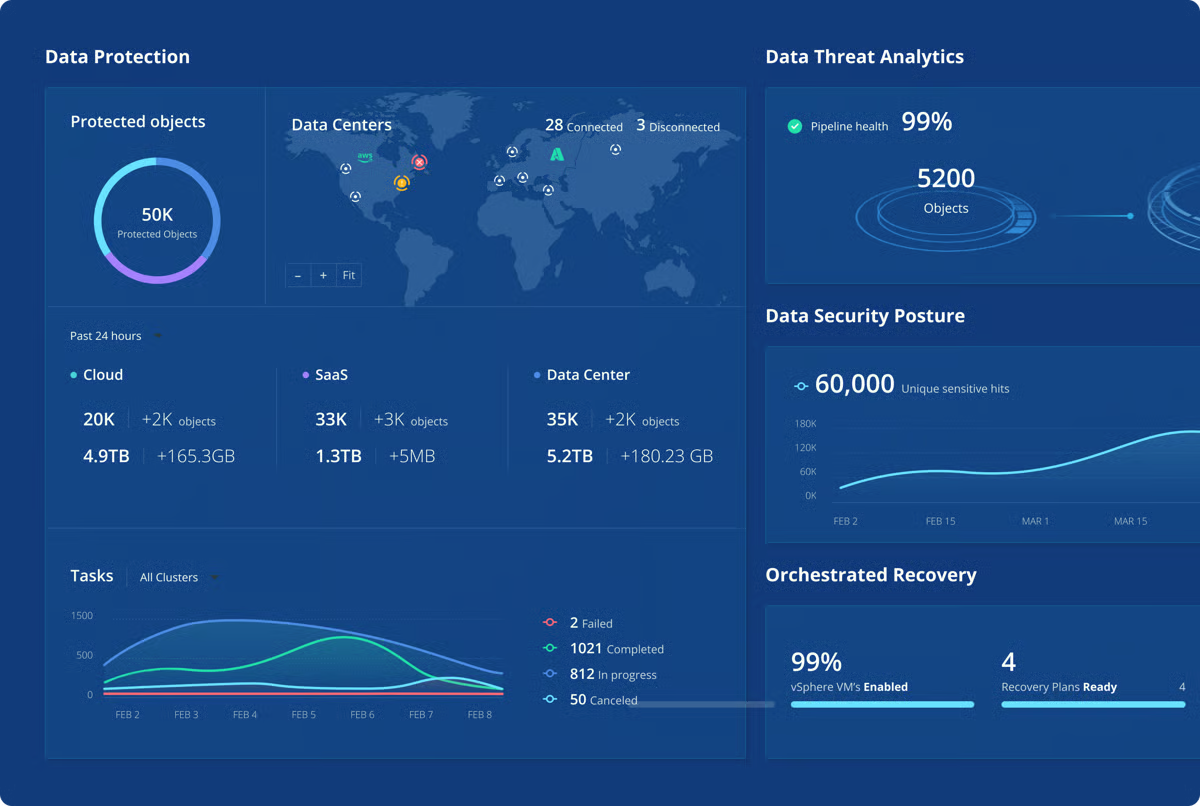
Rubrik connects with cloud platforms like AWS and Microsoft 365, allowing teams to protect hybrid environments without adding separate security layers. G2 reviewers often describe this breadth as a reason Rubrik fits naturally into enterprise cloud strategies. Reviewers consistently say the platform holds up in practice, with 93% on G2 reporting that it meets their requirements, in line with the category average.
Automated backup schedules and policy-driven management reduce manual work and routine troubleshooting. G2 reviewers describe spending less time on day-to-day administration once policies are in place. Ease of administration scores 94% on G2, above the category average of 92%, consistent with how reviewers describe operations becoming more predictable over time.
Setup is frequently described as straightforward across G2 reviews, with reviewers noting they were able to get backups running with just a few clicks. Ease of setup scores 94% on G2, above the category average of 90%, reflecting how consistently first-time users describe the platform as easy to get started with, despite its enterprise scope.
The UI is consistently described as clean and modern across G2 reviews. For large teams managing complex environments, that clarity makes it easier to assess system status and act quickly when needed. G2 reviewers describe the interface as intuitive enough for first-time users while remaining powerful enough for experienced administrators.
Rubrik’s configuration and reporting options are built for structured, policy-driven environments. Teams looking for highly customized reporting out of the box may need to rely on the API for specific dashboards. G2 reviewers note that the core reporting covers most operational needs well once teams are familiar with the available options.
The pricing reflects its enterprise orientation, with licensing and renewal costs that can feel high compared to simpler backup tools. Teams in smaller environments may find the cost harder to justify against their specific needs. G2 reviewers note that the platform’s recovery reliability and enterprise-grade protection make the investment feel justified for organizations where data security is critical.
In practice, Rubrik delivers most clearly where cloud data security is mission-critical. Its strengths in recovery reliability, ransomware protection, and ease of use make it a strong match for enterprises operating across hybrid and cloud environments. For organizations prioritizing resilience and confidence at scale, Rubrik stands out as a dependable foundation.
What I like about Rubrik:
- Rubrik connects backup, ransomware protection, and cloud recovery into one workflow. G2 reviewers consistently highlight how straightforward it is to define policies, monitor jobs, and run restores from a single place.
- Recovery reliability stands out consistently across G2 reviews. Immutable backups, zero-trust architecture, and fast restores give teams confidence during high-pressure incidents.
What G2 users like about Rubrik:
“What I like most about Rubrik is how seamlessly it combines data backup, ransomware protection, and cloud integration into one platform. The UI is very clean and modern, which made it surprisingly easy to get used to, even as a first-time user. Their immutable backups and zero-trust architecture give you real confidence that your data is protected, especially against ransomware. I also appreciated how fast and reliable the recovery process is – restoring files or entire systems is quick and doesn’t require jumping through complex steps. Integration with Microsoft 365 and cloud platforms like AWS also works smoothly.”
– Rubrik review, Akshat P.
What I dislike about Rubrik:
- Rubrik’s reporting is built around standard policy-driven views, with limited customization available out of the box. G2 reviewers note the core reporting covers most operational needs well once teams are familiar with the options available.
- Licensing and renewal costs can feel high compared to simpler backup tools, particularly for smaller environments. The platform’s reliability and enterprise-grade protection make the investment feel justified where data security is critical.
What G2 users dislike about Rubrik:
“The licensing model can feel opaque, and costs can scale up quickly as your data grows. The initial setup and policy configuration come with a learning curve, particularly around SLA domains. Reporting could also be more customizable out of the box; we’ve had to rely on the API for some of the dashboards we need.”
– Rubrik review, Chetana M.
7. IBM Guardium Data Detection and Response: Best for governance-led cloud data security
Governance-driven security programs need more than basic data protection. IBM Guardium Data Detection and Response addresses this directly, giving organizations consistent oversight of sensitive data across cloud and hybrid environments where auditability and policy enforcement are part of daily operations. Most users come from mid-market teams (52%) and enterprise organizations (38%), reflecting its alignment with structured, governance-driven security programs.
The platform helps teams understand where sensitive data lives, how it is accessed, and where exposure risks exist. Data discovery, classification, encryption, masking, and redaction are frequently highlighted in reviews as core capabilities that protect regulated and business-critical data. Cloud Gap Analytics scores 96% on G2, well above the category average of 88%, reflecting how consistently users describe IBM Guardium’s ability to identify where data protection gaps exist across cloud environments.
Threat detection and risk visibility come through consistently in reviews. IBM Guardium surfaces vulnerabilities and presents data risk in a clear, structured way rather than surfacing isolated alerts. Data security scores 96% on G2, consistent with how users describe the platform prioritizing meaningful risks over noise.
IBM Guardium operates across cloud, on-premises, and hybrid environments, allowing organizations to apply consistent data security and governance policies regardless of where data lives. Reviews often connect this flexibility to smoother alignment with compliance frameworks and internal controls. For enterprises managing data across multiple infrastructure types, this consistency reduces gaps in coverage.
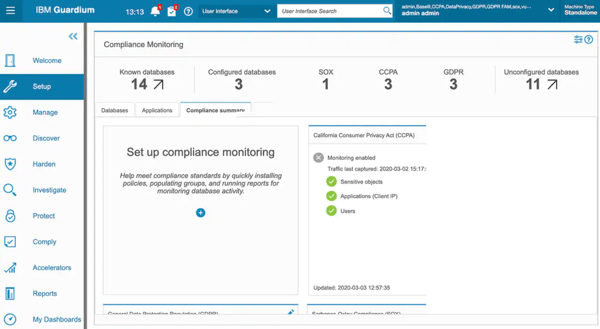
IBM Guardium consolidates data security functions into one platform, reducing the need to manage separate tools for discovery, classification, and policy enforcement. Reviews describe this as making data security more manageable without adding complexity. Data encryption and security scores 95% on G2, reflecting confidence in how the platform protects sensitive data at rest and in transit.
Compliance management and risk management capabilities are frequently highlighted alongside data protection in reviews. Users describe IBM Guardium as effective at maintaining application security, managing regulatory requirements, and giving security teams the information they need to demonstrate control. For teams with ongoing audit obligations, this reduces the manual effort needed to show readiness.
Users highlight the platform as user-friendly despite its broad feature set, with guidance available for teams working through more complex configurations. For organizations new to governance-focused security tools, that accessibility helps reduce the time needed to get value from the platform.
IBM Guardium’s feature set is broad and highly configurable, which supports complex governance requirements but takes time to set up fully. Teams transitioning from simpler data protection tools may need extra time to work through initial configuration. Once set up, the platform is designed to run consistently across the environments it covers.
Pricing reflects IBM Guardium’s enterprise orientation and may feel high for smaller organizations evaluating the platform against simpler alternatives. The UI and overall experience prioritize functionality and depth over visual simplicity, which suits security-focused teams but may feel dense for users expecting a more guided interface. Reviews note that documentation and support are available to help teams work through both cost planning and setup.
Viewed in full, IBM Guardium Data Detection and Response fits organizations that treat cloud data security as a governance discipline rather than a tactical control. Its strengths in data visibility, risk analysis, and Cloud Gap Analytics make it especially relevant for teams managing regulated data at scale. For enterprises prioritizing audit readiness and long-term data oversight, IBM Guardium is a credible and purpose-built option.
What I like about IBM Guardium Data Detection and Response:
- IBM Guardium brings data discovery, classification, encryption, masking, and redaction into one platform. Reviews describe this as making governance-led data security more manageable without requiring separate tools for each function.
- Cloud Gap Analytics and real-time threat reporting give security teams a clear view of where risks exist. Reviews highlight the platform’s ability to surface meaningful risks in a structured way rather than generating isolated alerts.
What G2 users like about IBM Guardium Data Detection and Response:
”The most helpful thing about IBM Security Guardium Insights is data protection features such as data masking, encryption, and redaction to safeguard sensitive information from unauthorized access or disclosure.
The upside of using it is flexible deployment options.”
– IBM Guardium Data Detection and Response review, Namrata M.
What I dislike about IBM Guardium Data Detection and Response:
- IBM Guardium’s pricing reflects its enterprise scope and can feel high for smaller organizations, weighing it against simpler alternatives. Documentation and support are available to help with cost planning and setup.
- The interface prioritizes depth and functionality over visual simplicity. Teams expecting a more guided or visually polished experience may need time to get comfortable with the layout. Reviews note that support resources and documentation help teams work through the platform’s more complex areas.
What G2 users dislike about IBM Guardium Data Detection and Response:
“Being an IBM product, Guardium Insights might carry a hefty price tag, which could be a concern for some organizations, especially small or medium-sized businesses.”
– IBM Guardium Data Detection and Response review, Roee N.
8. Check Point CloudGuard CNAPP: Best for prevention-led multi-cloud security
Multi-cloud growth introduces layered data security risks; this is where Check Point CloudGuard CNAPP consistently fits. The platform is built for organizations managing multiple cloud accounts, projects, or customers, where visibility and control need to extend across environments rather than sit in isolated tools.
CloudGuard unifies Cloud Security Posture Management (CSPM), Cloud Workload Protection Platform (CWPP), and Cloud Infrastructure Entitlement Management (CIEM) in one place. Teams managing multiple cloud accounts no longer need to log into separate consoles to track assets, access paths, and risk. Access control scores 92% on G2, helping support reviewers’ descriptions of maintaining policy enforcement consistency across complex environments.
CloudGuard catches misconfigurations, vulnerabilities, and identity risks early in the development process, before workloads are exposed. Agentless scanning runs continuously without adding extra steps to deployment, while CIEM capabilities surface over-privileged access patterns before they become a problem. For teams working across CI/CD pipelines, this prevention-first approach reduces the manual remediation work that builds up when issues are caught late.
Built-in compliance frameworks, including Center for Internet Security (CIS), Payment Card Industry (PCI), and General Data Protection Regulation (GDPR), allow teams to apply controls at the project level. Reports with remediation guidance align with ongoing audit requirements, helping organizations stay consistent across fast-changing cloud environments. Governance scores 92% on G2, which aligns with how reviewers describe audit preparation becoming less of a manual effort over time.
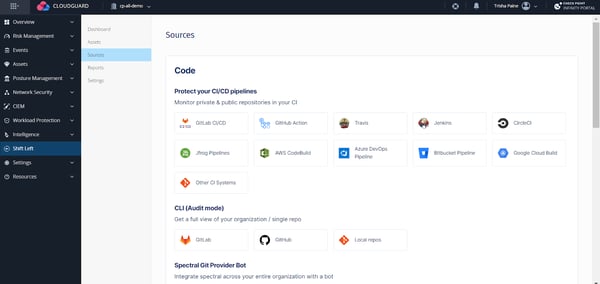
All cloud assets surface in a single dashboard, removing the need to log into individual cloud accounts. For teams managing multiple environments or customers, this makes it easier to spot risks and act on them quickly. Reviewers describe this centralized view as one of the most valuable aspects of the platform, particularly for teams handling multiple projects at once.
Automated threat detection and remediation reduce manual work across cloud environments. Risk-based prioritization helps teams focus on what matters most rather than working through every alert in order. Reviewers describe real-time risk visualization as making it faster to respond to the threats that carry the most impact. Data security scores 92% on G2, close to the category average of 93%, consistent with how reviewers describe protection holding up across dynamic cloud workloads.
Customer support and detailed remediation guidance are frequently highlighted in reviews as reasons teams feel confident resolving issues. Reviewers describe step-by-step guidance that aligns with internal processes, making it easier to fix vulnerabilities without having to work out the approach independently. For teams new to multi-cloud security, this support reduces the time needed to get full value from the platform.
CloudGuard’s configuration depth supports complex environments, but takes time to work through during initial setup. Teams new to cloud-native security or those expecting a minimal setup experience may find the early stages take longer than anticipated. Reviewers note that comprehensive documentation is available and helps teams proceed through setup with greater confidence.
The interface covers a broad range of features and can feel busy before navigation becomes familiar. Teams expecting a streamlined or role-specific view may need time to adjust to the level of detail on screen. G2 Reviewers describe navigation becoming more natural once teams are comfortable with the platform’s layout and structure.
Taken together, Check Point CloudGuard CNAPP fits enterprises and regulated industries that prioritize stopping risks early across multi-cloud environments. Its strengths in posture management, access governance, and automated remediation make it especially relevant for teams where continuous control is non-negotiable. For organizations managing complex cloud environments across multiple providers, CloudGuard delivers the visibility and prevention coverage to stay ahead of exposure.
What I like about Check Point CloudGuard CNAPP :
- CloudGuard brings CSPM, CWPP, and CIEM into one platform. Reviewers describe catching misconfigurations and identity risks early across AWS, Azure, and GCP without switching between tools.
- Built-in compliance frameworks and automated remediation guidance reduce audit preparation work. Reviewers describe staying audit-ready continuously rather than scrambling before review deadlines.
What G2 users like about Check Point CloudGuard CNAPP:
“I have been using Check Point CloudGuard CNAPP for cloud security posture management, and it has proven to be incredibly effective and efficient for our operations. The setup process was straightforward, thanks to the comprehensive documentation provided by Check Point, allowing us to execute it with ease. I find the visibility it offers across all our cloud assets and the identification of misconfigurations vital to our operations, as it aggregates all my cloud assets into a single dashboard. This means we do not have to log into individual accounts, which is especially beneficial because we handle multiple projects and clients.
Additionally, the binding of compliance policies to specific projects and the ability to generate reports with remediations have greatly enhanced our operational security. The agentless scanning and Cloud Workload Protection features are standout capabilities that help us identify security vulnerabilities without much hassle. Furthermore, the CIEM feature is very useful in identifying critical accounts, and the software’s compatibility with various cloud providers ensures seamless integration.”
– Check Point CloudGuard CNAPP review, KISHOREKUMAR G.
What I dislike about Check Point CloudGuard CNAPP:
- Initial setup and configuration take time, particularly for teams new to cloud-native security. The depth of the platform means early rollout requires more effort than simpler alternatives. Reviewers note that detailed documentation helps teams work through setup more confidently.
- The interface covers a wide range of features and can feel busy before navigation becomes familiar. G2 Reviewers describe navigation as becoming more natural once familiar with the layout.
What G2 users dislike about Check Point CloudGuard CNAPP:
“While Checkpoint CloudGuard CNAPP is a powerful platform, there are a few areas that could be improved, like the user interface, especially when navigating complex policies or cross-cloud views. Some features require a steeper learning curve, particularly for teams that are newer to cloud native security concepts.”
– Check Point CloudGuard CNAPP review, Nasseer Q.
9. Cisco Duo: Best for identity-first cloud data security anchored in strong MFA
Identity is where most cloud security breaches start. Cisco Duo addresses this directly, treating secure access as a foundational layer of cloud data protection rather than an add-on. Its multi-factor authentication capabilities are among the most comprehensive in the category, with adoption spread across enterprise (36%), mid-market (40%), and small business (24%) teams.
Duo connects with Microsoft 365, Amazon Web Services (AWS), Google Cloud Platform (GCP), virtual private network (VPN), Remote Desktop Protocol (RDP), and Secure Shell (SSH), while also supporting on-premises Active Directory and custom applications through SAML single sign-on (SSO) and virtual appliances. Cloud Registry scores 95% on G2, which reviewers connect to protection that reaches across both cloud and legacy systems without gaps.
Duo Push and the Duo Mobile app make secure authentication fast and easy, rather than disruptive. Users can authenticate via Duo Push, WebAuthn, Touch ID, hardware keys, or SMS, covering most compliance and insurance requirements. Reviewers describe the mobile app as intuitive and the push-based authentication process as smooth across all devices and platforms.
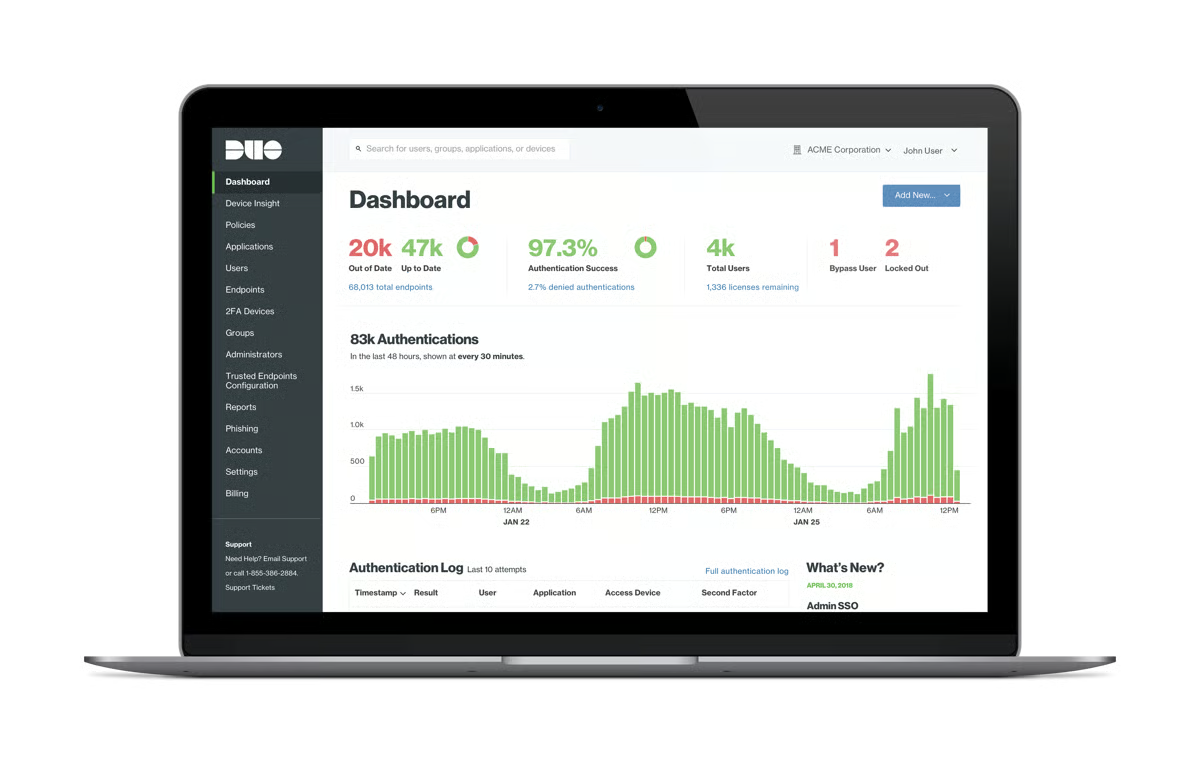
Access governance for sensitive systems is another area where Duo performs consistently well. Data Discovery scores 95% on G2, above the category average of 90%, reflecting how effectively the platform supports controlled access to critical applications and data. These strengths show up most clearly in environments where access policies must align with regulatory and internal governance requirements.
MFA can be rolled out quickly across hundreds or thousands of endpoints using role-based policy controls and admin dashboards. Sensitive Data Compliance scores 95% on G2, above the category average of 91%, consistent with how reviewers describe enforcing consistent access rules for privileged users, admins, and developers without creating gaps in coverage.
Login checks factor in risk level and device health alongside identity, helping reduce exposure to phishing, stolen credentials, and unauthorized access. For security teams managing large user populations, this context-aware approach enforces stronger access controls without slowing down day-to-day workflows. Reviewers describe the platform as rock solid in responsiveness, with fine-grained controls that can be tuned to specific business needs.
MSP support and centralized admin dashboards are frequently highlighted in reviews as reasons teams feel confident managing access policies at scale. Reviewers describe out-of-the-box MSP options, centralized dashboarding, and responsive support as making it easier to manage distributed environments. For teams handling access across multiple clients or locations, this reduces the administrative effort needed to keep policies consistent.
Duo covers authentication and access enforcement, but does not include device analytics or behavior-based detection. Teams that need those capabilities will need to run separate tools alongside it. For organizations that treat MFA as a core control within a broader security stack, this focused scope fits cleanly without overlap.
Advanced setups such as federated SSO tied to on-premises Active Directory require careful planning and a solid understanding of how identity dependencies connect. Teams new to these configurations may find the setup takes more time than expected. Basic MFA deployments are typically quick to get running, and documentation covers the more complex scenarios in detail.
Cisco Duo continues to stand out for how effectively it secures access to cloud and enterprise systems without adding friction for end users. Its strength lies in enforcing identity-based security at scale, making it a reliable choice for organizations that treat MFA as a core pillar of cloud data protection rather than a secondary control.
What I like about Cisco Duo:
- Duo integrates with Microsoft 365, AWS, GCP, VPN, RDP, SSH, and on-premises Active Directory out of the box. Reviewers describe extending identity-based protection across cloud and legacy systems without rebuilding existing access architecture.
- The Duo Mobile app and push-based authentication keep the end-user experience fast and simple. Reviewers describe the authentication as smooth across all devices without disrupting daily workflows.
What G2 users like about Cisco Duo:
“DUO has built the most complete MFA product I have seen. It integrates with a lot of other solutions out of the box, and for anything not already integrated, it provides Cloud-based, AD-integrated SAML SSO and virtual appliance options to provide protection to even custom interfaces. This has allowed us to extend our security perimeter wherever our business demands we go.
The product is rock solid in responsiveness, so we’re not accidentally blocked from required access, and provides enough fine-grained functionality that we can tune it to our business demands for maximum secure productivity (believe me, those two concepts are mostly adversaries).
MSP options out of the box, great centralized control dashboarding, and responsive support.”
– Cisco Duo review, Steve S.
What I dislike about Cisco Duo:
- Duo covers authentication and access enforcement but does not include device analytics or behavior-based detection. For teams using Duo as one part of a broader security stack, this focused scope works cleanly.
- Federated SSO tied to on-premises Active Directory requires careful planning and a good understanding of identity dependencies. Teams new to this setup may need more time than expected. Basic MFA deployments are quick to get running and well covered by documentation.
What G2 users dislike about Cisco Duo:
“Duo’s learning curve can be steep when you are setting up more advanced tasks, such as SSO against on-prem. Ensure you read and re-read the documentation as you set up the services, and that you fully understand the process. Keep in mind that if you use an AD server, that server must be on for users to sign into 365. If not, then it will not let them validate.”
– Cisco Duo review, Benjamin K.
10. CrashPlan Platform: Best for reliable SaaS backup and fast recovery
CrashPlan is built around one core promise: reliable, administrator-controlled backup and recovery that runs without constant attention. Its feature set is intentionally focused on doing this well rather than expanding into broader security territory.
CrashPlan supports user data lifecycle management through Personal Storage Table (PST) exports for departing users and in-place archive access. This makes historical data accessible during employee offboarding, audits, or compliance reviews without disrupting active systems. Ease of Setup scores 99% on G2, which aligns with how reviewers describe the platform as quick to get running from day one.
Administrative control is a consistent strength across reviews. File-format-level inclusion and exclusion, device-specific storage limits, and network or CPU throttling allow backups to run quietly in the background. Ease of Admin scores 99% on G2, reflecting how consistently reviewers describe the admin console as practical and easy to navigate without requiring constant oversight.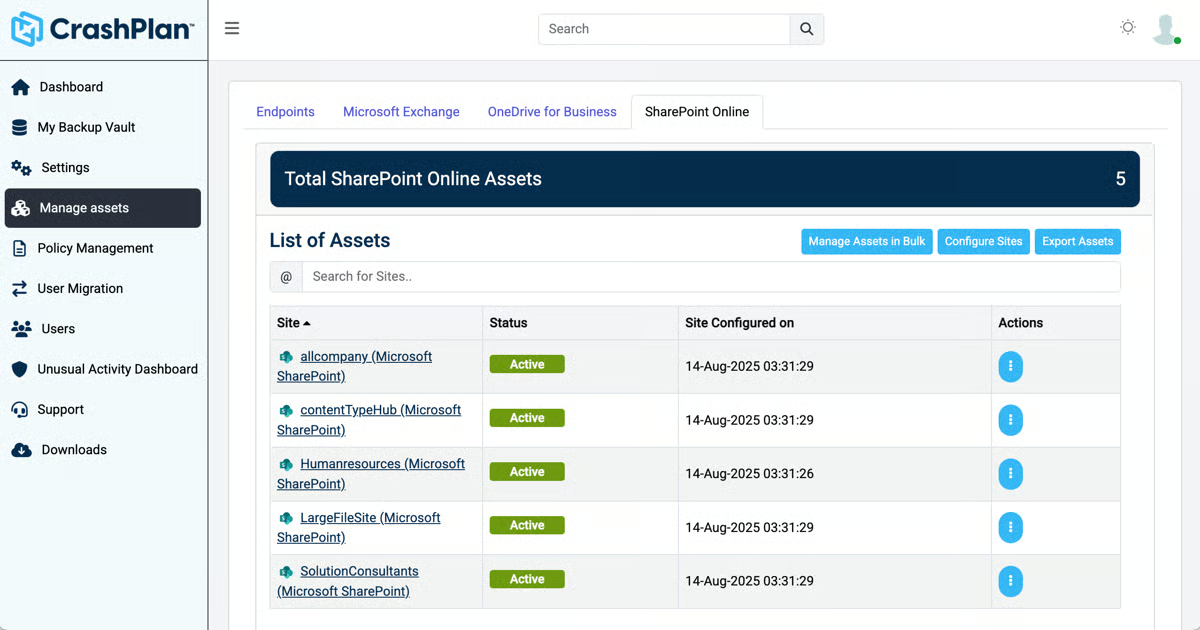
In-place restores, deleted file recovery, and date-based recovery options are tools reviewers describe depending on the real incidents. Several reviews highlight successful restores after system failures or accidental deletions, with minimal downtime and predictable outcomes. Ease of Doing Business With scores 99% on G2, consistent with how reviewers describe recovery workflows that hold up when they are needed most.
Backup rules, retention policies, and device management run through a structured control layer that keeps coverage consistent across large user populations. Meets Requirements scores 99% on G2, above the category average of 93%, reflecting how well the platform aligns with what mid-market and enterprise IT teams need from a long-term backup solution.G2 Reviewers describe this approach as treating backup as essential infrastructure rather than a secondary task.
Device registration, policy assignment, and backup schedules run automatically from the moment a user is onboarded, with no manual steps required. Ease of Use scores 99% on G2, well above the category average of 92%, consistent with how reviewers describe the platform as straightforward to manage across large user populations.
Restore speeds and cloud-to-cloud recovery are frequently highlighted in reviews as standout capabilities. Reviewers describe data being restored quickly with minimal disruption, including cloud-to-cloud restores that save significant time during recovery scenarios. Quality of Support scores 100% on G2, reflecting how consistently reviewers describe the support team as responsive and helpful when issues arise.
Most users come from mid-market teams (66%) and enterprise organizations (33%), reflecting how the platform is designed: structured, controlled, and focused on continuity at scale rather than lightweight self-serve use.
Backup access and management sit entirely with administrators, with no controls available to end users directly. Teams where employees expect to access or manage their own backup history may find this adds steps to routine requests. For IT-led environments where centralized control matters, this structure keeps oversight consistent and predictable.
Taken as a whole, CrashPlan earns consistent trust as a SaaS backup platform built for reliable recovery and long-term data protection. Its strong support scores, recovery performance, and administrative controls make it especially relevant for mid-market and enterprise IT teams that treat backup as essential infrastructure.
What I like about CrashPlan Platform:
- CrashPlan treats backup as a long-term continuity system rather than a simple file sync. In-place archives, exit-user exports, and date-based recovery support real operational needs.
- Reviewers consistently highlight how controlled and predictable the platform feels in production. Throttling, inclusion rules, and clear admin visibility keep backups running quietly.
What G2 users like about CrashPlan Platform:
“ The Data Migration feature helped us to migrate the resigned users’ data to a common storage place so that we can access the data when required and maintain it for audit purposes as well.”
– CrashPlan Platform review, Girish R.
What I dislike about CrashPlan Platform:
- End users have no direct access to backup controls. All requests go through an administrator, which can slow things down for teams where employees manage their own data needs. IT-led environments tend to find this setup straightforward to work with.
- Restoration of on-premises environments can take longer and use more network bandwidth than cloud-to-cloud recovery. Teams with large on-premises footprints may need to plan recovery timelines accordingly. Cloud-based restores are consistently described as fast and reliable across reviews.
What G2 users dislike about CrashPlan Platform:
“On-premises solution and restoration process take time and a good amount of network bandwidth.”
– CrashPlan Platform review, Prasanna N.
Comparison of the cloud data security software
| Software | G2 rating | Free plan | Ideal for |
Acronis Cyber Protect Cloud | 4.7/5 | No | SMBs and MSPs who need unified cloud backup and cybersecurity |
| Druva Data Security Cloud | 4.7/5 | Free plan | Mid-market and enterprise teams wanting SaaS-native data protection |
| Sprinto | 4.8/5 | No | Fast-growing SaaS teams building repeatable cloud compliance |
| Coro Cybersecurity | 4.7/5 | No | Small and mid-market teams seeking unified cloud security |
| Check Point Harmony Email & Collaboration | 4.6/5 | No | Organizations securing Microsoft 365 email and collaboration data |
| Rubrik | 4.6/5 | No | Enterprises requiring resilient cloud data security and recovery |
| IBM Guardium Data Detection and Response | 4.4/5 | No | Organizations managing governance-led cloud data protection |
| Check Point CloudGuard CNAPP | 4.5/5 | Free trial available | Enterprises running prevention-first multi-cloud security |
| Cisco Duo | 4.5/5 | Free for up to 10 users | Teams enforcing identity-first cloud access with strong MFA |
| CrashPlan Platform | 4.9/5 | No | Businesses needing reliable SaaS backup and rapid recovery |
*These cloud data security software products are top-rated in their category, based on G2’s Winter 2026 Grid® Report. Most offer custom pricing tiers, with demos available on request.
Best cloud data security software: Frequently asked questions (FAQs)
Got more questions? G2 has the answers!
Q1. Which cloud data security tools are best when ransomware recovery is the top concern?
Rubrik and Acronis Cyber Protect Cloud are most often associated with recovery confidence. Reviews frequently highlight immutable backups, predictable restores, and clear recovery workflows. Druva also shows up when teams want ransomware resilience without managing infrastructure, particularly for SaaS and endpoint data.
Q2. What tools are better suited for cloud-first teams with minimal IT overhead?
Druva Data Security Cloud and Coro Cybersecurity are commonly chosen by teams that want protection without managing servers, storage, or complex configurations. Review patterns emphasize fast deployment, SaaS-native operation, and security controls that run quietly in the background.
Q3. Which platforms focus more on data visibility and governance than backup alone?
IBM Guardium Data Detection and Response and Check Point CloudGuard CNAPP are frequently evaluated when teams need to understand where sensitive data lives, how it’s accessed, and where exposure risk exists. These tools show up most often in governance-driven and compliance-heavy environments.
Q4. How do teams decide between unified platforms and specialized security tools?
Some teams favor unified platforms like Acronis or Coro to reduce tool sprawl and simplify daily operations. Others intentionally combine focused tools, such as Cisco Duo for access control and Rubrik or Druva for recovery, when responsibilities are split across security, IT, and compliance teams.
Q5. Which cloud data security tools work best for distributed or remote workforces?
Druva, Cisco Duo, and Check Point Harmony Email & Collaboration are often selected in distributed environments. Reviews highlight strong protection for endpoints, identity-based access control, and SaaS collaboration tools, helping teams secure data without relying on perimeter-based controls.
Q6. Are cloud data security platforms useful beyond security teams?
Yes. Tools like Sprinto, IBM Guardium, and Rubrik frequently support compliance, audit, and IT operations teams as well. Reviewers mention shared visibility, role-based access, and reporting that helps non-security stakeholders understand risk and readiness without digging into raw alerts.
Q7. Which tools are better when compliance pressure is constant rather than periodic?
Sprinto, IBM Guardium, and Check Point CloudGuard CNAPP are often shortlisted when compliance is ongoing rather than audit-driven. Reviews emphasize continuous monitoring, evidence tracking, and policy enforcement that holds up between audits, not just during certification windows.
Q8. What should teams migrating from traditional backup tools be cautious about?
A common risk is treating cloud data security as a direct backup replacement. Review patterns suggest teams see better results when tools like Rubrik or Druva are evaluated for recovery workflows, governance, and access visibility, not just storage efficiency.
Q9. Which tools make sense for SMBs that need security without complexity?
Coro Cybersecurity, Acronis Cyber Protect Cloud, and Cisco Duo are often chosen by small and mid-market teams. Reviews highlight approachable administration, predictable pricing models, and protection that doesn’t require dedicated security staff to operate day to day.
Q10. Should cloud data security be a standalone layer or part of a broader cloud security stack?
It depends on operational maturity. Some teams deploy standalone solutions like CrashPlan or Druva to solve immediate protection gaps. Others integrate platforms like CloudGuard CNAPP or IBM Guardium into broader cloud security architectures when governance, identity, and posture management are tightly linked.
Lock it down, without slowing down
Security breakdowns in the cloud usually start quietly. Instead of alarms, teams notice slower response cycles, gaps in visibility, and uncertainty around what data is truly protected or recoverable. Those signals are easy to dismiss early on, but they compound. Over time, more effort goes into validating controls and coordinating recovery than preventing incidents, and that inefficiency becomes part of daily security operations.
The difference between strong and weak outcomes shows up in execution under pressure. When protection, detection, and recovery are tightly connected, teams move with clarity and confidence. Ownership is clear, response paths are shorter, and leadership trust holds during incidents. When those connections are loose, manual checks and handoffs creep in, response slows, and risk exposure expands without warning.
Choosing cloud data security software is ultimately an operating model decision. The right platform aligns with how teams actually secure, monitor, and restore data across evolving environments, reducing friction rather than adding process weight. If the software consistently supports control and recovery in real conditions, it will continue to pay off over time. That is the lens worth holding as you make this decision.
If compliance and audit readiness are part of your security strategy, explore the best cloud compliance software to see how teams manage governance, monitoring, and continuous control across cloud environments.