



Why the AceiiLab A1 Tennis Robot Moves Between Shots
A moving feed point gives solo players a different way to practise footwork and patterns of play.
You stretch wide for a forehand, send the ball back and start recovering. But what happens next? In a real rally, you’re already reading the other side of the court, adjusting your position and preparing for the next shot. When practising alone, recreating that sequence can be more difficult. A conventional ball machine may change its launch direction, but it usually stays in the same position.
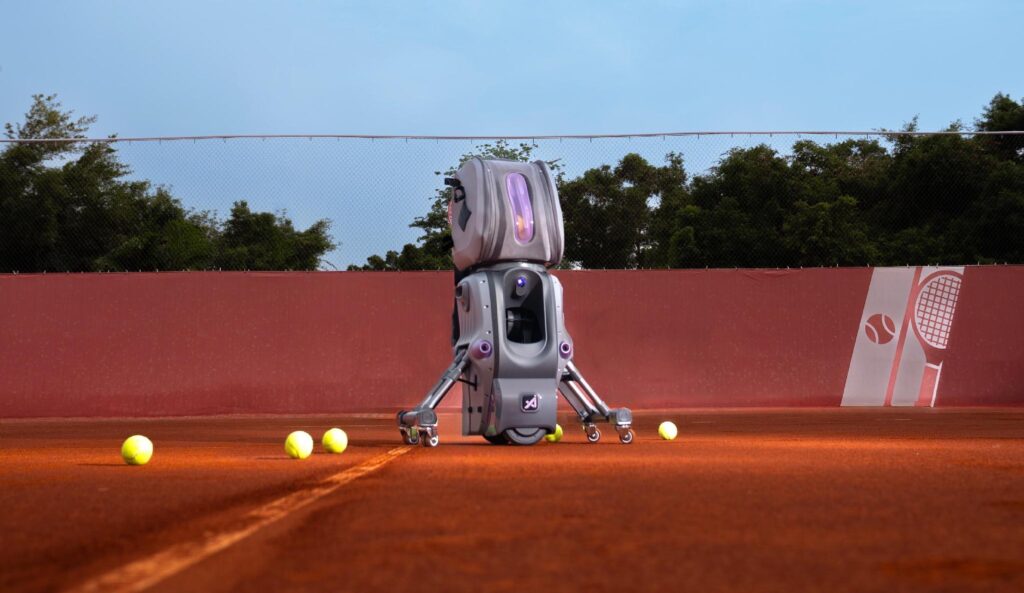
The AceiiLab A1 takes a different approach. Instead of delivering every ball from one fixed location, the moving tennis robot can reposition for the next feed. That changes not only where the ball lands, but also where the next shot starts. For players working on footwork, recovery and patterns of play, that difference gives solo practice another dimension.
A Different Starting Point for the Next Ball
A conventional ball machine can already send players from side to side by varying its launch direction. The A1 adds another variable: the physical position from which the next ball is delivered. Changing that starting point also changes the angle a player has to prepare for.
AceiiLab lists a maximum movement speed of 4 m/s, approximately 8.9 mph. Its vision system tracks the player, ball and court to support repositioning within the selected training mode. Rather than physically catching and returning the ball a player has just hit, the robot moves into position and launches a fresh ball from its own ball bag.
For solo practice, the benefit is what happens between shots. After making contact, players have a reason to look up, adjust their position and prepare for the next feed. The exercise becomes about more than hitting the ball back; it also involves recovering and getting ready for what comes next.
Build a Sequence Around the Point You Want to Practise
Consider a player who can hit a comfortable forehand but struggles to recover when pulled wide. Repeating that forehand is one task. Linking it to a backhand on the opposite side, with enough time to recover but not enough to switch off, creates a different training goal.
The A1 app allows players to work with supported movement routes, shot placement, speed, spin and feeding intervals to build custom drills. A wide forehand followed by a backhand is one example of a sequence that can be configured around recovery. Instead of treating each feed as a separate exercise, players can practise the connection between shots and the movement required to prepare for the next one.
The same approach can shape a longer session. Start with a simpler pattern, adjust the interval as needed, then combine drills around a particular goal. Preset training options offer a starting point for players who would rather get on court than build a programme from scratch. Available settings depend on the selected training mode and app version.
A Session With Something to Respond To
Movement also changes the character of solo practice. The A1 uses its vision system to follow play and reposition as the session develops. AceiiLab describes its adaptive Rally mode as matching the difficulty to the player’s receiving ability. The aim is to make the next feed more relevant to what is happening during the session.
That gives players another way to structure independent practice. They can choose a particular situation, repeat it and vary the challenge while keeping the training goal in view. The robot won’t reproduce every decision or surprise of a human opponent, but it offers another way to work on movement and shot sequences without a hitting partner.
Keep Something From the Session
Practice doesn’t have to end with the last ball. The A1 companion app also brings together AI-guided courses, post-session feedback, rally highlights and shared training packs. These features give players a way to review their sessions, consider what needs more work and share training material with coaches or other players.
For someone working on a wide forehand followed by a recovery backhand, that review can help keep the next session focused on the same objective rather than starting from scratch. Software-supported features vary by app version and enabled training mode.
Players who remember Aceii One from Kickstarter will recognize the same product under its refreshed brand name, AceiiLab A1. The name change followed a brand refresh, not the introduction of a new product generation. The original Kickstarter campaign recorded HK$6.43 million pledged by 679 backers.
The Takeaway
The AceiiLab A1 gives solo players another way to practise what happens after they make contact. Its moving feed point changes where the next ball starts, while customizable drills allow players to work on the sequences that matter to their game.
It won’t replace the unpredictability of a human hitting partner, but it can make solo practice more focused on footwork, recovery and the connection between shots.
Which sequence do you find hardest to practise when a hitting partner isn’t available?